
dvc.yaml stages, deps and outs
dvc.yaml is a pipeline file that names each stage of a project, the command it runs, the files and parameters it reads, and the files it writes.
Last updated: 19 Oct, 2026 · MLOps
Versioning the data, as DVC remote storage finished doing, covers the inputs. The other half of DVC is the pipeline. Running the training entry point re-downloads the dataset, re-fits the preprocessor and retrains the model every time, even when nothing has changed, and the video opens its DVC section on exactly that complaint: the artifacts are all there, and the whole thing runs again anyway. A stage file is what lets a tool answer the question the script cannot, which is which inputs moved.
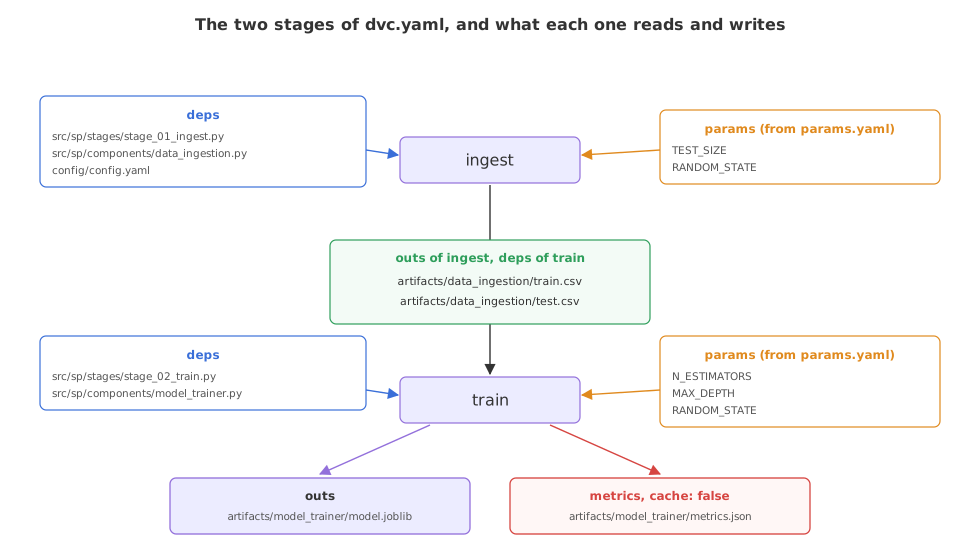
The clip writes these keys for the deep-learning project, whose stages depend on a downloaded archive; this file writes the same four keys for the student-performance project's two stages.
Writing the ingest stage
A stage has four parts. The command is what DVC runs. The dependencies are the files whose content decides whether the stage is out of date. The parameters are the keys it reads from params.yaml. The outputs are the files it writes, which DVC then tracks the same way it tracks a file handed to dvc add.
stages:
  ingest:
    cmd: python -m sp.stages.stage_01_ingest
    # the three files whose contents decide whether this stage is out of date
    deps:
      - src/sp/stages/stage_01_ingest.py
      - src/sp/components/data_ingestion.py
      - config/config.yaml
    params:
      - TEST_SIZE
      - RANDOM_STATE
    outs:
      - artifacts/data_ingestion/train.csv
- artifacts/data_ingestion/test.csv- cmd runs the stage script as a module, so the import paths are the project's own.
- deps lists the stage script, the component it calls and the config it reads. A change to any of the three makes the stage stale.
- params names only the keys this stage cares about, so editing an unrelated key in
params.yamlleaves it alone. - outs are the train and test CSVs. DVC caches them, writes the matching
.gitignoreentries, and from here on they are versioned data.
Writing the train stage
The second stage reads the two CSVs the first one wrote. That single overlap, an output of one stage listed as a dependency of the next, is the whole of how DVC works out the order.
  train:
    cmd: python -m sp.stages.stage_02_train

    # the two CSVs are outputs of ingest, which is what puts train after it
    deps:
      - src/sp/stages/stage_02_train.py
      - src/sp/components/model_trainer.py
      - artifacts/data_ingestion/train.csv
      - artifacts/data_ingestion/test.csv
Its own parameters are the forest's settings, and it writes two files of different kinds. The model is an output DVC caches. The metrics file is marked cache: false, which leaves it for git to track, so the numbers travel inside the commit and can be compared across commits.
    params:
      - N_ESTIMATORS
      - MAX_DEPTH
      - RANDOM_STATE

    outs:
      - artifacts/model_trainer/model.joblib
    metrics:
      - artifacts/model_trainer/metrics.json:
          cache: false
The pipeline in the video has four stages and belongs to a deep-learning project, so its stages depend on image folders and a saved model file and it reports a scores.json. This one has two stages over the student-performance data. The keys are the same four in either file, which is the part worth carrying across.
What a stage script holds
Each cmd points at a short module that wires the components together, so the pipeline file stays readable and the components stay reusable.
from sp.components.data_ingestion import DataIngestion
from sp.config.configuration import ConfigurationManager

cfg = ConfigurationManager()
ingestion = DataIngestion(cfg.get_data_ingestion_config())
df = ingestion.download()
ingestion.split(df)
src/sp/stages/stage_02_train.py has the same shape: it reads the two CSVs, runs the transformation component, then the trainer, and prints the metrics the trainer saved.
Seeing the graph the stages make
DVC draws the same graph from the file itself, which is worth running once after any edit to check that the stages joined up the way you meant them to.
dvc dag+--------+
| ingest |
+--------+
*
*
*
+-------+
| train |
+-------+
+-------------------+
| data/stud.csv.dvc |
+-------------------+- ingest sits above train because train depends on files ingest writes. DVC worked that out from the paths, not from the order they appear in the file.
- data/stud.csv.dvc stands on its own. The dataset is versioned, but the ingest stage downloads from the source URL rather than reading that file, so it is not a dependency of any stage. Listing it under
depswould join it to the graph.
A stage file vs a training script
| A script that calls each step | dvc.yaml | |
|---|---|---|
| Order | The order you wrote the calls in | Worked out from outs and deps |
| When a step is skipped | Never, unless you add the check yourself | When its deps, params and cmd are unchanged |
| What it records | Whatever you log | A hash of every dep, out and param |
| Rerunning one step | Comment out the others | Change its inputs and rerun the pipeline |
Where a pipeline file is worth the trouble
- Training that costs minutes or hours. Skipping the stages that cannot have changed is the difference between a fast edit cycle and a slow one.
- A project with more than two steps. Ingestion, validation, transformation, training and evaluation have an order, and a file states it better than a convention.
- A scheduled retrain. One command reruns whatever the new data touched, which is what a job on a build machine needs.
deps is a file DVC does not watch. Edit it, run the pipeline, and the stage is skipped as unchanged, so the run uses the old output and the mistake surfaces much later. If a stage reads it, list it.Related
- Previous: DVC remote storage
- Next: dvc repro and the cache
- Reference: dvc.yaml files
- Add
data/stud.csvto the ingest stage'sdepsand rundvc dagagain to watch the loose node join the graph. - Take
config/config.yamlout ofdeps, edit a path in it, and see that DVC no longer considers the stage stale. - Run
dvc stage listfor a one-line summary of each stage and what it reports.
Little by little, you're building something great.