
Amending, reverting and resetting a commit
Amend rewrites the last commit, revert adds a new commit that cancels an old one, and reset moves the branch back to an earlier commit. All three undo a commit, and they leave very different histories behind.
Last updated: 12 Oct, 2026 · git 2.54
Undoing changes before a commit dealt with work that was not committed yet, where there was no history to protect. Once a commit exists, undoing it means changing history or adding to it, and the choice between those two is the whole of this lesson.
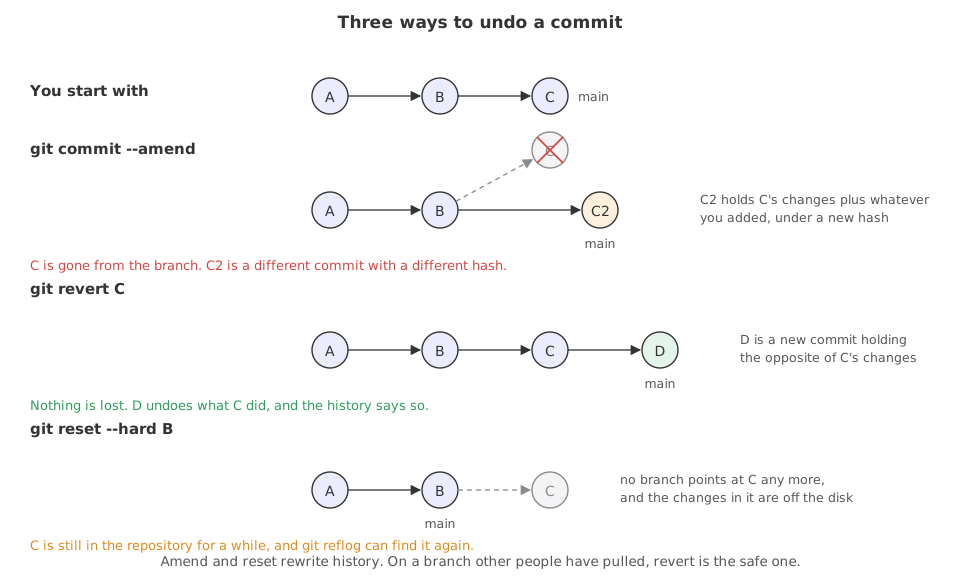
Syntax: the three commands, and the one that finds a commit you lost.
git commit --amend -m "A better message"   # replace the last commit
git commit --amend --no-edit               # replace it, keep the message
git revert <commit> --no-edit              # add a commit that undoes that one
git reset --soft HEAD~1                    # drop the commit, keep its changes staged
git reset --hard HEAD~1                    # drop the commit and its changes
git reflog                                 # every position the branch has been in
Starting from a repository with one commit
The examples below all work in one throwaway repository: a folder with a single file, committed once. The two export lines stand in for the name and email you set once with git config --global, and fix the date so the commit hashes are the same on every run. Watching the hashes is the point of this lesson: when a hash changes, history was rewritten.
export GIT_AUTHOR_NAME=Reader GIT_AUTHOR_EMAIL=reader@example.com GIT_AUTHOR_DATE=2026-10-12T10:00:00
export GIT_COMMITTER_NAME=Reader GIT_COMMITTER_EMAIL=reader@example.com GIT_COMMITTER_DATE=2026-10-12T10:00:00
mkdir ask-docs && cd ask-docs && git init -q -b main
printf 'chunk_size = 400\n' > settings.py
git add . && git commit -q -m "Add the settings"
git log --onelinebf0860d Add the settings
Fixing the last commit with amend
git commit --amend does not edit the last commit. It builds a new commit from the same parent, with whatever is staged now, and moves the branch to it. The old commit is left with nothing pointing at it.
printf 'Answer only from the notes.\n' > prompt.txt
git add . && git commit -q -m "add stuff"
git log --oneline4c132fc add stuff bf0860d Add the settings
The commit is fine and the message says nothing about it. Amend replaces that commit with one that has the message you meant to write.
git commit --amend -m "Add the prompt the model is given"
git log --oneline[main 489b3c4] Add the prompt the model is given Date: Mon Oct 12 10:00:00 2026 +0530 1 file changed, 1 insertion(+) create mode 100644 prompt.txt 489b3c4 Add the prompt the model is given bf0860d Add the settings
- The top hash is different. A commit is its contents, its parent, its author, its date and its message. Change any of those and it is a different commit with a different hash.
- The bottom hash is unchanged. Only the last commit was touched.
- A
Date:line appears in the output. Git prints it when the author date is not the current time, which here is the fixed date in theexportlines above.
Adding a file you forgot
--amend takes whatever is staged, so staging the forgotten file first folds it into the same commit. --no-edit keeps the message you already wrote.
git add . && git commit -q -m "Add the prompt and the loader"
printf 'def load(path):\n    return open(path).read()\n' > loader.py
git show --stat --oneline HEAD5403e3d Add the prompt and the loader prompt.txt | 1 + 1 file changed, 1 insertion(+)
The message promises the prompt and the loader. git show --stat lists one file, because loader.py was written after the commit was made.
git add loader.py
git commit --amend --no-edit
git show --stat --oneline HEAD[main ca60651] Add the prompt and the loader Date: Mon Oct 12 10:00:00 2026 +0530 2 files changed, 3 insertions(+) create mode 100644 loader.py create mode 100644 prompt.txt ca60651 Add the prompt and the loader loader.py | 2 ++ prompt.txt | 1 + 2 files changed, 3 insertions(+)
The second git show --stat lists two files and the message is the same. There is no extra commit saying forgot a file, which is the point: the history reads as if the mistake never happened.
Undoing a commit by adding one, with revert
git revert works out what a commit changed, turns that upside down, and commits the result. The commit being undone stays exactly where it is. Nothing is rewritten, so no hash that anyone else has changes.
printf 'chunk_size = 50\n' > settings.py
printf 'OPENAI_API_KEY=real-key-here\n' > .env
git add . && git commit -q -m "Tune the chunk size"
ls -A.env .git settings.py
The commit tuned a number and swept up .env with the real key in it. Reverting it undoes both.
git revert HEAD --no-edit
git log --oneline[main af46a8c] Revert "Tune the chunk size" Date: Mon Oct 12 10:00:00 2026 +0530 2 files changed, 1 insertion(+), 2 deletions(-) delete mode 100644 .env af46a8c Revert "Tune the chunk size" 9665733 Tune the chunk size bf0860d Add the settings
Two commits are in the log, not none. The reverted commit is where it was, and the new one above it carries the message git wrote: Revert "Tune the chunk size".
ls -A
cat settings.py.git settings.py chunk_size = 400
- The files are back.
.envis gone from disk andsettings.pyholds the old value, because the revert applied the opposite of everything that commit did. --no-editaccepted the message git wrote. Without it, git opens an editor so you can explain why.- The key is still in the history. The commit that added
.envwas not removed, so anyone who clones can read it. A revert undoes the files, never the record, and a leaked key has to be revoked wherever it came from.
Moving the branch back with reset
git reset moves the branch to another commit. The three options differ only in what they do with the changes from the commits you moved past. All three below start from the same two commits, with the second one being the mistake.
reset --soft, which keeps the change staged
--soft moves the branch and leaves everything else alone, so the changes from the commit you dropped are still in the staging area.
printf 'chunk_size = 200\n' > settings.py
git add . && git commit -q -m "Try 200 character chunks"
git reset --soft HEAD~1
git log --oneline
git status --shortbf0860d Add the settings M settings.py
The commit is no longer in the log and the mark is in the left column, M . Everything the commit held is ready to be committed again, which is how you redo a commit from scratch.
reset --mixed, which is what plain git reset means
--mixed is the default. It moves the branch and empties the staging area, leaving the change on disk only.
git reset HEAD~1
git status --short
cat settings.pyUnstaged changes after reset: M settings.py M settings.py chunk_size = 200
The mark moved to the right column and the file still says 200. Git prints a line about unstaged changes to say what it did, and because this is the default, a plain git reset HEAD~1 means this one.
reset --hard, which throws the change away
--hard moves the branch, empties the staging area and overwrites the files on disk.
git reset --hard HEAD~1
git status --short
echo "(git status printed nothing)"
cat settings.pyHEAD is now at bf0860d Add the settings (git status printed nothing) chunk_size = 400
- Status printed nothing and the file is back to 400. Nothing on disk survived.
HEAD~1means one commit before where you are.HEAD~2is two, and a commit hash works in the same place.
git reset --hard is the one command in this lesson that can lose work with no way back. Commits it moves past can be found again with git reflog, but uncommitted edits in the files it overwrites cannot: they were never in the repository. Run git status before typing it.What happens when the commit was already pushed
Amend and reset both end with the branch pointing at a commit that is not the one the remote has, and the remote's commit is not an ancestor of yours. That is the same situation as a push that arrives out of date, and git refuses it for the same reason.
printf 'chunk_size = 50\n' > settings.py
git add . && git commit -q -m "Tune the chunk size"
git init --bare -q ../ask-docs.git            # the stand-in for the repository on GitHub
git remote add origin ../ask-docs.git && git push -q -u origin main
git log --oneline849b033 Tune the chunk size bf0860d Add the settings
The bare repository stands in for the one on GitHub, and the push put both commits there. Now the second commit turns out to be a mistake.
git reset --hard HEAD~1
git log --oneline
git push origin mainHEAD is now at bf0860d Add the settings bf0860d Add the settings To ../ask-docs.git ! [rejected] main -> main (non-fast-forward) error: failed to push some refs to '../ask-docs.git' hint: Updates were rejected because the tip of your current branch is behind hint: its remote counterpart. If you want to integrate the remote changes, hint: use 'git pull' before pushing again. hint: See the 'Note about fast-forwards' in 'git push --help' for details.
The push is rejected. The only way to make it go through is git push --force, which deletes the commit from the remote for everyone, including anyone who has already pulled it and built on top. That is why the rule is short: rewrite history that is still only on your machine, and revert history that has left it.
git revert HEAD --no-edit
git push origin main
git log --oneline
cat settings.py[main bb7494d] Revert "Tune the chunk size" Date: Mon Oct 12 10:00:00 2026 +0530 1 file changed, 1 insertion(+), 1 deletion(-) To ../ask-docs.git 849b033..bb7494d main -> main bb7494d Revert "Tune the chunk size" 849b033 Tune the chunk size bf0860d Add the settings chunk_size = 400
The push is an ordinary one, because the branch moved forward rather than backward. Everyone else picks the fix up with a normal pull, and the file holds the old value again.
Finding a commit you reset away
git reflog lists every commit HEAD has pointed at in this repository, including the ones no branch reaches any more. A commit is not deleted when you reset past it; it is left without a name, and the reflog still has the name.
printf 'chunk_size = 200\n' > settings.py
git add . && git commit -q -m "Try 200 character chunks"
git reset --hard HEAD~1
git log --onelineHEAD is now at bf0860d Add the settings bf0860d Add the settings
The log says the commit never happened. It is still in the repository, with nothing pointing at it.
git reflogbf0860d HEAD@{0}: reset: moving to HEAD~1
76266cf HEAD@{1}: commit: Try 200 character chunks
bf0860d HEAD@{2}: commit (initial): Add the settingsThree lines, newest first: the reset, the commit that was dropped, and the first commit. The dropped commit's hash is on the line marked HEAD@{1}.
git reset --hard HEAD@{1}
git log --oneline
cat settings.pyHEAD is now at 76266cf Try 200 character chunks 76266cf Try 200 character chunks bf0860d Add the settings chunk_size = 200
HEAD@{1}is where HEAD was one move ago. The numbers count backwards through the list, and a hash from the same list works too.- The commit came back whole. Same hash, same message, same file contents.
- The reflog is local and temporary. It is not pushed, a fresh clone has none, and entries are cleared after a while. It saves you from your own reset, not from a lost laptop.
Restore, reset, revert and amend side by side
git restore | git reset | git revert | git commit --amend | |
|---|---|---|---|---|
| What it works on | a file you have not committed | where the branch points | one commit, by its hash | the last commit |
| Does the history change? | no, nothing is committed yet | yes, commits are left behind | no, a commit is added | yes, the last commit is replaced |
| Does a hash change? | no | the branch moves to an older hash | no, one is added | yes, the last one is new |
| Safe after pushing? | yes, it never touched a commit | no | yes | no |
| Can you get the work back? | no, it was never in a commit | yes, with git reflog | yes, revert the revert | yes, with git reflog |
| Reach for it when | the edit is wrong and not committed | the last few commits should never have existed, and are not pushed | a pushed commit has to be undone | the last commit is nearly right |
Where each one belongs
- A typo in the message you wrote ten seconds ago.
git commit --amend -m, before anyone pulls it. - Three experimental commits that went nowhere, never pushed.
git reset --hard HEAD~3, or--softif you want the changes back in the staging area to try again. - A change that broke the project and is already on GitHub.
git revert, which everyone else picks up with an ordinary pull.
Related
- Previous: Undoing changes before a commit
- Next: Stashing work in progress
- Reference: git revert, git reset and git reflog in the Git documentation
- In the amend example, run
git log --onelinebefore and after and write the two top hashes down. They are the proof that amend does not edit a commit. - Revert the revert: run
git revert HEAD --no-edittwice and read the log. The file comes back and the history records both decisions. - Run
git reset --hard HEAD~1with an uncommitted edit in the file, then look for the edit ingit reflog. It is not there, because it was never in a commit.
Every expert started right here.