
Writing a README
A README is the Markdown file GitHub shows on a repository's front page, and for most visitors it is the only part of the project they will read.
Last updated: 12 Oct, 2026 · git 2.54
Project repository structure put the files where a reader can find them. The README is the file that tells them what they are looking at and how to run it.
The video goes through the sections one at a time: the project title, a short description, where the work came from, and what it is built with. The tool in the video is readme.so, a web page that offers the sections and writes the Markdown for you. The sections are the useful part, and you can type them by hand in any editor.
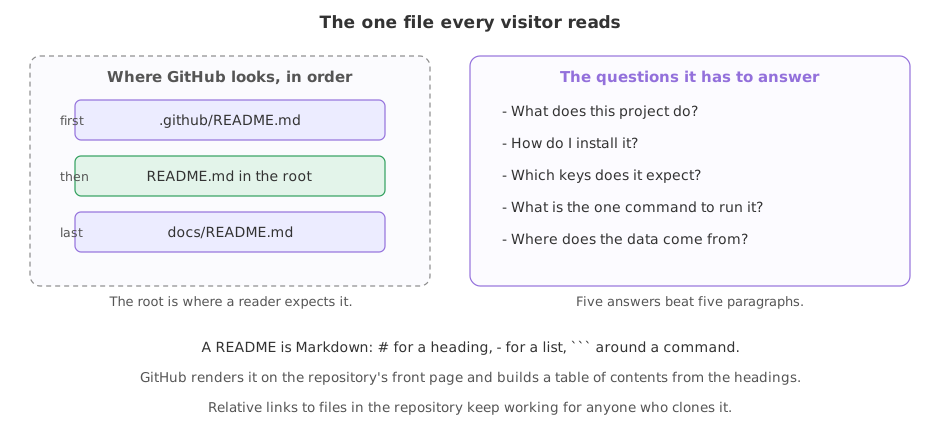
GitHub's docs are clear about the job: “A README should only contain information necessary for developers to get started using and contributing to your project”. They also name the three places GitHub looks, and which wins: the .github directory, then the repository's root directory, and finally the docs directory (About READMEs). The root is where people look, so that is where it goes.
Syntax: the whole of the Markdown a README needs.
# Project name          <- the big heading at the top
## A section            <- a smaller heading; GitHub builds a menu from these
- a list item
`one word of code`
[link text](https://example.com)
[the loader](src/loader.py)    <- a relative link, which works in a clone too

```
a block of commands
```
Answering the five questions
A short README that answers five questions beats a long one that answers none. What does this do, how do I install it, which keys does it want, what is the one command to run it, and where does the data come from.
The project the README has to describe
It is one script, one prompt, a sample note and a list of packages, in a throwaway repository. The two export lines stand in for the name and email you set once with git config --global, and fix the date so the hashes are the same on every run.
export GIT_AUTHOR_NAME=Reader GIT_AUTHOR_EMAIL=reader@example.com GIT_AUTHOR_DATE=2026-10-12T10:00:00
export GIT_COMMITTER_NAME=Reader GIT_COMMITTER_EMAIL=reader@example.com GIT_COMMITTER_DATE=2026-10-12T10:00:00
mkdir ask-docs && cd ask-docs && git init -q -b main
mkdir -p src data/sample
printf 'Answer only from the notes below.\n' > prompt.txt
printf 'A chunk is a slice of a document.\n' > data/sample/notes.txt
printf 'openai\npython-dotenv\n' > requirements.txt
git status --short?? data/ ?? prompt.txt ?? requirements.txt
Three untracked paths, and nothing in them says what the project is for. That is the gap the README fills.
The command the README will promise
The script takes a question, puts the prompt and the notes in front of it and prints the result. Run it once before writing it down anywhere.
cat > src/answer.py <<'PY'
import sys, pathlib
notes = pathlib.Path("data/sample/notes.txt").read_text()
prompt = pathlib.Path("prompt.txt").read_text()
print(prompt + notes + "\nQuestion: " + sys.argv[1])
PY
python3 src/answer.py "what is a chunk?"Answer only from the notes below. A chunk is a slice of a document. Question: what is a chunk?
That output is what the README's Run section is promising. Writing a command you have not run is how a README starts lying.
The title and the install section
The first heading is the repository's name and the line under it says what the project does. ## Install follows, with the commands indented by four spaces so Markdown shows them as a block.
cat > README.md <<'MD'
# ask-docs

Answers a question from a folder of notes, using the prompt in `prompt.txt`.

## Install

    python3 -m venv venv && source venv/bin/activate
    pip install -r requirements.txt
MD
The keys and the run command
## Keys names the key and where to put it, with no value. ## Run is the single command from the example above.
cat >> README.md <<'MD'

## Keys

Copy `.env.example` to `.env` and fill in `OPENAI_API_KEY`.

## Run

    python3 src/answer.py "what is a chunk?"
MD
Where the data comes from
The last section says what a reader has and what they do not, which is the honest version of a repository with a sample in it.
cat >> README.md <<'MD'

## Data

`data/sample/` holds two notes so the command above runs. The full set of notes is
not in this repository.
MD
Committing the README and reading its headings
With the file written, one commit puts it in the repository, and the headings are worth a look on their own.
git add . && git commit -q -m "Add a README that says how to run the project"
grep '^#' README.md# ask-docs ## Install ## Keys ## Run ## Data
- The title is the repository's name. A reader arriving from a search result sees the name and one sentence, and that is the whole decision about whether to read on.
- Each heading is a question somebody has. GitHub turns these into a table of contents, so a long README stays navigable.
- The indented blocks are commands. Four spaces makes a code block in Markdown; three backticks on their own line do the same and are more common.
Running the command the README gives
A README is a promise. The quickest way to break it is to write a command you have not run since the project changed. Run it in a fresh clone before you believe it.
git init --bare -q "$HOME/ask-docs.git"
git remote add origin "$HOME/ask-docs.git" && git push -q -u origin main
cd ~ && git clone -q "$HOME/ask-docs.git" fresh && cd fresh
lsREADME.md data prompt.txt requirements.txt src
The bare repository stands in for the one on GitHub, and the clone holds what a reader would get: five paths, the README among them.
python3 src/answer.py "what is a chunk?"Answer only from the notes below. A chunk is a slice of a document. Question: what is a chunk?
The same output, in a folder that holds only the commits. If the command needed a file that .gitignore kept out, it would fail here and not on your machine, which is the mistake this catches.
What belongs in which section
| Section | The question it answers | What goes wrong without it |
|---|---|---|
| Title and one line | what is this? | a reader leaves without knowing |
| Install | what do I install? | a wall of import errors |
| Keys | what do I need an account for? | it runs and fails on the first call |
| Run | what is the one command? | a reader guesses, and guesses wrong |
| Data | where do the files come from? | an empty folder and no idea what fills it |
| Licence | may I use this? | nobody can, legally |
Where the README does the work
- A recruiter or a reviewer. They open two or three of your repositories and read the front page of each. That page is this file.
- Yourself after a break. The install line and the run line are the two things you never remember.
- Anyone who wants to help. A project that cannot be run cannot be contributed to, so the install and run sections are what make a pull request possible.
OPENAI_API_KEY=your-key-here and let the reader fill it in.Related
- Previous: Project repository structure
- Next: Large files: data and model weights
- Reference: About READMEs in the GitHub docs
- Add a
## Licencesection and aLICENSEfile, then link to it from the README with a relative link,[the licence](LICENSE). - Break the run command, clone the repository into a new folder and run it there. The clone is where a broken README shows itself.
- Open one of your own repositories and count how many of the five questions its README answers.
Slow is fine. Stopping is the only problem.