
Resolving merge conflicts
A merge conflict is what Git reports when both branches changed the same lines of the same file, so it cannot decide which version to keep and asks you.
Last updated: 12 Oct, 2026 · git 2.54
Most merges finish on their own. Git only stops when the two sides changed the same lines, and then it hands the file back to you with both versions in it, marked. Nothing is lost and nothing is broken. The job is to edit the file into the version you want and commit it.
The situation in the clip is the usual one: two people take a copy of the same branch, both change the same file, and the second one to come back meets the conflict. It happens to one person working alone too, when two experiments have touched the same prompt.
View the code here
[user]
	name = Reader
	email = reader@example.com
Two branches that changed the same line
The repository below is a throwaway one in a temporary folder, and every example on this page starts from it. It holds a two line prompt. One branch rewrites the second line, and so does main.
mkdir ask-docs && cd ask-docs && git init -q -b main
export GIT_AUTHOR_DATE="2026-10-12T10:00:00+00:00" GIT_COMMITTER_DATE="2026-10-12T10:00:00+00:00"
printf 'You are a support assistant.\nAnswer from the documents.\n' > prompt.txt
git add . && git commit -q -m "Add the first prompt"
cat prompt.txtYou are a support assistant. Answer from the documents.
The first line says what the assistant is. The second says how it should answer, and that is the line two people are about to disagree on.
Committing a different second line on each side
git switch -q -c shorter-prompt                                  # the experiment
printf 'You are a support assistant.\nAnswer in two sentences.\n' > prompt.txt
git commit -q -am "Ask for two sentence answers"
git switch -q main                                               # meanwhile, on main
printf 'You are a support assistant.\nSay so when the documents do not answer.\n' > prompt.txt
git commit -q -am "Tell the model to admit when it cannot answer"
git log --oneline --all --graph --decorate* 654f0e4 (HEAD -> main) Tell the model to admit when it cannot answer | * 847d615 (shorter-prompt) Ask for two sentence answers |/ * 77cacfb Add the first prompt
The graph forks: each branch has one commit of its own after the shared first commit. Both of those commits wrote prompt.txt.
Reading the file on both branches
git show shorter-prompt:prompt.txt
git show main:prompt.txtYou are a support assistant. Answer in two sentences. You are a support assistant. Say so when the documents do not answer.
- git show <branch>:<file> prints a file as that branch has it, without switching. The first line is the same on both sides and the second is not.
- The first line will merge silently, because only one side changed it. The second line is the conflict.
What Git does when it cannot decide
The merge runs, finishes what it can, and stops on the file it cannot finish.
git merge shorter-promptAuto-merging prompt.txt CONFLICT (content): Merge conflict in prompt.txt Automatic merge failed; fix conflicts and then commit the result.
- Auto-merging prompt.txt says Git tried.
- CONFLICT (content): Merge conflict in prompt.txt names every file it could not finish. Files it could finish are already staged.
- Automatic merge failed; fix conflicts and then commit the result is the instruction, in the order to do it in: edit the file, then commit.
What the conflicted file looks like
cat prompt.txtYou are a support assistant. <<<<<<< HEAD Say so when the documents do not answer. ======= Answer in two sentences. >>>>>>> shorter-prompt
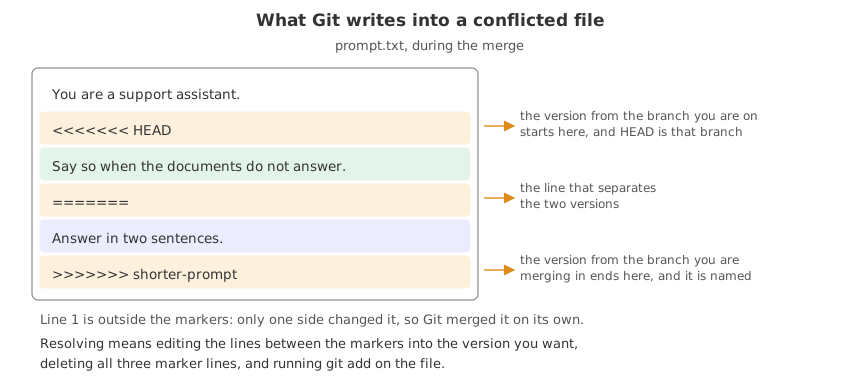
- <<<<<<< HEAD opens the version from the branch you are on, here
main. - ======= separates the two versions. It is not part of either.
- >>>>>>> shorter-prompt closes the version from the branch you are merging in, and names it.
- The line both sides left alone is outside the markers, printed once, which is Git merging the parts it could.
Reading status in the middle of a merge
A merge in progress is a state the repository is in, and git status is the map out of it.
git statusOn branch main You have unmerged paths. (fix conflicts and run "git commit") (use "git merge --abort" to abort the merge) Unmerged paths: (use "git add <file>..." to mark resolution) both modified: prompt.txt no changes added to commit (use "git add" and/or "git commit -a")
- You have unmerged paths is the state, with the two ways out printed under it: finish the merge, or abandon it.
- both modified: prompt.txt is the file waiting for you. A file listed here is neither staged nor finished.
- Git is not stuck. You can edit, run commands and look around; the merge waits.
Reading the short form of a conflict
git status --shortUU prompt.txt
UU prompt.txt is the short form: unmerged on both sides. The two letters are the staged and unstaged columns, and U in both is what a conflict looks like.
The video meets the conflict on git pull, because the other work had already reached GitHub. The commands here meet it on git merge inside one repository. The markers and the fix are the same, because git pull runs a merge once it has fetched.
Editing the file and finishing the merge
Resolving is an ordinary edit. Open the file, decide what the right content is, and delete all three marker lines. You can keep one side, keep both, or write something new. Here both ideas are worth keeping, so the two sentences join.
printf 'You are a support assistant.\nAnswer in two sentences. Say so when the documents do not answer.\n' > prompt.txt
cat prompt.txtYou are a support assistant. Answer in two sentences. Say so when the documents do not answer.
The three marker lines are gone and both ideas are in one sentence. Writing the file in one command is what a text editor would have done; what matters is that the markers go and the content is what you want.
Marking the conflict resolved
git add prompt.txt
git statusOn branch main All conflicts fixed but you are still merging. (use "git commit" to conclude merge) Changes to be committed: modified: prompt.txt
- git add prompt.txt is how you tell Git the conflict is handled. The file moved out of the unmerged list and into Changes to be committed.
- All conflicts fixed but you are still merging is status saying one step is left, and naming it.
Committing the result
git commit -q -m "Merge shorter-prompt: ask for two sentences and admit gaps"
git log --oneline --graph --decorate* 73055c8 (HEAD -> main) Merge shorter-prompt: ask for two sentences and admit gaps |\ | * 847d615 (shorter-prompt) Ask for two sentence answers * | 654f0e4 Tell the model to admit when it cannot answer |/ * 77cacfb Add the first prompt
- The commit ends the merge. The repository is back in its ordinary state and
git statuswould say the working tree is clean. - The graph shows the two lines joining at a merge commit with two parents, which is what any merge leaves behind, conflict or no conflict.
- Running git commit with no -m here opens an editor with a message Git prepared, listing the conflicted files.
Walking away from a merge
A conflict you do not want to deal with now is not a trap. One command puts the repository back exactly as it was before the merge started.
git merge --abort
git status
cat prompt.txtOn branch main nothing to commit, working tree clean You are a support assistant. Say so when the documents do not answer.
The markers are gone, the file is what main had, and no commit was made. git merge --abort works only while the merge is unfinished; once you commit, the merge is part of the history and undoing it is a different job, which the undoing part covers.
Which side is which
| In the file | Called | It is | In this example |
|---|---|---|---|
above ======= | ours | the branch you are standing on | main, the line about admitting gaps |
below ======= | theirs | the branch you named in the merge | shorter-prompt, the two sentence line |
Those two words appear in Git's own commands. git checkout --ours prompt.txt takes your side of the whole file and --theirs takes the other, which is quick when one version is clearly the right one. Most conflicts need a human edit instead, because both sides changed something worth keeping.
Where conflicts come from, and how to have fewer
- Two experiments on one prompt. Expected, and small. Merge one, then merge the other and fix the few lines that clash.
- A branch that lived for three weeks. The worst kind. Merge
maininto your branch often, so you deal with a few lines at a time instead of a hundred. - A notebook. A
.ipynbconflicts on execution counts and stored output as well as code, which is the reason the diff page gives for keeping real code in a.pyfile. - Whole-file reformatting. Reformatting a file in one commit guarantees a conflict with anyone editing it. Do it alone, in its own commit, and tell the team.
<<<<<<< before you commit, or run git diff --check, which prints leftover conflict marker and the line number for every one it finds.Related
- Previous: Merging a branch
- Next: Git remotes
- See also: Reading git status, which names the state a merge leaves you in
- Reference: How conflicts are presented in the Git reference
- Resolve the same conflict by keeping one side only, and read the result with
git show HEAD. - Make a conflict, run
git diffduring it, and read the combined form Git prints with two columns of markers. - Leave a marker in the file by mistake, run
git diff --check, and watch it name the line.
You understood something today that you didn't yesterday.