
Writing a commit message
A commit message is the text stored with a commit, and its job is to tell the next person who reads the history why the change was made.
Last updated: 12 Oct, 2026 · git 2.54
Git takes any message you give it, including update. The cost arrives later, when someone reads the history to find out when a value changed and why. That someone is often you, six months on.
The same three commits, written twice
These two repositories hold exactly the same changes. The only difference is what was typed after -m. Both start from the same two lines, an empty repository and one fixed date so the identifiers do not move from run to run:
mkdir ask-docs && cd ask-docs && git init -q -b main
export GIT_AUTHOR_DATE="2026-10-12T10:00:00+00:00" GIT_COMMITTER_DATE="2026-10-12T10:00:00+00:00"View the code here
[user]
	name = Reader
	email = reader@example.com
printf 'You are a support assistant.\n' > prompt.txt
git add . && git commit -q -m "update"
printf 'chunk_size = 500\n' > loader.py
git add . && git commit -q -m "fix"
printf 'chunk_size = 800\n' > loader.py
git commit -q -am "changes"
git log --oneline7c8aefc changes 886254d fix 5ff95ed update
update, fix and changes. To find out what any one of them did you have to open the commit and read its patch.
printf 'You are a support assistant.\n' > prompt.txt
git add . && git commit -q -m "Add the first support prompt"
printf 'chunk_size = 500\n' > loader.py
git add . && git commit -q -m "Split documents into 500 character chunks"
git log --onelinef5e0b3a Split documents into 500 character chunks fe26002 Add the first support prompt
Two subjects a reader can use without opening anything. The third change is the one that moves a number, and its subject says which number and why.
printf 'chunk_size = 800\n' > loader.py
git commit -q -am "Raise the chunk size to 800 for fewer, longer chunks"
git log --onelinedcdd2d2 Raise the chunk size to 800 for fewer, longer chunks f5e0b3a Split documents into 500 character chunks fe26002 Add the first support prompt
- The described history answers without being opened. The chunk size went from 500 to 800, and the subject says what the change was for.
- Both sets took the same ten seconds to type. The good subjects name the file's purpose instead of the fact that it changed.
The shape of a message
A message has a subject line and, when it needs one, a body. Git treats the first line as the subject: it is what git log --oneline prints, what GitHub shows in its list of commits, and what a reviewer sees first.
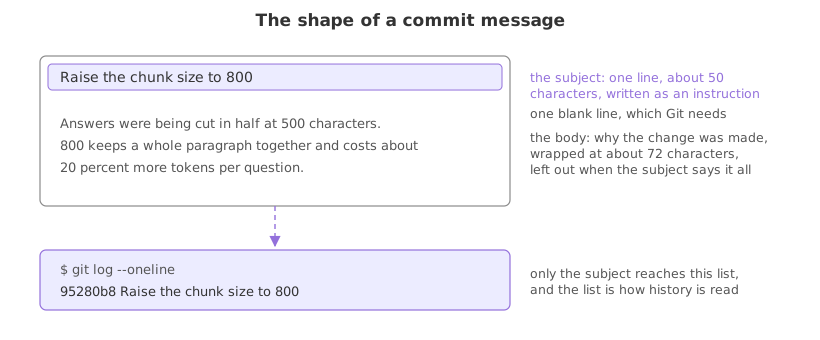
- Subject, one line, about fifty characters. Long enough to say what changed, short enough to read in a list.
- Write it as an instruction:
Add,Fix,Remove,Raise. Finish the sentence “this commit will ...”. Git's own generated messages, such asMerge branch 'main', are written that way. - No full stop at the end and no file name when the diff already shows it.
- A blank line, then the body, wrapped at about seventy-two characters. Use it for why, for what you tried, for anything the diff cannot say. Small commits often need none.
Writing a body with two -m flags
Each -m becomes one paragraph, and Git puts the blank line between them. Running git commit with no -m opens your editor instead, which is easier for a long body.
printf 'chunk_size = 800\n' > loader.py
git add .
git commit -q -m "Raise the chunk size to 800" \
  -m "Answers were being cut in half at 500 characters. 800 keeps a whole
paragraph together and costs about 20 percent more tokens per question."
git logcommit 95280b8485bdc2e523d415cbbec869e6c8836816
Author: Reader <reader@example.com>
Date: Mon Oct 12 10:00:00 2026 +0000
Raise the chunk size to 800
Answers were being cut in half at 500 characters. 800 keeps a whole
paragraph together and costs about 20 percent more tokens per question.- git log indents the whole message under the header, subject and body together.
- The body carries what the diff cannot: the reason for the number and what it costs.
git log --oneline95280b8 Raise the chunk size to 800
git log --oneline keeps the subject only, which is why the first line has to stand on its own.
What to put in a message, and what to leave out
| Instead of | Write | Because |
|---|---|---|
update | Add the first support prompt | a history of updates says nothing |
fix bug | Stop the loader dropping the last chunk | the next reader wants the bug, not the word |
changes to loader.py | Raise the chunk size to 800 | the diff already names the file |
asdf | any sentence at all | this one reaches GitHub too |
one commit called work | three commits with three subjects | a commit should hold one change |
Many teams add a prefix to the subject, such as fix: or feat:, a convention called Conventional Commits. It is a team agreement rather than a Git feature. Read the last ten subjects in a repository with git log --oneline and follow whatever it does.
Where the message is read
- In a pull request. Reviewers read the subjects before the code and decide what to look at closely.
- When something breaks. Finding the commit that changed a value is quick; understanding why it changed depends entirely on the message.
- On your GitHub profile. A list of commits is public, and
updateforty times is what a reader sees.
git commit --amend, which the undoing part covers, and anything older is harder and unsafe once the commits are shared. Write the message as if it is permanent, because it is.Related
- Previous: Seeing what changed with git diff
- Next: Branches
- See also: Looking at history with git log, which is where the message is read
- Reference: git commit in the Git reference and How to write a Git commit message
- Commit with no
-m, write a subject and a body in the editor, save, and read the result withgit log. - Run
git log --onelinein a repository you did not write and judge how much the subjects tell you. - Set
git config --global commit.template ~/.gitmessagewith a file holding your own reminders, and watch it appear in the editor.
Slow is fine. Stopping is the only problem.