
Seeing what changed with git diff
git diff is the command that prints the lines that changed, comparing the files in your folder with what you have staged for the next commit.
Last updated: 12 Oct, 2026 · git 2.54
Status names the files that changed. Diff shows what changed inside them. Running it before every commit is the habit that keeps a debugging line, a hard-coded key or a half-finished edit out of your history.
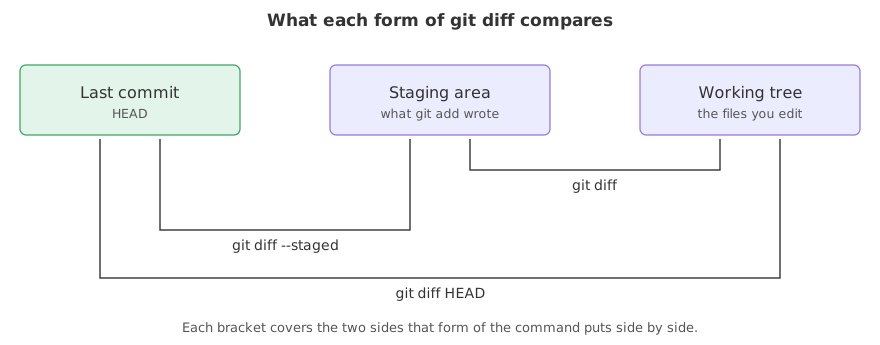
Syntax: the command takes no arguments for the common case, and a flag to move the comparison back a step.
git diff            # the folder against the staging area
git diff --staged   # the staging area against the last commit
git diff HEAD # the folder against the last commitView the code here
[user]
	name = Reader
	email = reader@example.com
Reading one change
The repository below has one commit holding a prompt and a loader. Those first five lines are the throwaway repository for the rest of this page, and every block after this one starts from them. This one changes the prompt and asks what is different.
mkdir ask-docs && cd ask-docs && git init -q -b main
export GIT_AUTHOR_DATE="2026-10-12T10:00:00+00:00" GIT_COMMITTER_DATE="2026-10-12T10:00:00+00:00"
printf 'You are a support assistant.\n' > prompt.txt
printf 'chunk_size = 500\n' > loader.py
git add . && git commit -q -m "Add the prompt and the loader"
printf 'You are a support assistant. Answer only from the documents.\n' > prompt.txt
git diffdiff --git a/prompt.txt b/prompt.txt index 900f445..6809cab 100644 --- a/prompt.txt +++ b/prompt.txt @@ -1 +1 @@ -You are a support assistant. +You are a support assistant. Answer only from the documents.
- diff --git a/prompt.txt b/prompt.txt names the file twice:
a/is the old side, the staging area, andb/is the new side, your folder. - index 900f445..6809cab 100644 names the stored content of each side and the file's permissions. You can ignore this line.
- --- a/prompt.txt and +++ b/prompt.txt label the two sides, so a line marked
-comes from the old one and a line marked+from the new one. - @@ -1 +1 @@ is the hunk header: it says this block of lines starts at line 1 on both sides. A bigger change has several hunks, each with its own header.
- The - line and the + line are the change. Git has no idea you edited one word; it stores whole lines, so a changed line is a removal and an addition.
After git add, the change moves to the other side
git diff compares the folder with the staging area. Once you stage the change the two agree, and the answer is empty, which surprises everyone the first time.
git add prompt.txt
echo '--- git diff ---'
git diff--- git diff ---
The marker line printed and nothing came after it. The folder and the staging area hold the same content, so there is no difference to show. --staged asks the other question: what is in the staging area that the last commit does not have.
git diff --stageddiff --git a/prompt.txt b/prompt.txt index 900f445..6809cab 100644 --- a/prompt.txt +++ b/prompt.txt @@ -1 +1 @@ -You are a support assistant. +You are a support assistant. Answer only from the documents.
The change is printed, because the staging area differs from the last commit. --cached is an older name for the same flag.
git diff HEADdiff --git a/prompt.txt b/prompt.txt index 900f445..6809cab 100644 --- a/prompt.txt +++ b/prompt.txt @@ -1 +1 @@ -You are a support assistant. +You are a support assistant. Answer only from the documents.
The same change again. git diff HEAD compares the folder with the last commit and ignores the staging area in between, so staging makes no difference to it.
Smaller answers for bigger changes
A diff across twenty files is unreadable. Two flags cut it down, and two commits can be compared the same way as two states of a file.
printf 'chunk_size = 800\n' > loader.py
printf 'You are a support assistant. Answer only from the documents.\n' > prompt.txt
git diff --statloader.py | 2 +- prompt.txt | 2 +- 2 files changed, 2 insertions(+), 2 deletions(-)
One line per file with the number of changed lines, then a total across the pair. --name-only cuts the answer down to the names.
git diff --name-onlyloader.py prompt.txt
Names and nothing more, which is what a script wants. A path after two dashes narrows the diff to one file.
git diff -- loader.pydiff --git a/loader.py b/loader.py index 12b7708..36506d8 100644 --- a/loader.py +++ b/loader.py @@ -1 +1 @@ -chunk_size = 500 +chunk_size = 800
git diff <commit> <commit> compares two points in the history the same way, so git diff HEAD~1 HEAD is the change the last commit made, and git diff main experiment is the difference between two branches.
Why a notebook diffs badly
A Jupyter notebook is not what Jupyter shows you. The .ipynb file is JSON, and the JSON holds the code, the output of every cell and an execution count that goes up each time you run one. Change a single number and the diff reports the code line, the stored output and the counter.
cat > explore.ipynb <<'EOF'
{"cells": [{"cell_type": "code", "execution_count": 1,
  "outputs": [{"output_type": "stream", "text": ["chunks: 12\n"]}],
  "source": ["chunk_size = 500\n", "print('chunks:', 6000 // chunk_size)"]}],
 "metadata": {}, "nbformat": 4, "nbformat_minor": 5}
EOF
git add . && git commit -m "Add the exploration notebook"[main 9200641] Add the exploration notebook 1 file changed, 4 insertions(+) create mode 100644 explore.ipynb
Four lines of JSON hold the whole notebook. source is the code, outputs is what the cell printed, and execution_count is the number Jupyter shows next to the cell. Raising the chunk size changes all three.
cat > explore.ipynb <<'EOF'
{"cells": [{"cell_type": "code", "execution_count": 7,
  "outputs": [{"output_type": "stream", "text": ["chunks: 7\n"]}],
  "source": ["chunk_size = 800\n", "print('chunks:', 6000 // chunk_size)"]}],
 "metadata": {}, "nbformat": 4, "nbformat_minor": 5}
EOF
git diff -- explore.ipynbdiff --git a/explore.ipynb b/explore.ipynb
index 41624b0..952ba72 100644
--- a/explore.ipynb
+++ b/explore.ipynb
@@ -1,4 +1,4 @@
-{"cells": [{"cell_type": "code", "execution_count": 1,
- "outputs": [{"output_type": "stream", "text": ["chunks: 12\n"]}],
- "source": ["chunk_size = 500\n", "print('chunks:', 6000 // chunk_size)"]}],
+{"cells": [{"cell_type": "code", "execution_count": 7,
+ "outputs": [{"output_type": "stream", "text": ["chunks: 7\n"]}],
+ "source": ["chunk_size = 800\n", "print('chunks:', 6000 // chunk_size)"]}],
"metadata": {}, "nbformat": 4, "nbformat_minor": 5}Three changed lines for one changed number, and only one of them is code. A real notebook is worse: a chart cell stores its image as thousands of characters of base64 text, so one re-run produces a diff nobody can read and two people editing the same notebook conflict on every cell. Two habits deal with it:
- Clear the outputs before committing. Cell, then All Output, then Clear in Jupyter, or the
nbstripouttool run for you at commit time. The diff then shows the code only. - Keep the real code in a .py file. The notebook stays for exploring, and the functions that matter move into
loader.pywhere a diff is one line, a review is possible and a test can import them.
The three comparisons side by side
| Command | Old side | New side | Answers |
|---|---|---|---|
git diff | staging area | your folder | what have I not staged yet |
git diff --staged | last commit | staging area | what is about to be committed |
git diff HEAD | last commit | your folder | everything I changed since the commit |
git diff A B | commit or branch A | commit or branch B | how two points differ |
Where you run git diff
- Before every commit.
git diff --stagedis the last chance to see what you are recording. - When a change stopped working.
git diff HEADlists every edit you made since the last good commit. - Reviewing someone else's branch.
git diff main their-branchis the same view a pull request shows.
git diff says nothing about untracked files. A brand new file has no old side to compare with, so it appears in git status and never in a diff until you add it. If a diff looks empty when you expect a change, check status first.Related
- Previous: Looking at history with git log
- Next: Writing a commit message
- See also: Reading git status, which names the files a diff then opens
- Reference: git diff in the Git reference
- Add three lines to
loader.pyin three different places and read how many hunks the diff has. - Run
git diff --word-diffafter changing one word in the prompt. Git marks the words instead of the whole lines. - Create a new file, run
git diff, thengit add -N newfileand run it again. The second form tells Git the file exists without staging its content.
You understood something today that you didn't yesterday.