
Project: your first project on GitHub
This project takes a small AI project from an empty folder to a repository on GitHub, using only the commands this course has taught.
Last updated: 12 Oct, 2026 · git 2.54
Large files: data and model weights was the last piece. The project below is ask-docs, which answers a question from a folder of notes, and it is the shape of every project you will start: a prompt, a script, a sample of data, a key that must never be committed, and one experiment that may or may not be kept.
The video reaches the same point from the other end: the project exists, the repository on GitHub is empty, and two commands join them. git remote add origin with the URL, then git push -u origin main.
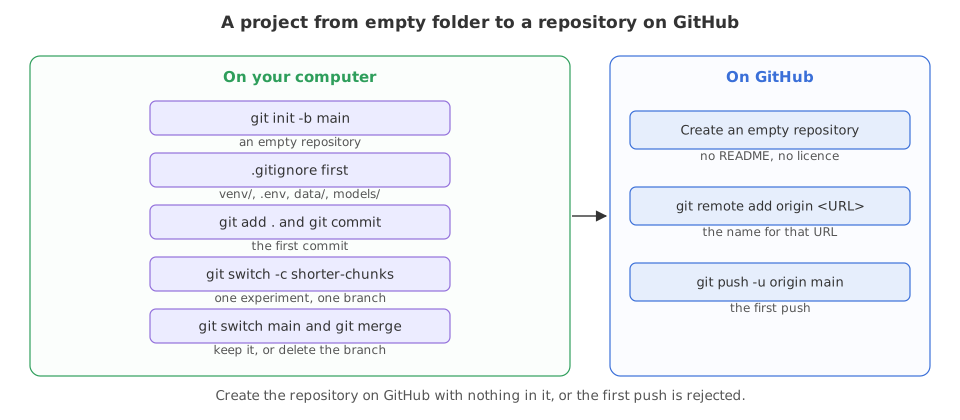
Starting the repository with .gitignore first
The order matters. Write .gitignore before the first git add, so the key and the data never enter the history at all. Everything below runs here, in a folder that is thrown away afterwards. The two export lines stand in for the name and email you set once with git config --global, and fix the date so the hashes are the same on every run.
export GIT_AUTHOR_NAME=Reader GIT_AUTHOR_EMAIL=reader@example.com GIT_AUTHOR_DATE=2026-10-12T10:00:00
export GIT_COMMITTER_NAME=Reader GIT_COMMITTER_EMAIL=reader@example.com GIT_COMMITTER_DATE=2026-10-12T10:00:00
mkdir ask-docs && cd ask-docs && git init -q -b main
git statusOn branch main No commits yet nothing to commit (create/copy files and use "git add" to track)
No commits yet, and nothing to commit. The first thing to go in is the list of what git must never pick up.
cat > .gitignore <<'IG'
venv/
__pycache__/
.ipynb_checkpoints/
.env
data/*
!data/sample/
models/
IG
git add .gitignore && git commit -m "Ignore the environment, the key and the data"[main (root-commit) 10bf502] Ignore the environment, the key and the data 1 file changed, 7 insertions(+) create mode 100644 .gitignore
The first commit in this repository is the rule that keeps the key out. Every git add . from here on is safe to type.
The files the project is made of
The prompt, the list of packages, the example key file and a sample note are all small text files, and all four belong in the repository.
mkdir -p src data/sample
printf 'Answer only from the notes below.\n' > prompt.txt
printf 'openai\npython-dotenv\n' > requirements.txt
printf 'OPENAI_API_KEY=\n' > .env.example
printf 'A chunk is a slice of a document.\n' > data/sample/notes.txt
git status --short?? .env.example ?? data/ ?? prompt.txt ?? requirements.txt
data/ is listed as a folder because the file inside it is untracked. Nothing here is ignored.
cat > src/answer.py <<'PY'
import sys, pathlib
chunk_size = 400
notes = pathlib.Path("data/sample/notes.txt").read_text()[:chunk_size]
prompt = pathlib.Path("prompt.txt").read_text()
print(prompt + notes + "\nQuestion: " + sys.argv[1])
PY
python3 src/answer.py "what is a chunk?"Answer only from the notes below. A chunk is a slice of a document. Question: what is a chunk?
The script puts the prompt and the first chunk_size characters of the notes in front of a question. That number is the thing the experiment later changes.
The files that must never be committed
A real key, two megabytes of weights and a virtual environment all live in the same folder. git add . would take them, if the rules let it.
mkdir -p models venv
printf 'OPENAI_API_KEY=a-real-key-would-be-here\n' > .env
python3 -c "import random; random.seed(1); open('models/model.bin','wb').write(random.randbytes(2*1024*1024))"
printf 'nothing real in here\n' > venv/marker.txt
git add .
git status --shortA .env.example A data/sample/notes.txt A prompt.txt A requirements.txt A src/answer.py
Five files are staged. .env, the two megabytes under models/ and the venv/ folder are on disk and are not among them, because the first commit in this repository was the rule that keeps them out.
The first commit, and reading it back
One commit, then two ways of looking at it: the log line, and the list of files it holds.
git commit -m "Add the prompt, the sample notes and the answer script"
git log --oneline[main 95240a0] Add the prompt, the sample notes and the answer script 5 files changed, 10 insertions(+) create mode 100644 .env.example create mode 100644 data/sample/notes.txt create mode 100644 prompt.txt create mode 100644 requirements.txt create mode 100644 src/answer.py 95240a0 Add the prompt, the sample notes and the answer script 10bf502 Ignore the environment, the key and the data
Five files in one commit, and the ignore rules underneath it.
git ls-files.env.example .gitignore data/sample/notes.txt prompt.txt requirements.txt src/answer.py
Six paths, all text, none of them secret. That is the whole repository.
One experiment, one branch
The next change is a guess: smaller chunks might answer better. It goes on its own branch, so main keeps working while you find out, and so the decision is recorded either way.
git switch -c shorter-chunks
sed 's/chunk_size = 400/chunk_size = 200/' src/answer.py > tmp.py && mv tmp.py src/answer.py
git diffSwitched to a new branch 'shorter-chunks'
diff --git a/src/answer.py b/src/answer.py
index d9633b1..3eea0ad 100644
--- a/src/answer.py
+++ b/src/answer.py
@@ -1,5 +1,5 @@
import sys, pathlib
-chunk_size = 400
+chunk_size = 200
notes = pathlib.Path("data/sample/notes.txt").read_text()[:chunk_size]
prompt = pathlib.Path("prompt.txt").read_text()
print(prompt + notes + "\nQuestion: " + sys.argv[1])The whole experiment is one line of the diff: chunk_size goes from 400 to 200. The branch is where it sits until it is worth keeping.
git commit -q -am "Try 200 character chunks"
git switch main
git merge shorter-chunksSwitched to branch 'main' Updating 95240a0..7368d42 Fast-forward src/answer.py | 2 +- 1 file changed, 1 insertion(+), 1 deletion(-)
Fast-forward is git saying main had no commits of its own since the branch started, so it moved the label instead of making a merge commit.
git log --oneline --graph
git branch -d shorter-chunks
git branch* 7368d42 Try 200 character chunks * 95240a0 Add the prompt, the sample notes and the answer script * 10bf502 Ignore the environment, the key and the data Deleted branch shorter-chunks (was 7368d42). * main
- The graph is a straight line. That is what a fast-forward leaves behind, and it is why the branch is invisible in the history afterwards.
- Deleting the branch loses nothing. The commit is on
main. If the experiment had failed,git branch -D shorter-chunkswould have thrown away the branch and its commit instead.
The mistake almost everyone makes once
Suppose .gitignore came second and the key went in. A second folder, started the other way round, shows what it looks like and what to do, including the part people skip.
mkdir no-ignore && cd no-ignore && git init -q -b main
printf 'Answer only from the notes below.\n' > prompt.txt
printf 'OPENAI_API_KEY=a-real-key-would-be-here\n' > .env
git add . && git commit -q -m "First commit"
git ls-files.env prompt.txt
.env is in the repository. Taking it out of the project is three commands.
printf '.env\n' > .gitignore
git rm --cached -q .env
git add .gitignore && git commit -q -m "Stop tracking the key file"
echo "--- what git tracks now"
git ls-files
echo "--- what is on disk"
ls -A--- what git tracks now .gitignore prompt.txt --- what is on disk .env .git .gitignore prompt.txt
The file is out of the project and still on disk, which is --cached doing its job. The repository looks clean now. It is not.
git show --stat --oneline HEAD~1
git show HEAD~1:.env2a0f035 First commit .env | 1 + prompt.txt | 1 + 2 files changed, 2 insertions(+) OPENAI_API_KEY=a-real-key-would-be-here
git show HEAD~1:.envprinted the key. Anyone who clones the repository can run that command. The commit was never removed, only the file's future.- So the fix is not a git command. Go to the provider, revoke that key, and issue a new one. Rewriting the history as well is worth doing, and it never comes first, because the key is already out.
Putting it on GitHub
The last steps need a real GitHub account, so they are not run here. On GitHub, create a repository with nothing in it: no README, no .gitignore and no licence. A repository created with any of those already has a commit, and your first push is then rejected for the reason Pushing and pulling showed.
# in the project folder, after the commits above
git remote add origin https://github.com/you/ask-docs.git
git push -u origin main

# or, with the GitHub CLI, which creates the repository and pushes in one step
gh repo create ask-docs --public --source=. --push
What those two commands print is the same in both cases, and the two examples below are a real run of them against a bare repository in a folder on this machine, standing in for the URL.
git init --bare -q ../ask-docs.git             # the stand-in for the empty repository on GitHub
git remote add origin ../ask-docs.git
git remote -vorigin ../ask-docs.git (fetch) origin ../ask-docs.git (push)
origin is the name, the path is the URL, and git lists it twice because a remote can read from one place and write to another. Nothing has been sent yet.
git push -u origin main
git status -sbTo ../ask-docs.git * [new branch] main -> main branch 'main' set up to track 'origin/main'. ## main...origin/main
[new branch] is the remote saying main did not exist there before. -u is what makes git status -sb able to print main...origin/main: the branch now knows which remote branch it belongs with, so later pushes and pulls need no arguments.
From here the daily loop is the one this part has been building: pull, work on a branch, push the branch, open a pull request, merge it, pull again. Nothing new is needed.
What a finished first repository has in it
- A
.gitignorewritten before the first commit, coveringvenv/,__pycache__/,.env,data/andmodels/. - A README that answers five questions, with a run command you have tried in a fresh clone.
- A
requirements.txtand a.env.example, so someone else can install it and knows which keys to set. - A sample of data small enough to commit, and a note saying where the rest lives.
- Commit messages that say what changed, and one branch per experiment rather than one branch called
new.
What this course left out
Git is larger than any one course. These are the parts worth knowing about, with the page in the Git documentation that covers each.
| Not covered here | What it is for |
|---|---|
| git rebase -i | reordering, squashing and editing your own commits before sharing them |
| git cherry-pick | taking one commit from another branch |
| git tag | naming a commit as a release |
| git bisect | finding the commit that broke something, by halving the history |
| git blame | which commit last touched each line |
| git submodule | one repository used inside another |
| git worktree | two branches checked out in two folders at once |
| hooks | running a check automatically before each commit |
| GitHub Actions | running tests on GitHub every time you push |
| Protected branches | stopping anyone pushing straight to main |
.gitignore costs ten seconds at the start and saves a revoked key, a rewritten history or a repository nobody can clone. Write it before the first git add, every time.Related
- Previous: Large files: data and model weights
- See also: Pushing and pulling for what to do when the first push is rejected
- Reference: the Git documentation and GitHub's getting started guides
- Run the whole first example on your own machine, then
git log --statand check that nothing you did not expect is in the commit. - Make the experiment fail: change the branch to something you would not keep, then
git switch mainandgit branch -D shorter-chunks. The history onmainnever mentions it. - Create an empty repository on GitHub and push this project to it for real. The only line that changes is the URL in
git remote add.
Every expert started right here.