
Large files: data and model weights
Git keeps every version of every file it has ever been given, for ever, so a large file committed once makes the repository large for everyone who clones it, permanently.
Last updated: 12 Oct, 2026 · git 2.54
Writing a README said where the data comes from. This lesson says why it is not in the repository, and what to do when the file is big.
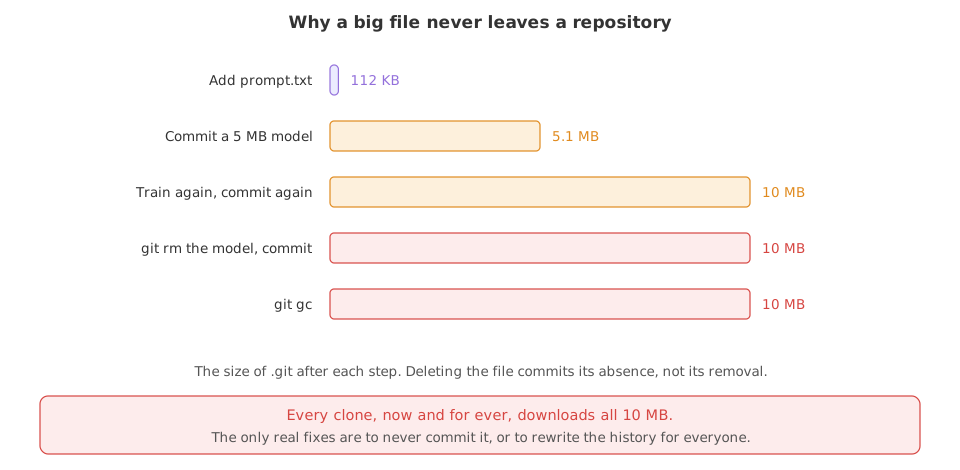
A commit does not store a change. It stores the whole content of every file as it was at that moment, and git keeps all of it so that any commit can be checked out again. For text that costs almost nothing, because two versions of a Python file compress down to the few lines that differ. For a file of weights or a compressed dataset there is nothing to compress and nothing in common between versions, so every version is kept in full.
Watching a repository grow
Each step below commits or deletes something and then measures the .git folder, so the number moves as you read. The model file is generated here from a fixed random seed, which makes it incompressible, like real weights. The two export lines stand in for the name and email you set once with git config --global, and fix the date so the hashes are the same on every run.
export GIT_AUTHOR_NAME=Reader GIT_AUTHOR_EMAIL=reader@example.com GIT_AUTHOR_DATE=2026-10-12T10:00:00
export GIT_COMMITTER_NAME=Reader GIT_COMMITTER_EMAIL=reader@example.com GIT_COMMITTER_DATE=2026-10-12T10:00:00
mkdir ask-docs && cd ask-docs && git init -q -b main
printf 'Answer only from the notes.\n' > prompt.txt
git add . && git commit -q -m "Add the prompt"
echo "the repository so far: $(du -sh .git | cut -f1)"the repository so far: 112K
112K is the floor: the objects git writes for one small file and one commit. Now commit five megabytes of weights.
python3 -c "import random; random.seed(7); open('model.bin','wb').write(random.randbytes(5*1024*1024))"
git add model.bin && git commit -q -m "Add the trained model"
echo "after one model file: $(du -sh .git | cut -f1)"after one model file: 5.1M
The repository is now the size of the file, because random bytes do not compress. Training again writes a new file with the same name.
python3 -c "import random; random.seed(8); open('model.bin','wb').write(random.randbytes(5*1024*1024))"
git commit -q -am "Retrain the model"
echo "after the second one: $(du -sh .git | cut -f1)"after the second one: 10M
Another 5 MB. Nothing was shared between the two versions, because two sets of random bytes have nothing in common. So delete the file and commit the deletion.
git rm -q model.bin && git commit -q -m "Remove the model file"
ls
echo "after deleting it: $(du -sh .git | cut -f1)"prompt.txt after deleting it: 10M
ls shows the file is gone from the working tree and .git is the same size. The deletion is a new commit saying the file is absent; the two commits that hold it are still in the history.
git gc -q --prune=now
echo "after git gc: $(du -sh .git | cut -f1)"after git gc: 10M
git gcchanged nothing. Garbage collection removes objects no commit refers to. These are referred to by commits in the history, so they stay.- Every clone downloads all of it. A new member of the team waits for 10 MB of weights nobody uses, and so does every automated build, for the life of the project.
Scale that up. A 400 MB checkpoint committed on five training runs is two gigabytes in the history. GitHub's own guidance is “We recommend repositories remain small, ideally less than 1 GB”, and it enforces limits on single files: a file over 50 MiB produces a warning, and “GitHub blocks files larger than 100 MiB” (About large files on GitHub).
Keeping the file out, and saying where it lives
The working version of this is three decisions. Ignore the large files. Commit a sample small enough that the code can run. Write down where the real files come from, so a reader can fetch them.
mkdir -p data/sample models
printf 'id,text\n1,a note\n2,another note\n' > data/sample/notes.csv
python3 -c "import random; random.seed(7); open('data/notes-full.csv','wb').write(random.randbytes(5*1024*1024))"
python3 -c "import random; random.seed(9); open('models/model.bin','wb').write(random.randbytes(5*1024*1024))"
echo "the two large files: $(du -ch data/notes-full.csv models/model.bin | tail -1 | cut -f1)"the two large files: 10M
Ten megabytes sitting in the project folder, next to a sample file of two rows. The rules decide which of them git ever sees.
cat > .gitignore <<'IG'
data/*
!data/sample/
!data/README.md
models/
IG
git add . && git commit -q -m "Add a sample and ignore the large files"
git ls-files.gitignore data/sample/notes.csv prompt.txt
data/* excludes the contents of the folder, the two ! lines put the sample and one document back, and models/ takes the weights out. The two 5 MB files are not in the list.
That leaves one thing missing: a folder a reader cannot see into should still say what belongs in it. !data/README.md is the line that lets this file in.
cat > data/README.md <<'MD'
The full notes are not in this repository.

Download notes-full.csv from the team drive into data/, then check it with:

    shasum -a 256 data/notes-full.csv

data/sample/ holds two rows so the tests can run without it.
MDgit add data/README.md && git commit -q -m "Say where the real data lives"
git ls-files
echo "the repository: $(du -sh .git | cut -f1)".gitignore data/README.md data/sample/notes.csv prompt.txt the repository: 152K
- Four small files are tracked. The two 5 MB files are not among them, and
.gitstayed tiny. - The sample is committed. Two rows is enough for the tests and the README's command to run, which is the difference between a repository someone can try and one they cannot.
data/README.mdis the part people forget. A folder that is ignored should still tell a reader what belongs in it and where to get it.- A checksum is worth one line. It is how the next person knows they downloaded the same file you used.
When the file is already committed
git rm --cached stops git tracking a file while leaving it on disk, and adding it to .gitignore stops it coming back. Neither makes the repository smaller, and the measurements above already showed why.
python3 -c "import random; random.seed(7); open('model.bin','wb').write(random.randbytes(5*1024*1024))"
git add . && git commit -q -m "Add the model, which was a mistake"
echo "after the mistake: $(du -sh .git | cut -f1)"after the mistake: 5.1M
One git add . was enough. Now stop tracking it and keep it out.
git rm --cached -q model.bin
printf 'model.bin\n' > .gitignore
git add .gitignore && git commit -q -m "Stop tracking the model file"
git ls-files.gitignore prompt.txt
git ls-files no longer lists it, which is what --cached means: remove it from git, not from the folder.
ls
echo "after the clean-up: $(du -sh .git | cut -f1)"model.bin prompt.txt after the clean-up: 5.1M
The file is in the folder and the size of .git is unchanged, because the commit that added it is still in the history. Removing it from the history means rewriting every commit from that point on, which changes every hash after it and forces everyone who has a clone to throw theirs away. The tool for that is git filter-repo, and it is a decision for the whole team, not a tidy-up.
What Git LFS fixes, and what it does not
Git Large File Storage keeps the big file somewhere else and commits a small stand-in in its place. GitHub's docs describe it as creating “a pointer file which acts as a reference to the actual file (which is stored somewhere else)”, holding a version, an object id and a size. Git only ever sees the pointer, so the repository stays small; the bytes are downloaded when you check that file out.
git lfs install                       # once per machine
git lfs track "*.bin"                 # writes a rule into .gitattributes
git add .gitattributes                # the rule must be committed, or it only works for you
git add models/model.bin && git commit -m "Add the model through LFS"
git lfs ls-files # what LFS is handling- It fixes the clone. The repository holds pointers, so the history stays small and a clone is fast.
- It does not apply to what is already committed. GitHub's docs say existing files “need to first [be removed] from the repository and then [added] to Git LFS”. Moving old commits into LFS means
git lfs migrate import, which its own documentation calls destructive: it rewrites your history, “changing commits and generating new commit SHAs”. - It does not make the bytes free. The files live in a store with its own limits, and GitHub lists a maximum file size per plan, starting at 2 GB on Free and Pro.
- It adds a requirement for everyone else. Anyone cloning needs Git LFS installed, or they get the pointer files instead of the data and nothing works.
.gitattributesmust be committed. The docs “strongly suggest” it, so that forks and clones get the same rules.
Where each kind of file belongs
| What it is | Where it goes | Why |
|---|---|---|
| Code, prompts, configs | in the repository | small, text, and the point of it |
| A few rows of sample data | in the repository | lets a reader run the project at all |
| A dataset | object storage or a shared drive, named in the README | it changes without the code changing |
| Model weights | a model registry or object storage | large, binary, and produced by a run |
| A file you must version and is large | Git LFS | the history keeps a pointer, not the bytes |
| A built artefact, a cache, a virtual environment | nowhere | it can be made again from what is committed |
Where this bites
- A training script that writes into the project folder. One
git add .and a checkpoint is in the history. Ignoremodels/on the day you create it. - A notebook that saves figures and arrays beside itself. Those are outputs, and outputs are rebuilt, not committed.
- A dataset that someone thought was small. Fifty megabytes of CSV committed weekly is a repository nobody wants to clone within a year.
git gc all leave the bytes in the history, as the five measurements above showed. The cheap moment is before the first git add; everything after it costs the whole team a rewritten history.Related
- Previous: Writing a README
- Next: Project: your first project on GitHub
- See also: .gitignore for the pattern rules
- Reference: About Git Large File Storage in the GitHub docs
- Change the seed in the second commit of the growth example to
7, so both versions are identical, and watch the repository stay at 5 MB. Git stores one copy of identical content. - Replace the random bytes with a 5 MB text file made of one repeated line and run the example again. Text compresses, so the numbers look nothing like the first run.
- Run
git count-objects -vHin one of your own repositories and comparesize-packwith the size of your working folder.
This is what real progress feels like.