
Looking at history with git log
git log is the command that prints the commits of the branch you are on, newest first, with the identifier, author, date and message of each.
Last updated: 12 Oct, 2026 · git 2.54
Committing writes the history. Reading it is how you find out when a value changed, which commit touched a file, and what the person who wrote it was trying to do. One command does all of that, and its flags decide how much of each commit you see.
Syntax: git log with no arguments prints the whole history of the current branch. Flags cut it down.
git log                 # every commit, newest first
git log --oneline -n 5  # the last five, one line each
The history these examples read
Every block on this page reads the same repository: three commits made on three days. The first two blocks build it, and the ones after them start from the same twelve lines without repeating them.
mkdir ask-docs && cd ask-docs && git init -q -b main
# one fixed date per commit, so every run gives the same hashes
export GIT_AUTHOR_DATE="2026-10-10T09:00:00+00:00" GIT_COMMITTER_DATE="2026-10-10T09:00:00+00:00"
printf 'Support bot\n' > README.md
printf 'You are a support assistant.\n' > prompt.txt
git add . && git commit -q -m "Add the README and the first prompt"
git logcommit a290cb35a37c296a0d6b8ca943a85a2b810c9e8d
Author: Reader <reader@example.com>
Date: Sat Oct 10 09:00:00 2026 +0000
Add the README and the first prompt- commit a290cb35... is the identifier, forty characters computed from the commit's content, its parent and its author. No two commits share one.
- Author is the name and email from your configuration, copied in at commit time.
- Date is the moment the commit was made, in your time zone. The commits on this page carry a fixed date and a zero offset because the examples set them.
- The message is indented under the header. It is the only part a human wrote.
Two more commits follow, each with its own date and its own message.
export GIT_AUTHOR_DATE="2026-10-11T11:30:00+00:00" GIT_COMMITTER_DATE="2026-10-11T11:30:00+00:00"
printf 'chunk_size = 500\n' > loader.py
git add . && git commit -q -m "Split documents into 500 character chunks"
export GIT_AUTHOR_DATE="2026-10-12T10:00:00+00:00" GIT_COMMITTER_DATE="2026-10-12T10:00:00+00:00"
printf 'You are a support assistant. Answer only from the documents.\n' > prompt.txt
git commit -q -am "Tell the model to answer only from the documents"
git logcommit 0d7298e71a494105c98611d796735049e4bea9eb
Author: Reader <reader@example.com>
Date: Mon Oct 12 10:00:00 2026 +0000
Tell the model to answer only from the documents
commit 67205d1e4f5f67efd7180dc10500d553099bd0f7
Author: Reader <reader@example.com>
Date: Sun Oct 11 11:30:00 2026 +0000
Split documents into 500 character chunks
commit a290cb35a37c296a0d6b8ca943a85a2b810c9e8d
Author: Reader <reader@example.com>
Date:   Sat Oct 10 09:00:00 2026 +0000

    Add the README and the first prompt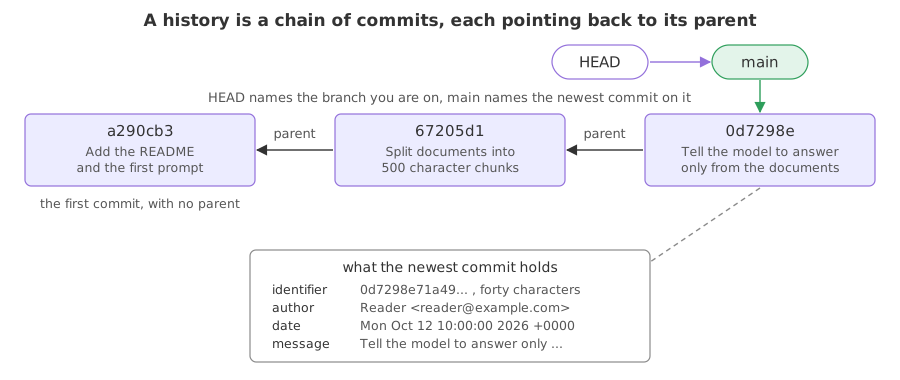
The newest commit is at the top. Each commit also records its parent, the commit that came before it, which is how Git knows the order.
Where the author name comes from
Every line of the Author field was read from your global configuration when the commit was made. The examples on this page run with this file in place:
[user]
	name = Reader
	email = reader@example.com
Changing that file changes the author of your next commit. It does not change the ones already made, because the name is stored inside each commit.
One line per commit
--oneline shortens each commit to its short identifier and the first line of its message. This is the form you will use most.
git log --oneline0d7298e Tell the model to answer only from the documents 67205d1 Split documents into 500 character chunks a290cb3 Add the README and the first prompt
The short identifier is the first seven characters of the long one, which is enough to name a commit in almost every repository.
git log --oneline -n 20d7298e Tell the model to answer only from the documents 67205d1 Split documents into 500 character chunks
-n 2 stops after two commits. --oneline is also what makes the first line of a commit message worth writing carefully, which the message page covers.
Which files a commit touched
--stat adds the file names and a count of changed lines under each commit.
git log --stat -n 1commit 0d7298e71a494105c98611d796735049e4bea9eb
Author: Reader <reader@example.com>
Date: Mon Oct 12 10:00:00 2026 +0000
Tell the model to answer only from the documents
prompt.txt | 2 +-
1 file changed, 1 insertion(+), 1 deletion(-)- prompt.txt | 2 +- says one line went in and one went out of that file.
- 1 file changed, 1 insertion(+), 1 deletion(-) is the summary across the commit.
-p goes further and prints the changed lines themselves.
git log -p -n 1commit 0d7298e71a494105c98611d796735049e4bea9eb
Author: Reader <reader@example.com>
Date: Mon Oct 12 10:00:00 2026 +0000
Tell the model to answer only from the documents
diff --git a/prompt.txt b/prompt.txt
index 900f445..6809cab 100644
--- a/prompt.txt
+++ b/prompt.txt
@@ -1 +1 @@
-You are a support assistant.
+You are a support assistant. Answer only from the documents.The block under -p is the same change written as a patch: the line starting with - was removed and the line starting with + replaced it. The diff page reads that format in full.
Narrowing the history
Three flags answer most questions you bring to a history: the commits that touched one file, the commits whose message mentions a word, and a format of your own.
git log --oneline -- prompt.txt0d7298e Tell the model to answer only from the documents a290cb3 Add the README and the first prompt
-- prompt.txt keeps only the commits that changed that file. The two dashes separate paths from flags, so Git does not mistake a file name for an option.
git log --oneline --grep=chunk67205d1 Split documents into 500 character chunks
--grep=chunk searches the messages, not the code. -S chunk_size searches the code instead.
git log --pretty=format:'%h %ad %an %s' --date=short0d7298e 2026-10-12 Reader Tell the model to answer only from the documents 67205d1 2026-10-11 Reader Split documents into 500 character chunks a290cb3 2026-10-10 Reader Add the README and the first prompt
--pretty=format: builds a line out of placeholders: %h short identifier, %ad author date, %an author name, %s the subject. --date=short prints the date as a plain day.
The flags worth remembering
| Flag | What it adds | Reach for it when |
|---|---|---|
--oneline | one line per commit | you want the shape of the history |
-n <k> | stops after k commits | only the recent ones matter |
--stat | files and line counts | you ask what a commit touched |
-p | the changed lines | you ask exactly what changed |
-- <path> | only commits touching that path | one file behaves oddly |
--grep=<word> | only matching messages | you remember a word from a message |
--graph --all | a drawing of every branch | branches have split and merged |
Where you read the history
- Before changing a file you did not write.
git log -p -- loader.pyshows every change that file has had and why. - When a setting stops working. Find the commit that changed it, read its message, and you have the reason.
- Before you write your own message. Reading the last ten lines of
--onelineshows the style the project uses.
git log opens a pager and the terminal seems to stop taking commands. Press q to leave it, the space bar to go down a page. git --no-pager log prints straight out instead. Also, git log shows the history of the branch you are on; the branches page uses --all to see the rest.Related
- Previous: .gitignore
- Next: Seeing what changed with git diff
- See also: Writing a commit message, which is what
--onelineprints - Reference: git log in the Git reference
- Run
git log --oneline --statand compare it withgit log --stat. - Run
git log -S chunk_size, which finds the commits where that text appeared or disappeared in the code. - Run
git show <short id>with one of the identifiers from your--onelineoutput. It prints that one commit with its patch.
Little by little, you're building something great.