
Your first repository
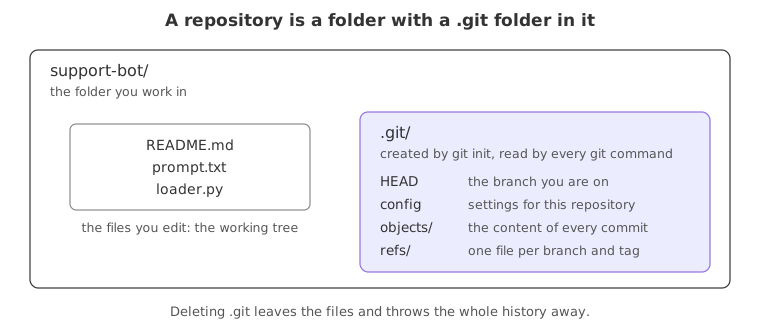
A Git repository is an ordinary folder with a hidden .git folder inside it, and that hidden folder is where every commit, branch and setting for the project is stored.
Last updated: 12 Oct, 2026 · git 2.54
Git works per folder. Until you run git init in a folder, Git knows nothing about it and no command works there. One command turns the folder into a repository, and nothing outside the folder is touched.
Syntax: git init -b <name> creates the repository in the folder you are standing in and names its first branch.
git init -b main # -b names the first branch; without it Git uses init.defaultBranchView the code here
[user]
	name = Reader
	email = reader@example.com
Creating the folder and running git init
Make an empty folder, step into it, and initialise it. The project in this course is called ask-docs.
mkdir ask-docs && cd ask-docs
git init -b mainInitialized empty Git repository in /private~/ask-docs/.git/
The path in the answer is where the repository lives. -b main names the first branch main. Without -b, Git uses the init.defaultBranch setting, and when that is not set it falls back to master and prints a hint saying so. Running git init twice in the same folder is harmless: it reports that the repository was reinitialised and keeps your commits.
Those two lines are the throwaway repository the rest of this page works in, and the blocks below start from them without showing them again. If you are following along in one folder, run them once and skip them after that. Adding -q to git init keeps it quiet, which is useful once you know what it says.
Looking inside the .git folder
The folder looks unchanged in a file manager, because .git starts with a dot and is hidden. ls -a lists hidden entries too.
ls -a. .. .git
Only .git is new, and the folder holds nothing but that. Everything Git keeps for the project sits inside it, which ls .git lists.
ls .gitHEAD config description hooks info objects refs
Those entries are Git's own storage:
- HEAD is a one-line file naming the branch you are on.
- config holds the settings for this repository alone, the
--locallevel. - objects is where the content of every commit ends up.
- refs holds one small file per branch and tag, each naming a commit.
- hooks and info and description are for scripts and notes, and you can leave them alone.
You never edit these by hand. The only thing worth remembering is that deleting .git deletes the whole history and turns the project back into a plain folder, while leaving your current files untouched.
Reading status in an empty repository
git status is the command you run most. In a repository with no commits and no files it already says three useful things.
git statusOn branch main No commits yet nothing to commit (create/copy files and use "git add" to track)
- On branch main names the branch, so the
-b mainworked. - No commits yet means the history is empty. The first commit is called the root commit.
- nothing to commit with the hint about
git addis Git saying the folder is empty. The next page fills it.
A plain folder compared with a repository
| A plain folder | A repository | |
|---|---|---|
| Keeps old versions | Only what you copied by hand | Every commit you made |
| Says what changed | No | Yes, line by line |
| Works offline | Yes | Yes, the history is local |
| Extra storage | None | The .git folder, usually small |
| Can be shared with history | No | Yes, by pushing it to GitHub |
Where you run git init
- A project you are starting. Make the folder, run
git init -b main, commit early. - A folder of code you already have. Initialising it keeps the files as they are and puts them all in the first commit.
- A folder you plan to put on GitHub. You can also clone an empty repository from GitHub instead, which the GitHub part covers.
git init in the project folder, not in your home folder. A repository in your home folder tries to track every file you own, and git status becomes a page of noise. A repository inside another repository is also trouble: the outer one stores the inner folder as a single unreadable entry. If you make that mistake, delete the .git folder you created and start again in the right place.Related
- Previous: Installing Git
- Next: Staging and committing
- Reference: git init in the Git reference
- Run
git statusin a folder that is not a repository. Git answersfatal: not a git repository, which is how you tell the two apart. - Run
git initwithout-b mainin another empty folder and read the branch name ingit status. - Create a file in the folder, delete the
.gitfolder withrm -rf .git, and rungit statusagain. The file survives, the repository does not.
You understood something today that you didn't yesterday.