
Branches
A branch is a name that points at one commit, and Git moves that name forward every time you commit while you are on it.
Last updated: 12 Oct, 2026 · git 2.54
Up to here the project has had one line of history. A branch gives it a second one. The usual reason is an idea you are not sure about: a different prompt, a chunk size of 800 instead of 500, a loader that strips headings. Each idea gets its own branch, and the branch is either merged or deleted when you know the answer. The commits on main never move while you try.
Syntax: the same command lists branches, creates one, and deletes one.
git branch                 # list them, with a star on the one you are on
git branch <name>          # create a branch pointing at the current commit
git branch -d <name> # delete a branch that has been mergedView the code here
[user]
	name = Reader
	email = reader@example.com
Creating a branch for one experiment
The repository below is a throwaway one in a temporary folder, and every example on this page starts from it. It holds one commit. The experiment is a bigger chunk size, so the branch is named after it, and a name that says what the idea was is worth the ten seconds.
mkdir ask-docs && cd ask-docs && git init -q -b main
export GIT_AUTHOR_DATE="2026-10-12T10:00:00+00:00" GIT_COMMITTER_DATE="2026-10-12T10:00:00+00:00"
printf 'You are a support assistant.\n' > prompt.txt
printf 'chunk_size = 500\n' > loader.py
git add . && git commit -q -m "Add the prompt and the loader"
git branch* main
git branch on its own lists the branches and marks the one you are on with a star. A repository that has never been branched has exactly one name in it.
Creating the branch
git branch chunk-800
git branchchunk-800 * main
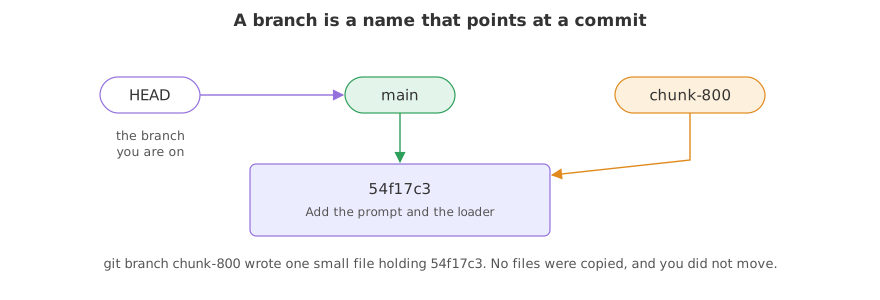
git branch chunk-800 printed nothing and created the name. The listing has two lines now, and the star has not moved: the commits you make next still go to main.
Reading which commit each name points at
git branch -v
git branch --show-currentchunk-800 54f17c3 Add the prompt and the loader * main 54f17c3 Add the prompt and the loader main
- -v adds the commit each name points at. The same short identifier and the same subject appear on both lines, because both names are pointing at the one commit there is.
- git branch --show-current prints the one name you are on, which is useful inside scripts and before a merge.
Creating a branch copies nothing. Git writes a small file under .git/refs/heads holding the identifier of the commit, which is why branches are instant whatever the size of the project. It also leaves you where you were: you are still on main, and the next page moves you across.
Why the name stays behind
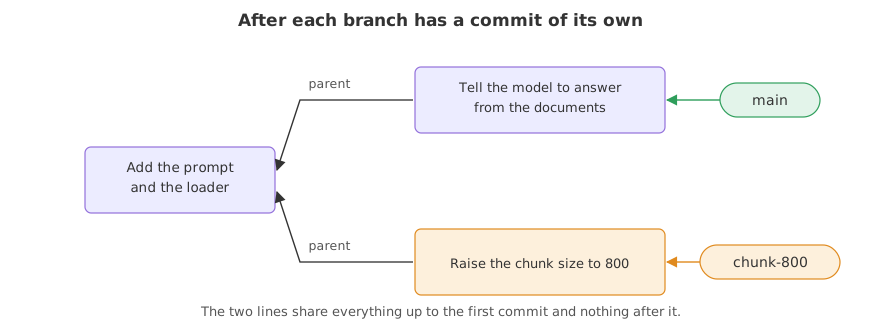
A branch moves only when you commit on it. Commit on main after creating chunk-800, and the two names come apart.
git branch chunk-800
printf 'You are a support assistant. Answer from the documents.\n' > prompt.txt
git commit -q -am "Tell the model to answer from the documents"
git branch -vchunk-800 54f17c3 Add the prompt and the loader * main a6a78a1 Tell the model to answer from the documents
git branch -v now shows two different commits. main moved to the new one and chunk-800 stayed on the old one, because a branch moves only when you commit on it.
Seeing both lines of history at once
git log --oneline --all --graph --decorate* a6a78a1 (HEAD -> main) Tell the model to answer from the documents * 54f17c3 (chunk-800) Add the prompt and the loader
- --all adds the commits of every branch, not only the one you are on, and --decorate prints the names in brackets, so
(HEAD -> main)says where you are standing. - The graph is still a straight line, because the experiment has no commits of its own yet. It starts to fork the moment you switch to it and commit.
One branch per experiment
- Name it after the idea.
chunk-800,shorter-prompt,strip-headings. A reader ofgit branchthen knows what was tried. - Keep it short-lived. An experiment that runs for weeks drifts far from
mainand the merge gets painful. - Throw it away without guilt.
git branch -ddeletes a merged branch andgit branch -Ddeletes one whose commits were never merged. The experiment that failed costs nothing to delete, andmainnever saw it.
A branch compared with a copy of the folder
| ask-docs-v2 copied | a branch | |
|---|---|---|
| Disk used | the whole project again | one small file |
| Made in | as long as the copy takes | an instant |
| History | none, it starts empty | the full history, shared |
| Bringing it back | copy files by hand | git merge |
| Knowing what differs | compare by eye | git diff main chunk-800 |
| Throwing it away | delete and hope | git branch -D |
Where you create a branch
- An experiment you may not keep. One branch, one idea, measured against
main. - A feature that takes a few days. Nobody else sees half-finished work, and
mainstays runnable. - A fix while a feature is in progress. Branch from
main, fix, merge, and go back to the feature branch.
git branch chunk-800 creates the branch and leaves you where you are. Commits you make next still go to the branch you were on, which is the most common way work ends up on main by accident. Check with git branch --show-current, or create and move in one step with the command on the next page.Related
- Previous: Writing a commit message
- Next: Switching branches
- See also: Merging a branch, which brings an experiment back
- Reference: git branch in the Git reference and Branches in a nutshell in the Git book
- Create three branches with different names and run
git branch -v. All three point at the same commit. - Run
git branch -d chunk-800on a branch with no commits of its own. Git deletes it without complaining, because nothing would be lost. - Run
cat .git/refs/heads/chunk-800and compare what it holds with the output ofgit log --oneline -n 1.
This is what real progress feels like.