
Project repository structure
A project repository structure is the set of folders and files at the top of a repository, chosen so that someone who has never seen the project can find the code, run it, and leave the large and secret files alone.
Last updated: 12 Oct, 2026 · git 2.54
Stashing work in progress closed the commands. The rest of this part is about what you point those commands at: a repository that reads like a project instead of a folder somebody zipped.
The video walks through a project's folders: a folder for documents, a folder for models, a folder of source files, and a setup.py at the top so the project can be installed. The names differ between projects. What does not differ is that every folder has one job and a reader can guess what is in it.
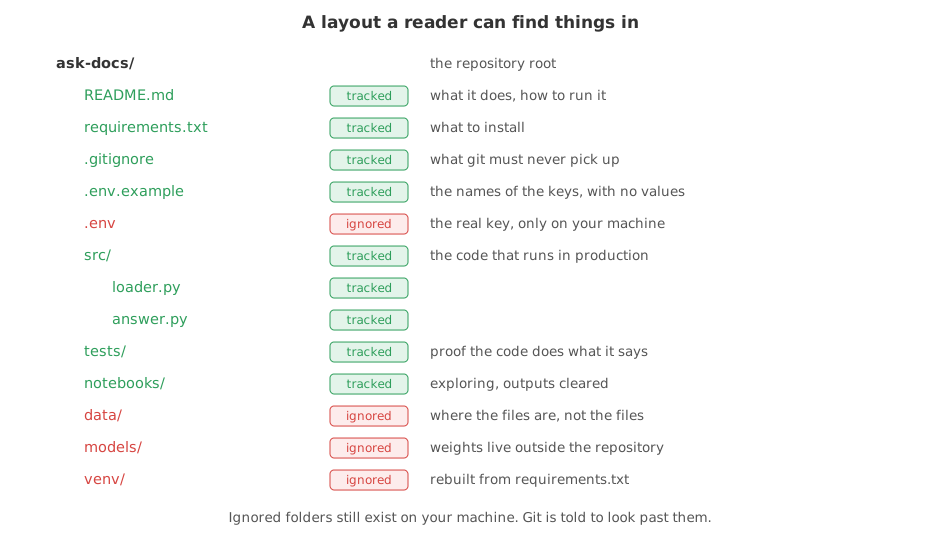
Four files at the top do most of the work. README.md says what the project is. requirements.txt says what to install. .gitignore says what git must never pick up. .env.example names the keys the project needs without holding any of them.
Building the layout, and seeing what git takes
The project below is built a few files at a time, in a throwaway repository, so you can see what each group of files is for before any of it is staged. The two export lines stand in for the name and email you set once with git config --global, and fix the date so the hashes are the same on every run.
export GIT_AUTHOR_NAME=Reader GIT_AUTHOR_EMAIL=reader@example.com GIT_AUTHOR_DATE=2026-10-12T10:00:00
export GIT_COMMITTER_NAME=Reader GIT_COMMITTER_EMAIL=reader@example.com GIT_COMMITTER_DATE=2026-10-12T10:00:00
mkdir ask-docs && cd ask-docs && git init -q -b main
mkdir -p src tests notebooks data/sample models venv
lsdata models notebooks src tests venv
Each folder has one job: the code in src/, the checks in tests/, exploring in notebooks/, the files the project reads in data/, trained weights in models/, and the installed packages in venv/.
The small files that belong in the repository
Code, the prompt, the list of packages and the example of the key file are all small text files, and all four are worth keeping for ever.
printf 'Answer only from the notes.\n' > prompt.txt
printf 'def load(path):\n    return open(path).read()\n' > src/loader.py
printf 'from src.loader import load\n' > tests/test_loader.py
printf 'openai\npython-dotenv\n' > requirements.txt
printf 'OPENAI_API_KEY=\n' > .env.example
git status --short?? .env.example ?? prompt.txt ?? requirements.txt ?? src/ ?? tests/
?? means git can see the path and is not tracking it. Folders are listed as folders while everything inside them is untracked.
The files that must stay out
The next five are the real key, a two-row sample of the data, the 120 KB file the sample came from, a file of weights and a marker inside the virtual environment. Only the sample under data/sample/ belongs in the repository.
printf 'OPENAI_API_KEY=a-real-key-would-be-here\n' > .env
printf 'id,text\n1,a note\n' > data/sample/notes.csv
head -c 120000 /dev/zero | tr '\0' 'x' > data/notes-full.csv
printf 'weights\n' > models/model.bin
printf 'nothing real in here\n' > venv/marker.txt
du -sh data/notes-full.csv models venv120K data/notes-full.csv 4.0K models 4.0K venv
These are on your machine and they have to stay there. A key in the history is a leaked key, a dataset in the history is a slow clone for everyone, and a virtual environment is rebuilt from requirements.txt in one command.
Writing .gitignore before the first git add
.gitignore is a list of patterns git skips. Written before anything is staged, it makes git add . safe to type.
cat > .gitignore <<'IG'
venv/
__pycache__/
.ipynb_checkpoints/
.env
data/*
!data/sample/
models/
IG
git add .
git status --shortA .env.example A .gitignore A data/sample/notes.csv A prompt.txt A requirements.txt A src/loader.py A tests/test_loader.py
- Every line starts with
A. That column means added to the staging area. These seven are what the first commit would hold. - The key is not there.
.envwas written to disk and.gitignorekept it out, while.env.examplewas taken, so the next person knows which key to set. - The large data file is not there, and the small sample is.
data/*excludes everything in the folder and!data/sample/puts one folder back, which is how you commit enough data to run the tests without committing the dataset. - The empty folder is missing.
notebookswas created and nothing was put in it, so git has nothing to take;testshas a file, so it is there. Git tracks files, not folders, which is why a folder with nothing in it cannot be committed.
Asking git which rule ignored a file
When a file does not show up where you expect, git check-ignore -v names the file that ignored it and the line number, which turns a guess into a fact.
git check-ignore -v .env data/notes-full.csv models/model.bin.gitignore:4:.env .env .gitignore:5:data/* data/notes-full.csv .gitignore:7:models/ models/model.bin
Each line reads as the file that holds the rule, the line number inside it, the rule itself and the path it matched.
git check-ignore -v data/sample/notes.csv || echo "data/sample/notes.csv is not ignored"data/sample/notes.csv is not ignored
The command printed nothing and exited with an error, which is git's way of saying no rule matches. The echo after || is what you are reading.
Keeping an empty folder in the repository
A folder a reader is meant to put files into is worth keeping even when it is empty. Committing the project first shows the problem.
git add . && git commit -q -m "Add the project"
ls -d notebooks tests
git status --short
echo "(git status printed nothing)"notebooks tests (git status printed nothing)
Both folders exist. tests/ went into the commit because it holds a file, notebooks/ did not, and git has nothing left to report either way.
The convention is an empty file inside the folder, named .gitkeep. The name means nothing to git; any file would do.
touch notebooks/.gitkeep
git add . && git commit -q -m "Keep the notebooks folder"
git ls-files.env.example .gitignore data/sample/notes.csv notebooks/.gitkeep prompt.txt requirements.txt src/loader.py tests/test_loader.py
notebooks/.gitkeep is in the list, so the folder arrives in every clone. The rest of the list is what the first commit already held.
What goes in each folder
| Path | What belongs there | Tracked? |
|---|---|---|
README.md | what the project is and how to run it | yes |
requirements.txt | the packages to install | yes |
.gitignore | everything git must not pick up | yes |
.env.example | the names of the keys, with no values | yes |
.env | the real keys for this machine | no, never |
src/ | the code that has to keep working | yes |
tests/ | the checks that prove it does | yes |
notebooks/ | exploring, with the outputs cleared first | yes |
data/ | a small sample; the real files live elsewhere | the sample only |
models/ | trained weights | no |
venv/ | the installed packages, rebuilt from requirements.txt | no |
Notebooks are worth one extra sentence. A .ipynb file keeps its outputs inside it, so committing one with the outputs left in puts a wall of base64 and execution counts into the history and makes every change unreadable. Clear the outputs before you stage it, as Seeing what changed with git diff explains.
Where the layout earns its keep
- Somebody new on the project. They open the repository, read the README, see
src/andtests/, and know where to look without asking. - Your own machine, six months later.
requirements.txtand.env.exampleare the two files that make the project run again. - Anything automated. A build that installs from
requirements.txtand runs what is intests/needs those paths to be where it expects.
.gitignore before the first git add ., not after. A file that has been committed once is in the history for good: adding its name to .gitignore later stops nothing, because .gitignore only applies to files git is not already tracking.Related
- Previous: Stashing work in progress
- Next: Writing a README
- See also: .gitignore for the pattern rules
- Reference: gitignore in the Git documentation
- Run
git check-ignore -von a file in one of your own projects that you expected to be committed and is not. - Add
!data/sample/abovedata/*instead of below it and rungit status --short. Order matters: the last matching rule wins. - Delete the
.gitkeepfrom a folder, commit, and see the folder disappear from a fresh clone while staying on your own disk.
You understood something today that you didn't yesterday.