
Merging a branch
git merge brings the commits of another branch into the branch you are standing on, and leaves the other branch untouched.
Last updated: 12 Oct, 2026 · git 2.54
An experiment that worked has to come back. Merging is how: you stand on the branch that should receive the work, name the branch that has it, and Git joins the two lines of history. There are two ways it can end, and the output tells you which one happened.
Syntax: switch to the receiving branch first, then name the branch to bring in.
git switch main            # the branch that receives the work
git merge chunk-800        # the branch whose commits come in
git merge --no-edit <name> # keep Git's prepared message, open no editor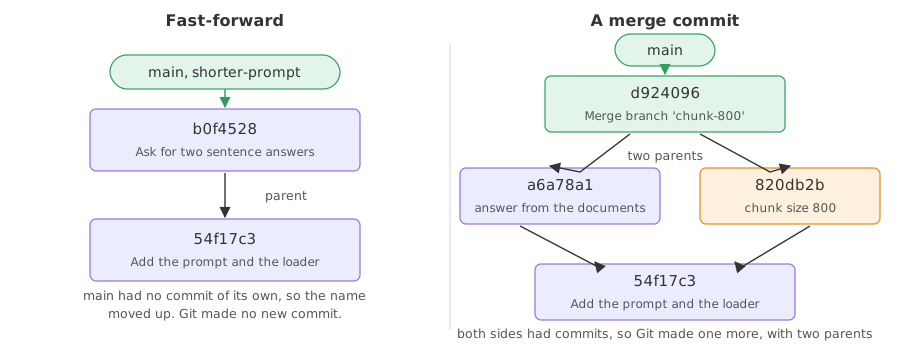
A merge that moves the name forward
When the branch you are on has made no commits since the split, the work in front of it is a straight continuation. The repository below is a throwaway one in a temporary folder, and every example on this page starts from it.
mkdir ask-docs && cd ask-docs && git init -q -b main
export GIT_AUTHOR_DATE="2026-10-12T10:00:00+00:00" GIT_COMMITTER_DATE="2026-10-12T10:00:00+00:00"
printf 'You are a support assistant.\n' > prompt.txt
printf 'chunk_size = 500\n' > loader.py
git add . && git commit -q -m "Add the prompt and the loader"
git log --oneline54f17c3 Add the prompt and the loader
One commit, one branch. The experiment branches off here, so this commit is the point the two lines of history have in common.
A branch one commit ahead of main
git switch -q -c shorter-prompt
printf 'Answer in two sentences.\n' > prompt.txt
git commit -q -am "Ask for two sentence answers"
git switch main
git branch -vSwitched to branch 'main' * main 54f17c3 Add the prompt and the loader shorter-prompt b0f4528 Ask for two sentence answers
git branch -v shows the experiment on a newer commit and main still on the first one. main has nothing of its own in the way, which is the condition for what happens next.
Running the merge
git merge shorter-prompt
git log --oneline --graph --decorateUpdating 54f17c3..b0f4528 Fast-forward prompt.txt | 2 +- 1 file changed, 1 insertion(+), 1 deletion(-) * b0f4528 (HEAD -> main, shorter-prompt) Ask for two sentence answers * 54f17c3 Add the prompt and the loader
- Updating 54f17c3..b0f4528 names the commit the branch moved from and the one it moved to.
- Fast-forward is Git saying no merge commit was needed.
- prompt.txt | 2 +- and the summary under it count what changed, the same as a commit would print.
- The graph is one straight line, and
(HEAD -> main, shorter-prompt)shows both names now on the newest commit.
A merge that makes a commit
When both branches have commits of their own, there is nothing to fast-forward to. Git joins them with a new commit that has two parents, and that commit is the merge.
git switch -q -c chunk-800
printf 'chunk_size = 800\n' > loader.py
git commit -q -am "Raise the chunk size to 800"
git switch -q main
printf 'You are a support assistant. Answer from the documents.\n' > prompt.txt
git commit -q -am "Tell the model to answer from the documents"
git branch -vchunk-800 820db2b Raise the chunk size to 800 * main a6a78a1 Tell the model to answer from the documents
Both names are on different commits, and neither is reachable from the other. There is no name to move forward, so Git has to join the two lines instead.
Joining the two lines
git merge --no-edit chunk-800
git log --oneline --graph --decorateMerge made by the 'ort' strategy. loader.py | 2 +- 1 file changed, 1 insertion(+), 1 deletion(-) * d924096 (HEAD -> main) Merge branch 'chunk-800' |\ | * 820db2b (chunk-800) Raise the chunk size to 800 * | a6a78a1 Tell the model to answer from the documents |/ * 54f17c3 Add the prompt and the loader
- Merge made by the 'ort' strategy names the method Git used to put the two sides together. It is the default and you do not have to choose it.
- The graph forks and joins. The two lines leave the first commit and meet again at the merge commit at the top.
- --no-edit keeps the message Git prepared,
Merge branch 'chunk-800'. Without it, Git opens your editor with that message so you can add a line about why the experiment was kept.
What makes a merge commit a merge commit
git log -1 --format='%h has parents %p'd924096 has parents a6a78a1 820db2b
Every other commit has one parent. This one has two, one from each branch, and that is what records in the history that two lines came back together here.
Who the merge commit belongs to
A merge commit is a commit like any other and carries the name and email from your configuration:
[user]
	name = Reader
	email = reader@example.com
That matters when a team reads the history later: the merge is attributed to whoever ran git merge, not to the person who wrote the commits that came in.
Tidying up after a merge
A merged branch has nothing left in it that main does not have, so the name can go. Keeping dead experiment names makes git branch useless within a month.
git branch -d chunk-800
git branchDeleted branch chunk-800 (was 820db2b). * main
- Deleted branch chunk-800 (was ...) removes the name and prints the commit it pointed at, in case you want it back.
- git branch now lists
mainon its own. On an unmerged branch Git refuses and asks for-D, which does lose the commits.
The commits the deleted name was pointing at
git log --oneline820db2b Raise the chunk size to 800 54f17c3 Add the prompt and the loader
The commit from the experiment is still in the log, because deleting a branch deletes a name and not commits. The work came into main with the merge, and the label had nothing left to say.
Fast-forward compared with a merge commit
| Fast-forward | Merge commit | |
|---|---|---|
| Happens when | the receiving branch has no new commits | both branches have new commits |
| New commit made | no | yes, with two parents |
| The history looks | like one straight line | like a fork that joins |
| Message | none to write | Git prepares one, you can edit it |
| Force the other one | git merge --no-ff makes a commit anyway | git merge --ff-only refuses unless it can fast-forward |
Teams argue about which is tidier. A fast-forward keeps the log readable; a merge commit records that a branch existed and when it came in. --no-ff is what projects use when they want every feature branch visible in the history.
Where you merge
- An experiment that worked. Switch to
main, merge the branch, delete the name. - Keeping a long branch up to date. Merge
maininto your branch now and then, so the differences stay small and the final merge is easy. - Accepting someone's work. A pull request on GitHub runs this same merge on their server, which the GitHub part covers.
git merge main while you are on your experiment brings main into the experiment, which is the opposite of what you probably wanted. Run git branch --show-current first, and read the first line of git log --oneline --graph after.Related
- Previous: Switching branches
- Next: Resolving merge conflicts
- See also: Branches for where the second line of history came from
- Reference: git merge in the Git reference
- Run the fast-forward example again with
git merge --no-ff shorter-promptand compare the two graphs. - Try
git branch -don a branch whose commits are not merged. Read what Git says and decide whether-Dis what you want. - After a merge commit, run
git show HEADand notice that a merge commit's own diff is usually empty.
Little by little, you're building something great.