
Reading git status
git status is the command that prints which branch you are on, which changes are staged for the next commit, and which changes are not.
Last updated: 12 Oct, 2026 · git 2.54
The staging lesson used status one step at a time. A real project has several files in different states at once, and one git status shows all of them. Learning to read it means you never guess what a commit is about to contain.
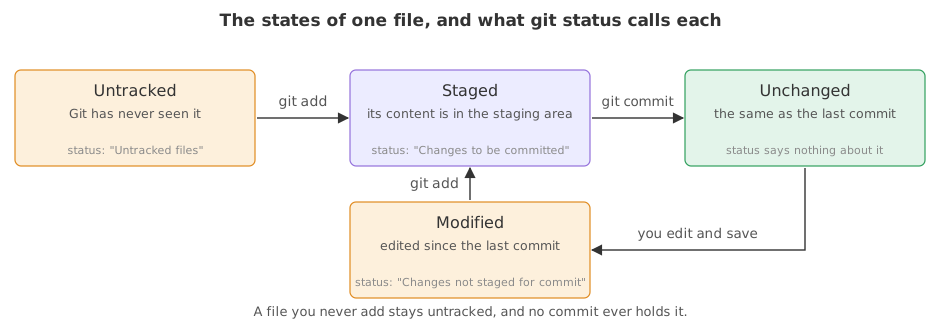
The four states a file can be in
- Untracked. The file is in the folder and in no commit. Status lists it under Untracked files.
- Staged. Its current content is in the staging area, waiting for a commit. Status lists it under Changes to be committed.
- Modified. Git tracks the file, and the version in the folder differs from the last commit. Status lists it under Changes not staged for commit.
- Unchanged. The file matches the last commit. Status does not mention it at all, which is why a quiet answer is good news.
View the code here
[user]
	name = Reader
	email = reader@example.com
One repository with a file in every state
The repository below holds three committed files. Each block after it puts one more file in a different state, and the one git status answer grows with it.
mkdir ask-docs && cd ask-docs
git init -q -b main
printf 'Support bot\n' > README.md
printf 'chunk_size = 500\n' > loader.py
printf 'You are a support assistant.\n' > prompt.txt
git add . && git commit -q -m "Start the project"
git statusOn branch main nothing to commit, working tree clean
All three match the last commit, so status has nothing to report about them. Those six lines are the throwaway repository for the rest of this page, and the blocks below start from them.
printf 'Support bot\n\nAnswers from your documents.\n' > README.md    # modified, not staged
git statusOn branch main Changes not staged for commit: (use "git add <file>..." to update what will be committed) (use "git restore <file>..." to discard changes in working directory) modified: README.md no changes added to commit (use "git add" and/or "git commit -a")
README.md appears under Changes not staged for commit, the heading for an edit that is in the folder and nowhere else.
printf 'chunk_size = 800\n' > loader.py    # modified, then staged
git add loader.py
git statusOn branch main Changes to be committed: (use "git restore --staged <file>..." to unstage) modified: loader.py Changes not staged for commit: (use "git add <file>..." to update what will be committed) (use "git restore <file>..." to discard changes in working directory) modified: README.md
loader.py gets a heading of its own. The staging area holds its new content, so it is listed under Changes to be committed while README.md stays below. One answer, two states.
printf 'try a shorter prompt\n' > scratch.md    # untracked
git statusOn branch main Changes to be committed: (use "git restore --staged <file>..." to unstage) modified: loader.py Changes not staged for commit: (use "git add <file>..." to update what will be committed) (use "git restore <file>..." to discard changes in working directory) modified: README.md Untracked files: (use "git add <file>..." to include in what will be committed) scratch.md
- On branch main is the first line of every status. It is the quickest way to notice you are about to commit to the wrong branch.
- Changes to be committed holds
loader.py, because it was staged. - Changes not staged for commit holds
README.md, edited but not staged. - Untracked files holds
scratch.md, which Git has never been told about. - prompt.txt is missing from the answer, and that is correct: it matches the last commit, so there is nothing to say about it.
Each block of the answer carries the hint for undoing it: git restore --staged to unstage, git restore to throw an edit away, git add to stage or to start tracking. Reading those hints is faster than searching the web.
The short format
git status --short, or -s, prints one line per file with two columns of letters. The left column is the staging area and the right column is the working tree.
git status --shortM README.md M loader.py ?? scratch.md
Three files, three lines. loader.py has its M in the left column because the change is staged, README.md has its M in the right column because the change is only in the folder, and scratch.md gets two question marks because Git does not track it. The table below reads every pair you will meet.
| Line | Left column | Right column | Meaning |
|---|---|---|---|
M loader.py | M | blank | staged change, nothing more in the folder |
M README.md | blank | M | changed in the folder, not staged |
MM prompt.txt | M | M | staged, then changed again |
A loader.py | A | blank | a new file, staged for the first time |
?? scratch.md | ? | ? | untracked |
D old.py | D | blank | deletion staged |
The short format is what you want once you know the long one: it fits a screen when twenty files changed. git status -sb adds one line at the top naming the branch.
The three sentences status ends with
- nothing to commit, working tree clean means the folder, the staging area and the last commit all agree.
- nothing added to commit but untracked files present means the only changes are files Git does not track yet.
- No commits yet appears instead of a commit summary in a repository where nothing has been committed.
Long format compared with short format
git status | git status -s | |
|---|---|---|
| Groups by state | yes, under headings | no, one line per file |
| Names the branch | always | only with -b |
| Prints undo hints | yes | no |
| Fits twenty files on a screen | no | yes |
| Good for | learning and a last check | a quick look while working |
Where you run git status
- Before every commit. It is the list of what the commit will contain.
- After switching branch. It confirms which branch you are on and that the switch left nothing behind.
- When a command surprises you. Status names the state and prints the command that gets you out of it.
git status says nothing about files your .gitignore covers, so an ignored file looks like it does not exist. git status --ignored lists them when you need to check what is being left out.Related
- Previous: Staging and committing
- Next: .gitignore
- See also: Seeing what changed with git diff, which shows the lines behind each of these states
- Reference: git status in the Git reference
- Delete a committed file with
rm prompt.txtand rungit status. A deletion is a change like any other and needs staging. - Rename a committed file with
mv loader.py chunks.pyand read the two lines status prints. - Run
git status -sband compare the first line with the long format.
This is what real progress feels like.