
Git remotes
A remote is a name your repository keeps for a copy of itself somewhere else, almost always the copy on GitHub.
Last updated: 12 Oct, 2026 · git 2.54
Resolving merge conflicts finished everything one person can do inside one folder: branches, merges and the whole history lived on one machine. A remote is the line between that folder and a copy other people can reach.
The video copies the repository's URL from GitHub and hands it to git remote add origin. That one command is the whole of this lesson. The branch here is called main, which is the name GitHub creates today.
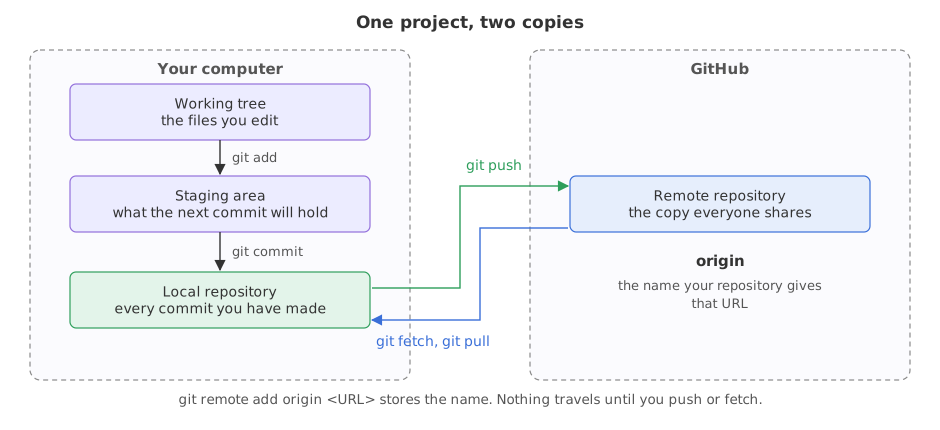
A remote is two pieces of text in a config file: a name and a URL. Adding one copies nothing, uploads nothing and checks nothing. It gives you a short word to type instead of a long URL.
Syntax: every form of git remote you will use.
git remote add origin <URL>         # give a URL the name origin
git remote -v                       # list the remotes, with their URLs
git remote rename origin github     # change a remote's name
git remote set-url origin <URL>     # point an existing name at a different URL
git remote remove github            # forget a remote
Adding a remote called origin
origin is a name, not a keyword. Git gives it no special treatment. It is the name git clone picks for the repository it copied from, so everyone uses it for the main copy and other people reading your repository know what it means.
git remote add origin https://github.com/you/ask-docs.gitReading what git remote -v prints
The repository below is a throwaway one in a temporary folder, and the rest of this page works in it. The two export lines stand in for the name and email you set once with git config --global on your own machine, and they fix the date so the commit identifiers on this page are the same every time.
git --version                       # the version every example on this page ran against
export GIT_AUTHOR_NAME=Reader GIT_AUTHOR_EMAIL=reader@example.com GIT_AUTHOR_DATE=2026-10-12T10:00:00
export GIT_COMMITTER_NAME=Reader GIT_COMMITTER_EMAIL=reader@example.com GIT_COMMITTER_DATE=2026-10-12T10:00:00
mkdir ask-docs && cd ask-docs
git init -q -b main                 # -q prints nothing, -b main names the first branch
printf 'Answer only from the notes.\n' > prompt.txt
git add prompt.txt && git commit -q -m "Add the prompt"
git log --onelinegit version 2.54.0 (Apple Git-157) 0bc2f92 Add the prompt
One commit, no remote. git remote -v would print nothing at all here, which is what a repository that has never been connected to anything looks like.
git remote add origin https://github.com/you/ask-docs.git
git remote -vorigin https://github.com/you/ask-docs.git (fetch) origin https://github.com/you/ask-docs.git (push)
- Two lines for one remote. Git prints the URL it fetches from and the URL it pushes to on separate lines, because they are allowed to differ.
git remote addsets both to the same URL. - Nothing left the machine. The commit is still only here. The command wrote the name and the URL into
.git/configand stopped. - The URL was not checked. That repository does not exist, and git accepted it without complaint. A wrong URL is found at the first push, not now.
Renaming, repointing and removing a remote
All three are edits to the same two pieces of text. git remote rename changes the name, git remote set-url changes the URL under a name you keep, and git remote remove forgets the pair.
git remote rename origin github           # the name is yours to choose
git remote set-url github git@github.com:you/ask-docs.git
git remote -vgithub git@github.com:you/ask-docs.git (fetch) github git@github.com:you/ask-docs.git (push)
One name and one URL changed, and git remote -v prints the pair as it now stands. No commit was touched by either command.
git remote remove github
echo "remotes left: $(git remote | wc -l | tr -d ' ')"remotes left: 0
The URL changed from the https:// form to the git@github.com: form without touching a single commit. A remote's URL is not part of your history, so changing it is free. Which of those two forms to use, and what each one asks you for, is what the next lesson is about.
origin against upstream
origin | upstream | |
|---|---|---|
| Points at | your own copy of the repository | the original you copied from |
| Can you push to it? | yes, it is yours | usually not |
| Who sets it | git clone, or you | always you, by hand |
| When you have both | you forked someone else's project | you forked someone else's project |
| Used for | pushing your branches | pulling in work the original has added |
Where a remote is the thing you need
- A project that exists only on your laptop. One remote and one push, and the work survives the laptop.
- A team on one repository. Everyone's
originis the same URL, which is what makes it one project instead of five. - A project you do not own. You end up with two remotes, your copy and theirs, which the forks lesson builds.
git remote add accepts any text as a URL. If the owner name or the repository name is misspelled, everything looks fine until the first push fails. Read the output of git remote -v once, slowly, and fix it with git remote set-url origin <URL> rather than removing and re-adding.Related
- Previous: Resolving merge conflicts
- Next: GitHub authentication
- Reference: git remote in the Git documentation
- Run
git remote -vin a repository you did not create and read the URL out loud. Does it start withhttps://or withgit@? - Add a second remote called
backupwith a different URL, then rungit remote -v. A repository may have as many remotes as you like. - Remove it with
git remote remove backupand checkgit remote -vagain.
Slow is fine. Stopping is the only problem.