 Git and GitHub
Git is a version control system that saves a snapshot of your project every time you ask it to, and GitHub is a website that keeps a copy of those snapshots so other people can work on the same project.
Last updated: 12 Oct, 2026 · git 2.54
A project without version control turns into folders named final, final_v2 and final_v2_fixed, and after a week nobody can say which one runs. Git keeps one folder and remembers every state it has been in. You can read what changed and when, go back to a version that worked, and let two people edit the same project in the same week without overwriting each other.
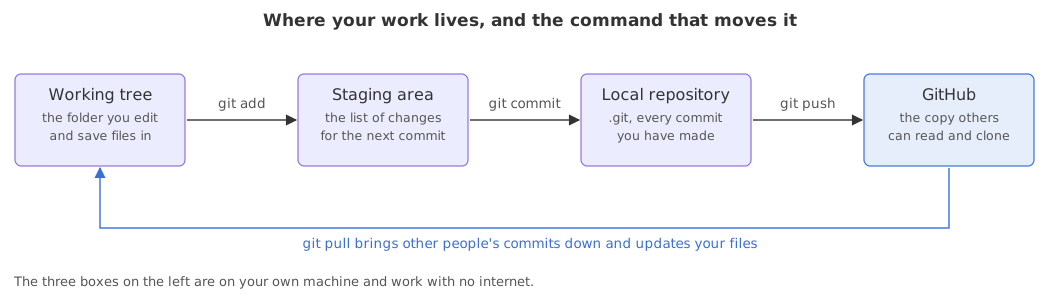
The four places your work lives
Every command in this course moves work between the four boxes above. Three of them sit on your own machine and one of them is on GitHub.
- The working tree is the folder you edit. Your editor only ever sees this.
- The staging area is the list of changes that will go into your next commit. You put changes there with
git add. - The local repository is the
.gitfolder, where every commit you have made is stored.git commitwrites to it. - The remote repository is the copy on GitHub.
git pushsends your commits there andgit pullbrings down what other people pushed.
The project this course builds
Everything is built in one small project: a folder called ask-docs, a helper that answers questions from a company's own documents. It holds a README.md, a prompt.txt, a loader.py that splits documents into chunks, a requirements.txt and a .env with an API key in it. The files are short and you never have to run them. The point is what happens to them: the folder becomes a repository, collects a history you can read, grows a branch for one experiment, hits a real merge conflict and comes out of it merged.
- Starting out takes you from an empty folder to a commit you can read back.
- History reads that history with
git logandgit diff, and writes messages the next person can use. - Branches splits the project in two, merges it back and resolves the conflict that comes from both sides editing one file.
- GitHub, undoing things and a repository a team can read follow in the later parts: the remote, pull requests, taking changes back and the files a reader expects to find.
What you need
- A terminal: Terminal on macOS, Windows Terminal or Git Bash on Windows, any shell on Linux.
- Git itself, which the next page installs.
- A GitHub account, free, for the parts that use the remote.
- No particular programming language. The example files are a Markdown file, a prompt in plain text and a few lines of Python, and you never have to run them.
Git compared with GitHub
The two names are used together so often that beginners treat them as one thing. They are not.
| Git | GitHub | |
|---|---|---|
| What it is | A program on your machine | A website that hosts repositories |
| Who made it | Linus Torvalds, 2005, open source | A company, now owned by Microsoft |
| Needs the internet | No | Yes |
| Holds your history | Yes, in the .git folder | Yes, a copy of it |
| Reviews code | No | Yes, through pull requests |
| You can swap it | Hard, it is the tool | Yes, for GitLab, Bitbucket or a server |
Where you use version control
- Your own project. Commit before a risky change so you can get the working version back in one command.
- A team repository. Everyone works on a branch, and the history says who changed what and why.
- A job application. A readable commit history on GitHub says more about how you work than a list of frameworks.
Related
- Next: Installing Git
- Reference: the Git documentation and GitHub's getting started guide
Every expert started right here.