
Agent memory
Agent memory is the information an agent keeps between steps and between conversations: short-term memory is the message history of one conversation, saved by a checkpointer, and long-term memory is data saved across conversations in a store.
Last updated: 08 Oct, 2026 · LangChain 1.4 · LangGraph 1.2
Each call to agent.invoke starts from the messages it is given and from no earlier run. An agent that should remember a name, a preference or an earlier question needs somewhere to keep it, and a rule for which conversation it belongs to.
Why an agent forgets
The video tells the chatbot "Hello my name is" followed by a name, gets a friendly reply, then asks "what is my name". The second question goes into a fresh run and the model has no record of the first, so it cannot answer. The same thing happens with an agent, whatever tools it has:
from langchain.agents import create_agent

agent = create_agent(
    model="groq:openai/gpt-oss-120b",
    tools=[],
    system_prompt="You are a helpful assistant. Keep replies short.",
)

first = agent.invoke({"messages": [{"role": "user", "content": "Hi, my name is Asha."}]})
print(first["messages"][-1].content)

second = agent.invoke({"messages": [{"role": "user", "content": "What is my name?"}]})
print(second["messages"][-1].content)Hi Asha! How can I help you today? I’m not sure—could you remind me of your name?
The first reply greets the user by name. The second call is a separate run that holds only the new question, so the model asks to be told the name again. The model is not at fault: the run was never given the earlier turn.
Saving a conversation with a checkpointer
A checkpointer saves the conversation's state after every step. The video's memory saver is an in-memory checkpoint saver: it keeps checkpoints in a Python dictionary. It is given to the graph when the graph is built, and the same object goes into create_agent through the checkpointer argument. MemorySaver, the name in the video, is another name for InMemorySaver; both import from langgraph.checkpoint.memory.
from langgraph.checkpoint.memory import MemorySaver

agent = create_agent(
    model="groq:openai/gpt-oss-120b",
    tools=[],
    checkpointer=MemorySaver(),
)
The checkpointer needs to know which conversation a run belongs to. The video calls this a thread id: one id per session, unique for each user or chat. It goes in the run's config, and every call that should share memory passes the same id.
config = {"configurable": {"thread_id": "chat-1"}}

agent.invoke({"messages": [{"role": "user", "content": "Hi, my name is Asha."}]}, config)
Two threads, one agent. The first two questions share a thread; the third asks the same question on a different one:
from langchain.agents import create_agent
from langgraph.checkpoint.memory import MemorySaver

agent = create_agent(
    model="groq:openai/gpt-oss-120b",
    tools=[],
    system_prompt="You are a helpful assistant. Keep replies short.",
    checkpointer=MemorySaver(),
)

chat1 = {"configurable": {"thread_id": "chat-1"}}
chat2 = {"configurable": {"thread_id": "chat-2"}}

def ask(text, config):
    result = agent.invoke({"messages": [{"role": "user", "content": text}]}, config)
    return result["messages"][-1].content

print(ask("Hi, my name is Asha.", chat1))
print(ask("What is my name?", chat1))
print(ask("What is my name?", chat2))
print(len(agent.get_state(chat1).values["messages"]), "messages saved on chat-1")Hi Asha! Nice to meet you. How can I help you today? Your name is Asha. I’m not sure—I don’t have that information. 4 messages saved on chat-1
- Same thread, memory works. The second answer, "Your name is Asha.", comes from the first turn. The checkpointer saved it under
chat-1and loaded it before the model ran. - Different thread, no memory. The same question on
chat-2gets an answer that says the information is missing. Threads are separate conversations. - The saved state.
agent.get_state(config)returns the thread's current state, and itsvalues["messages"]list holds four messages after two questions: two from the user and two replies.
Keeping memory after the program stops
MemorySaver keeps its dictionary inside the running program. When the program ends, every thread is gone. A database-backed checkpointer writes the same checkpoints to disk or to a server. SqliteSaver from the langgraph-checkpoint-sqlite package writes them to a SQLite file. Below, every question builds a new saver and a new agent on the same file, so the only place the name can survive is the file:
from pathlib import Path

from langchain.agents import create_agent
from langgraph.checkpoint.sqlite import SqliteSaver

Path("agent_memory.db").unlink(missing_ok=True)  # start from an empty file
config = {"configurable": {"thread_id": "asha"}}

def ask(text):
    with SqliteSaver.from_conn_string("agent_memory.db") as saver:
        agent = create_agent("groq:openai/gpt-oss-120b", tools=[], checkpointer=saver)
        result = agent.invoke({"messages": [{"role": "user", "content": text}]}, config)
    return result["messages"][-1].content

print(ask("Hi, my name is Asha. Keep replies short."))
print(ask("What is my name?"))Hi Asha! Nice to meet you—I'll keep my replies short. Your name is Asha.
The second question is answered correctly although it ran in a new agent with a new saver. The history was read back from the file. Because the file stays on disk, a restart of the program behaves the same way. Real code opens the saver once and keeps it for the life of the app.
| Checkpointer | Where checkpoints live | Survives a restart | Use it for |
|---|---|---|---|
MemorySaver | A dictionary in the running program | No | Learning, tests, notebooks |
SqliteSaver | A SQLite file | Yes | One machine, small apps |
PostgresSaver | A Postgres database | Yes | Several servers sharing threads |
Trimming a long history
A thread keeps every message, and the model receives all of them on every call. A long conversation soon costs more and may not fit the model's context window. trim_messages keeps the last messages that fit a budget. This example counts each message as one token so the result is easy to read; real code passes a model or a token-counting function as token_counter.
from langchain_core.messages import AIMessage, HumanMessage, SystemMessage
from langchain_core.messages.utils import trim_messages

history = [
    SystemMessage("You are brief."),
    HumanMessage("My name is Asha."),
    AIMessage("Hello Asha."),
    HumanMessage("I like tea."),
    AIMessage("Noted."),
    HumanMessage("What is my name?"),
]
kept = trim_messages(
    history,
    strategy="last",       # keep the most recent messages
    max_tokens=3,          # the budget
    token_counter=len,     # count one per message
    start_on="human",      # the kept history must start with a person's message
    include_system=True,   # always keep the system message
)
for message in kept:
print(message.type, "|", message.content)system | You are brief. human | What is my name?
- The system message stays.
include_system=Truekeeps it whatever the budget. - The budget of three leaves room for the system message and two more messages. The last two are "Noted." and the final question, but the kept history must start with a person's message (
start_on="human"), so "Noted." is dropped. - The name is gone. "My name is Asha." is no longer in the kept history, so a model that read this list could not answer the last question.
In an agent the trimming runs before every model call. A before_model function from langchain.agents.middleware receives the state, and returning a RemoveMessage with REMOVE_ALL_MESSAGES followed by the kept messages replaces the saved history. A budget of four messages makes the effect visible:
from langchain.agents import create_agent
from langchain.agents.middleware import before_model
from langchain_core.messages import RemoveMessage
from langchain_core.messages.utils import trim_messages
from langgraph.checkpoint.memory import MemorySaver
from langgraph.graph.message import REMOVE_ALL_MESSAGES

@before_model
def keep_last_four(state, runtime):
    kept = trim_messages(state["messages"], strategy="last", max_tokens=4, token_counter=len, start_on="human")
    return {"messages": [RemoveMessage(id=REMOVE_ALL_MESSAGES), *kept]}

agent = create_agent("groq:openai/gpt-oss-120b", tools=[], middleware=[keep_last_four], checkpointer=MemorySaver())
config = {"configurable": {"thread_id": "trim-demo"}}

for text in ["My name is Asha.", "I live in Pune.", "I like tea.", "What is my name?"]:
    result = agent.invoke({"messages": [{"role": "user", "content": text}]}, config)
print(len(result["messages"]), "|", result["messages"][-1].content[:90])2 | Nice to meet you, Asha! How can I help you today? 4 | Great! Pune is a wonderful city with a vibrant mix of culture, tech, and nature. Is there 4 | That's wonderful—tea is a perfect companion for Pune’s pleasant climate! Here are a few id 4 | I don’t have any information about your name, so I’m not able to answer that. If you’d lik
- The counts. The thread holds two messages after the first turn and four from the second turn on. The older turns are removed from the saved state, not only hidden from the model.
- The last question. By then the turn that held the name had been trimmed away, and the reply says the information is missing. Trimming trades memory for a smaller prompt. Summarising old turns keeps more of them, and A chatbot with memory covers trimming and summaries for a plain chat.
Long-term memory with a store
A checkpointer belongs to one thread. A fact such as "only eats vegetarian food" should be available in every later conversation with the same person. That is long-term memory, and LangGraph keeps it in a store: a key-value database whose entries sit under a namespace, here ("notes", user_id). InMemoryStore keeps it in the running program, the way MemorySaver does for threads; production stores are database-backed.
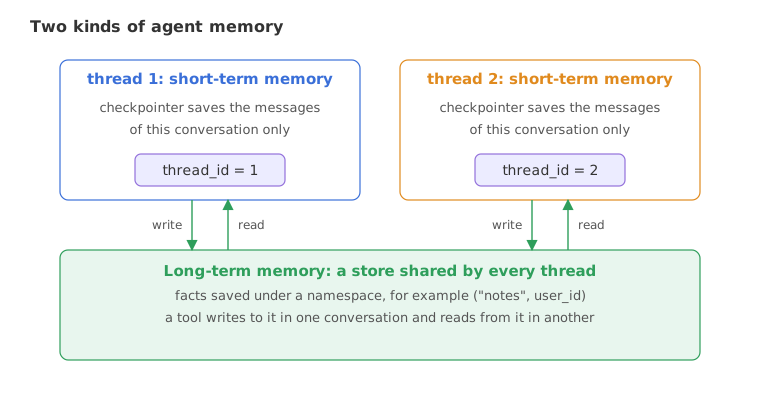
Two tools that use the store
A tool reaches the store through a ToolRuntime argument, which LangChain fills in at run time and hides from the model. runtime.store is the store and runtime.context holds values passed with the run, here the user id.
import uuid
from dataclasses import dataclass

from langchain.tools import tool, ToolRuntime

@dataclass
class Context:
    user_id: str

@tool
def save_note(note: str, runtime: ToolRuntime[Context]) -> str:
    """Save a fact about the user for later conversations."""
    namespace = ("notes", runtime.context.user_id)
    runtime.store.put(namespace, str(uuid.uuid4()), {"note": note})
    return "Saved."

@tool
def get_notes(runtime: ToolRuntime[Context]) -> str:
    """Read every fact saved about the user."""
    items = runtime.store.search(("notes", runtime.context.user_id))
    return "; ".join(item.value["note"] for item in items) or "No notes yet."
An agent with a store and a context
The store goes in with store=, and context_schema says what shape the run's context has. The context is passed on every call with context=Context(user_id=...).
from langchain.agents import create_agent
from langgraph.checkpoint.memory import MemorySaver
from langgraph.store.memory import InMemoryStore

store = InMemoryStore()
agent = create_agent(
    model="groq:openai/gpt-oss-120b",
    tools=[save_note, get_notes],
    store=store,
    checkpointer=MemorySaver(),
    context_schema=Context,
    system_prompt="Save facts the user tells you with save_note. When asked about the user, use get_notes.",
)
Three runs: a fact told on one thread, the same user asking on a different thread, and a different user asking on a third:
def ask(text, thread, user):
    result = agent.invoke(
        {"messages": [{"role": "user", "content": text}]},
        {"configurable": {"thread_id": thread}},
        context=Context(user_id=user),
    )
    return result["messages"][-1].content

print(ask("I only eat vegetarian food.", "thread-1", "asha"))
print(ask("What food do I eat?", "thread-2", "asha"))
print(ask("What food do I eat?", "thread-3", "ravi"))
print([item.value["note"] for item in store.search(("notes", "asha"))])Got it! I'll keep that in mind. You mentioned that you only eat vegetarian food. I don’t have any information about the foods you eat yet. Could you tell me a bit about your favorite meals or dietary preferences? I’ll make a note of it so I can remember for future conversations. ['User only eats vegetarian food.']
- Saving. On
thread-1the agent calledsave_note. The last line prints what the store now holds under("notes", "asha"), a note in the model's own words. - Recalling on a new thread.
thread-2has none of the messages fromthread-1, yet the answer is right. The only place the fact can come from is the store. - A different user. The user
ravihas no notes, so the tools find an empty namespace and the agent says it has no information. The context decided which notes the tools could read.
Short-term memory vs long-term memory
| Short-term (checkpointer) | Long-term (store) | |
|---|---|---|
| Scope | One thread | Every thread that uses the same namespace |
| What it holds | The messages and state of a conversation | Facts and records you choose to save |
| Who writes it | The agent, automatically, after each step | A tool or your code, deliberately |
| Keyed by | thread_id | A namespace and a key |
| Grows with | Every message in the conversation | Only what is saved |
Where you use agent memory
- Support chats. A thread per ticket keeps the conversation together, and a store keeps the customer's plan or preferences across tickets.
- Assistants. A thread per session, and saved facts such as a name, a language or a diet that the next session reads first.
- Long conversations. Trimming or summarising keeps a thread inside the model's context window.
Related
- Previous: ReAct agents
- Next: Human in the loop
- See also: Short-term memory, Long-term memory and the LangMem course
- Reference: LangChain short-term memory
- In the thread example, change the third call to use
chat1and check that the answer returns. - Change
max_tokens=4to8in the trimming agent and see whether the last question is answered correctly. - In the store example, tell the agent a second fact on
thread-4and print the notes for the user again.
This is what real progress feels like.