
Project: a research agent
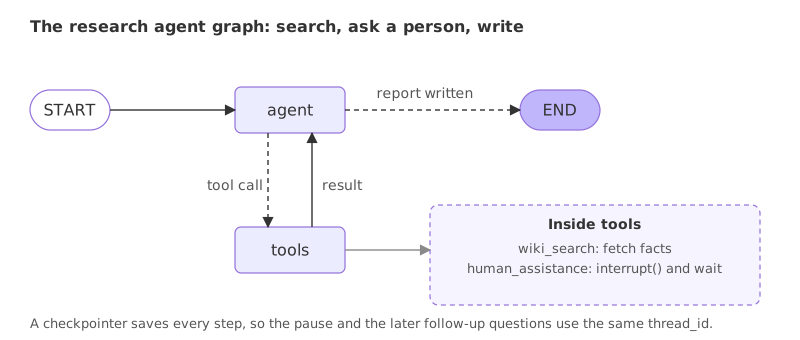
A research agent is an agent that gathers facts with a search tool, asks a person to steer it, and writes a short report that cites its sources.
Last updated: 08 Oct, 2026 · LangGraph 1.2 · LangChain 1.4
A research agent joins several earlier pieces. A search tool from Tool calling. The tool loop from ReAct agents. A graph built by hand, as in LangGraph essentials. A person who can steer it, from Human in the loop. And a thread of memory per report, from Agent memory. The video's own human-in-the-loop graph already holds three of them: tools, memory and an interrupt. The project adds a search tool that needs no key and a report with sources.
What the agent does
- Asks first. The agent calls a human tool to ask which aspect of the topic the reader cares about. The run pauses until a person answers.
- Researches. It searches Wikipedia, at most twice, for that aspect.
- Writes. It writes a title, three short findings and a list of sources, using only what the searches returned.
- Remembers. A checkpointer keeps the thread, so a follow-up such as "shorten that" works on the same report.
The search tool
The tool is wiki_search from Multi-agent systems: one request to the Wikipedia API, which returns the best page's title, link and first sentences, and which answers with a sentence instead of raising when something goes wrong. It needs no key.
import json
import time
import urllib.error
import urllib.parse
import urllib.request

from langchain.tools import tool

@tool
def wiki_search(query: str) -> str:
    """Search Wikipedia. Returns the page title, its link and the first sentences of the page."""
    params = {"action": "query", "format": "json", "generator": "search", "gsrsearch": query, "gsrlimit": 1,
              "prop": "extracts", "exintro": 1, "explaintext": 1, "exsentences": 3}
    request = urllib.request.Request("https://en.wikipedia.org/w/api.php?" + urllib.parse.urlencode(params),
                                     headers={"User-Agent": "agent-course-demo/1.0 (learning project)"})
    for attempt in range(3):
        try:
            with urllib.request.urlopen(request, timeout=20) as response:
                pages = json.load(response).get("query", {}).get("pages", {})
            break
        except urllib.error.HTTPError as error:
            if error.code != 429:
                return f"Search failed with HTTP {error.code}."
            time.sleep(2 * (attempt + 1))
    else:
        return "Search is busy, try again later."
    if not pages:
        return "No page found."
    page = next(iter(pages.values()))
    title = page["title"]
    return f"{title} (https://en.wikipedia.org/wiki/{title.replace(' ', '_')}): {page['extract']}"
The video's agents search with Tavily. If you set up a Tavily key in Tool calling, the swap is one line, and the rest of the graph stays the same:
from langchain_tavily import TavilySearch

tools = [TavilySearch(max_results=2), human_assistance]
The human tool and the state
human_assistance is the tool from the video's graph: it calls interrupt with the model's question and returns the person's answer. The state is the chat state from the earlier graphs, a message list with the add_messages reducer.
from typing import Annotated
from typing_extensions import TypedDict
from langchain_core.tools import tool
from langgraph.graph.message import add_messages
from langgraph.types import Command, interrupt

@tool
def human_assistance(question: str) -> str:
    """Ask the person who requested the report a question and wait for the answer."""
    reply = interrupt({"question": question})
    return reply["answer"]

class State(TypedDict):
    messages: Annotated[list, add_messages]
The model, the prompt and the agent node
The system prompt holds the whole procedure: ask, search at most twice, write the report from the results only, and say so when a search finds nothing. It is put in front of the messages on every model call and is not stored in the state.
PROMPT = (
    "You are a research assistant. First call human_assistance once to ask which aspect of the topic the reader cares about. "
    "Then call wiki_search at most twice to collect facts about that aspect. "
    "Then write a report: a title, three short bullet findings, and a Sources list with the links the searches returned. "
    "Use only facts that appear in the search results. If a search finds no page, say so in the report and add no facts."
)
The node is the same shape as in LangGraph essentials. It calls the model that has both tools bound and returns the reply.
from langchain.chat_models import init_chat_model
from langchain_core.messages import SystemMessage

tools = [wiki_search, human_assistance]
llm = init_chat_model("groq:openai/gpt-oss-20b")
llm_with_tools = llm.bind_tools(tools)

def agent(state: State):
    return {"messages": [llm_with_tools.invoke([SystemMessage(PROMPT)] + state["messages"])]}
Wiring the graph with a checkpointer
A tool node holds both tools, tools_condition sends tool calls to it, and an edge brings every result back to the agent. The graph is compiled with a MemorySaver, which the interrupt and the memory both need.
from langgraph.checkpoint.memory import MemorySaver
from langgraph.graph import StateGraph, START
from langgraph.prebuilt import ToolNode, tools_condition

builder = StateGraph(State)
builder.add_node("agent", agent)
builder.add_node("tools", ToolNode(tools))
builder.add_edge(START, "agent")
builder.add_conditional_edges("agent", tools_condition)
builder.add_edge("tools", "agent")
graph = builder.compile(checkpointer=MemorySaver())
Running a report, a follow-up and a new thread
Four calls on two threads. The first call runs until the agent asks its question and pauses. The second resumes with the person's answer and runs to the finished report. The third is a follow-up on the same thread. The fourth sends the same follow-up on a new thread, which has no report to shorten:
config = {"configurable": {"thread_id": "report-1"}}
request = {"messages": [("user", "Research the Eiffel Tower for me.")]}

paused = graph.invoke(request, config)
print("1. QUESTION:", paused["__interrupt__"][0].value["question"])

answer = {"answer": "Focus on its construction and who built it."}
result = graph.invoke(Command(resume=answer), config)
print("2. REPORT:")
print(result["messages"][-1].content)
print("tools used:", [call["name"] for m in result["messages"] if m.type == "ai" for call in m.tool_calls])

followup = {"messages": [("user", "Shorten that report to two bullets.")]}
print("3. SAME THREAD:")
print(graph.invoke(followup, config)["messages"][-1].content)

print("4. NEW THREAD:")
fresh = graph.invoke(followup, {"configurable": {"thread_id": "report-2"}})
print(fresh["__interrupt__"][0].value["question"] if "__interrupt__" in fresh else fresh["messages"][-1].content)1. QUESTION: Which aspect of the Eiffel Tower would you like to research? For example: history, architecture, visitor information, cultural significance, etc. 2. REPORT: **Report: Construction of the Eiffel Tower** - **Builder** – The tower was designed and built by the engineering company of Gustave Eiffel, a French civil engineer and industrialist. - **Construction period** – Work on the structure took place from 1887 to 1889, a span of just over two years. - **Purpose** – It was erected as the centerpiece of the 1889 World’s Fair, celebrating the centennial of the French Revolution. **Sources** 1. *Eiffel Tower* – https://en.wikipedia.org/wiki/Eiffel_Tower tools used: ['human_assistance', 'wiki_search', 'wiki_search'] 3. SAME THREAD: **Report: Construction of the Eiffel Tower** - Designed and built by Gustave Eiffel’s company from 1887‑1889. - Erected as the centerpiece of the 1889 World’s Fair, marking the French Revolution’s centennial. **Sources** - *Eiffel Tower* – https://en.wikipedia.org/wiki/Eiffel_Tower 4. NEW THREAD: Which aspect of the topic would you like the report to focus on?
- 1. The pause. The first call stopped at the agent's question. The run is waiting inside the tools node, and nothing has been searched yet.
- 2. The report. After the resume the tools used were
human_assistance, thenwiki_searchtwice, the limit the prompt set. The report follows the focus the person gave, the construction and its builder, with three findings and a source link taken from a search result. - 3. The same thread. The follow-up shortened the report to two bullets without asking anything again. The checkpointer held the whole conversation, report included.
- 4. A new thread. The same request on
report-2got the agent's opening question and no shortened report, because that thread holds no report. The memory in step 3 came from the checkpointer and the thread id.
A topic with no page
A report must not invent what the search did not find. The prompt tells the agent to say so when a search comes back empty. A made-up word has no Wikipedia page:
config = {"configurable": {"thread_id": "report-3"}}
graph.invoke({"messages": [("user", "Research Zxqvbnmkwj for me.")]}, config)
result = graph.invoke(Command(resume={"answer": "Explain what it is."}), config)

print([call["name"] for m in result["messages"] if m.type == "ai" for call in m.tool_calls])
print(result["messages"][-1].content)['human_assistance', 'wiki_search'] **Report: Research on Zxqvbnmkwj** - No facts were found – the search did not return any Wikipedia page for the term *Zxqvbnmkwj*. **Sources** - None (no Wikipedia page matched the query).
- The search came back empty. The agent called
human_assistanceand thenwiki_searchonce, and the search found no page. - The report says so. It states that no facts were found and lists no sources. It did not fill the report from the model's own knowledge, which the prompt forbids. The instruction asked for this behaviour, and a case like this one is how you check that it works.
The video's graph vs this project
| The video's graph | This project | |
|---|---|---|
| Search tool | Tavily, needs a key | Wikipedia, no key (Tavily is a one-line swap) |
| Human tool | human_assistance with a query and a data field | The same idea with a question and an answer field, used at the start to set the focus |
| Output | A chat reply | A report with findings and sources |
| Empty search | Not handled | The prompt says to report it, and the run above shows what happened |
| Memory | MemorySaver with a thread id | The same, with a follow-up and a new-thread comparison |
Where you use a research agent
- Briefing notes. A person asks for a topic, steers the angle, and gets a cited summary to start from.
- Due diligence. The agent gathers public facts about a company or product, and a person reviews the sources before anything is used.
- Study guides. A learner chooses the aspect, and the agent writes a short sourced explanation they can ask to shorten or expand.
MemorySaver keeps threads only while the program runs; use a database-backed checkpointer, as in Agent memory, for anything that must survive a restart. The model line uses groq:openai/gpt-oss-20b, which sometimes writes a tool call that is not valid JSON; Groq then answers with a 400 tool_use_failed error, and running the cell again clears it.Related
- Previous: Deep agents
- Next: Loop engineering
- See also: Project: support agent in the LangGraph course
- Reference: LangGraph interrupts
- Change the prompt to ask for two findings instead of three and run the report again.
- Answer the agent's question with a different focus for the same topic and compare the two reports' sources.
- Add a third tool, such as the temperature tool from Tool calling, to
toolsand ask for a report that needs it.
Every expert started right here.