
Your first LLM app
A first LLM app is a short Python program that creates a chat model, sends it a prompt with invoke and prints the reply from the message that comes back.
Last updated: 08 Oct, 2026 · LangChain 1.4 · LangGraph 1.2
LangChain essentials listed the pieces. This lesson wires three of them into a program that runs: a model, a call and a reply.
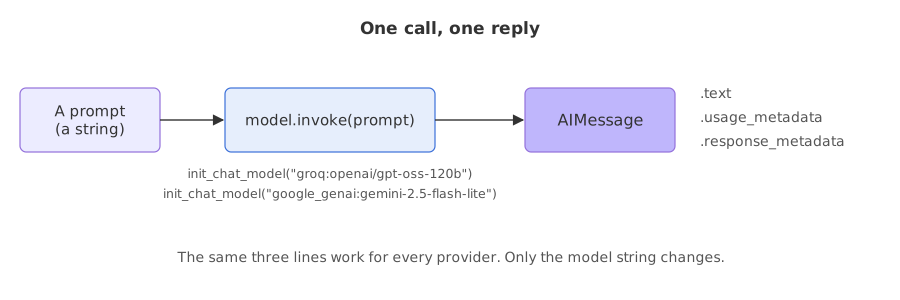
Calling a model with invoke
Syntax: create the model once, then call invoke with a prompt. The call waits until the whole reply is ready and returns it as one message.
Loading the key
The key must be in the environment before the model is created. load_dotenv() copies the keys from a .env file, as set up in Installing Python for generative AI. If you exported the key in the terminal, the line does no harm.
from dotenv import load_dotenv

load_dotenv()   # reads GROQ_API_KEY from a .env file when there is one
Creating the model
temperature controls how random the choice of each next token is. At 0 the model picks the most likely token every time, which makes replies as repeatable as the provider allows.
from langchain.chat_models import init_chat_model

model = init_chat_model("groq:openai/gpt-oss-120b", temperature=0)
Sending a prompt
reply = model.invoke("Why do parrots talk? Answer in two sentences.")Reading the reply
reply is an AIMessage. Its text property is the answer, usage_metadata counts tokens and response_metadata carries what the provider reported.
print(reply.text)
print(type(reply).__name__)
print(reply.usage_metadata)
print(reply.response_metadata["model_name"], reply.response_metadata["finish_reason"])
Running a first call end to end
from dotenv import load_dotenv
from langchain.chat_models import init_chat_model

load_dotenv()
model = init_chat_model("groq:openai/gpt-oss-120b", temperature=0)
reply = model.invoke("Why do parrots talk? Answer in two sentences.")

print(reply.text)
print(type(reply).__name__)
print(reply.usage_metadata)
print(reply.response_metadata["model_name"], reply.response_metadata["finish_reason"])Parrots mimic human speech because their highly developed syrinx (the bird equivalent of a vocal cord) and flexible tongue allow them to reproduce a wide range of sounds, and they are naturally inclined to imitate noises in their environment as a form of social communication. This vocal mimicry helps them bond with flock members—including humans—by reinforcing social connections and signaling attention.
AIMessage
{'input_tokens': 82, 'output_tokens': 133, 'total_tokens': 215, 'output_token_details': {'reasoning': 52}}
openai/gpt-oss-120b stopReading the reply object
- reply.text is the answer: two sentences, as the prompt asked.
- AIMessage is the type of
reply.invokereturns a message object, not a string, because a message also carries the numbers below. - usage_metadata counts tokens: 82 went in, 133 came out and 215 in all. The prompt is a dozen or so words, so the 82 includes the fixed text the provider adds around it. Of the 133 output tokens, 52 are reasoning: the model thought before it answered, and those tokens are counted like the rest.
- model_name and finish_reason say that
openai/gpt-oss-120banswered and that the reply ended on its own (stop). A reply cut off by a token limit reports a different reason.
Switching the provider
The video shows two ways to build the same model. The first is init_chat_model, which it points out gives indirect access to the provider's own class: printing the model shows ChatOpenAI. The second is to import that class yourself, ChatOpenAI for OpenAI, ChatGoogleGenerativeAI for Gemini and ChatGroq for Groq. The video's examples use an OpenAI model, a Gemini model and a Groq model that Groq has since retired. The page uses Groq and Gemini models that run on free keys; the calls are the same.
from langchain_groq import ChatGroq

model = ChatGroq(model="openai/gpt-oss-120b", temperature=0)   # the same model as init_chat_model("groq:...")
Changing provider with init_chat_model means changing the string. This is the same program on Gemini:
from dotenv import load_dotenv
from langchain.chat_models import init_chat_model

load_dotenv()
model = init_chat_model("google_genai:gemini-2.5-flash-lite", temperature=0)
reply = model.invoke("Why do parrots talk? Answer in two sentences.")

print(type(model).__name__)
print(reply.text)ChatGoogleGenerativeAI Parrots talk primarily to mimic sounds they hear in their environment, a behavior that helps them integrate into their social groups and communicate within their flock. This vocal learning ability is a complex cognitive skill that allows them to learn and reproduce a wide range of sounds, including human speech.
The first line is the class that init_chat_model returned for the Gemini string, ChatGoogleGenerativeAI, from the langchain-google-genai package. The rest of the program is the same call and the same .text, and the answer is two sentences from a different model.
init_chat_model vs the provider class
init_chat_model | The provider class | |
|---|---|---|
| Import | One import for every provider | A different import for each provider |
| Switching provider | Change the string | Change the import and the class name |
| Provider settings | Passed as keyword arguments | Typed arguments the editor can complete |
| Returns | The provider's class, such as ChatGroq | The same class |
Building a chat loop
A chat program calls the model again for every line the user types. The interactive version reads from the keyboard:
while True:
    question = input("You: ")
    if question in ("quit", "exit"):
        break
    print("Bot:", model.invoke(question).text)
To run the loop without a keyboard, the example feeds it from a list of two questions. The second one points back at the first.
from dotenv import load_dotenv
from langchain.chat_models import init_chat_model

load_dotenv()
model = init_chat_model("groq:openai/gpt-oss-120b", temperature=0)

for question in ["What is the capital of France?", "And what is its population?"]:
    print("You:", question)
print("Bot:", model.invoke(question).text)You: What is the capital of France? Bot: The capital of France is **Paris**. You: And what is its population? Bot: I’m not sure which place you’re asking about—could you let me know the name of the country, city, or region you’d like the population figure for?
Reading the chat loop
- The first question got a correct answer: Paris.
- The second question says its, which points back at the first answer. The model asked which place was meant, because each
invokeis a separate request and this one carried only the words And what is its population? - The loop is therefore a series of unrelated one-off questions. Making the second question work means sending the first exchange along with it, which A chatbot with memory builds.
Where you use a model call
- A command-line assistant: the loop above, with a system prompt added in Messages and prompts.
- A step inside a larger program: summarise a document, classify a ticket or write a draft, then use the text in the next step.
- A quick provider comparison: run one prompt through two model strings and read the replies side by side.
reply.text, not reply.content. For some providers and replies content is a list of parts instead of a string, and text joins the text parts into one string. Reasoning models such as openai/gpt-oss-120b also spend output tokens thinking before they answer, and those tokens are counted in usage_metadata.Related
- Previous: LangChain essentials
- Next: Messages and prompts
- Reference: Models
- Go deeper: invoke, batch and stream
- Change
temperature=0totemperature=1, run the first example three times and compare the replies. - Change the model string to
groq:openai/gpt-oss-20band compare the token counts with the larger model. - Add a third question to the chat loop that depends on the second one, and read what the model says.
Little by little, you're building something great.