
Agentic RAG
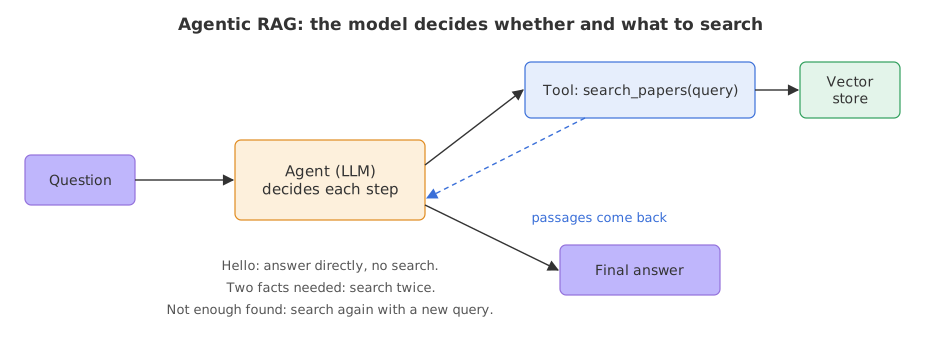
Agentic RAG is a RAG design in which the model, not fixed code, decides whether to search, what to search for and whether to search again, because retrieval is given to it as a tool.
Last updated: 08 Oct, 2026 · LangChain 1.4 · LangGraph 1.2
In the pipeline from Building a RAG pipeline every question triggers exactly one search with the user's own words. The video calls that traditional RAG. Agentic RAG changes who decides: the model chooses, step by step, whether to search, with which words, and whether the result is enough.
Turning retrieval into a tool
A tool is a function the model may ask to run. The @tool decorator turns a Python function into one: the function name, its argument names and its docstring are shown to the model, and the docstring is how the model decides when the tool is useful. When the model wants a search it replies with a tool call, a message that names the tool and its arguments instead of text. The Tool calling lesson covers the call in detail.
A search tool over the store
from langchain_core.tools import tool

@tool
def search_papers(query: str) -> str:
    """Search two research papers (the Transformer paper and the QZhou-Embedding report) and return matching passages."""
    docs = retriever.invoke(query)
    return "\n\n".join(f"[{d.metadata['source']} p.{d.metadata['page']}] {d.page_content}" for d in docs)
Giving the tool to an agent
create_agent from langchain.agents builds an agent: a loop in which the model is called, any tool calls it makes are run, the results are added to the conversation, and the model is called again until it replies with plain text. The system prompt tells it what the tool is for. The AI agents lesson explains this loop.
from langchain.agents import create_agent

agent = create_agent(
    init_chat_model("groq:openai/gpt-oss-120b", temperature=0),
    tools=[search_papers],
    system_prompt="Answer questions about the two papers. Use search_papers when you need facts from them. Answer in at most three sentences.",
)
result = agent.invoke({"messages": [("user", "Why is the attention score scaled?")]})
Reading what the agent searched for
The result holds every message of the loop. A message of type ai with tool_calls is a search the model chose to make, and args["query"] is the text it searched for. Printing those shows the decisions.
calls = [tc["args"]["query"] for m in result["messages"] if m.type == "ai" for tc in m.tool_calls]
print(calls)                                  # the searches the model made, in order
print(result["messages"][-1].content)         # the final reply
Three questions, three behaviours
from langchain_core.tools import tool
from langchain.agents import create_agent
from langchain.chat_models import init_chat_model

retriever = store.as_retriever(search_kwargs={"k": 2})

@tool
def search_papers(query: str) -> str:
    """Search two research papers (the Transformer paper and the QZhou-Embedding report) and return matching passages."""
    docs = retriever.invoke(query)
    return "\n\n".join(f"[{d.metadata['source']} p.{d.metadata['page']}] {d.page_content}" for d in docs)

agent = create_agent(
    init_chat_model("groq:openai/gpt-oss-120b", temperature=0),
    tools=[search_papers],
    system_prompt="Answer questions about the two papers. Use search_papers when you need facts from them. Answer in at most three sentences.",
)

def ask(question):
    result = agent.invoke({"messages": [("user", question)]})
    searches = [tc["args"]["query"] for m in result["messages"] if m.type == "ai" for tc in m.tool_calls]
    print("Q:", question)
    print("  searches:", searches)
    print("  A:", result["messages"][-1].content)
    print()

ask("Hello! What can you help me with?")
ask("Why is the attention score scaled?")
ask("Which model is QZhou-Embedding built on, and how many attention heads does the original Transformer use?")Q: Hello! What can you help me with?
searches: []
A: I can answer questions about the Transformer paper and the QZhou‑Embedding report, pulling specific details or explanations from those documents. Just ask about any concept, experiment, result, or comparison you’re curious about, and I’ll provide a concise answer. If needed, I’ll retrieve the exact passage from the papers to support my response.
Q: Why is the attention score scaled?
searches: ['scaled dot-product attention 1/sqrt(d_k) reason']
A: The dot‑product between queries and keys has variance proportional to the key dimension \(d_k\); as \(d_k\) grows the raw scores become large, pushing the softmax into saturated regions with vanishing gradients. Scaling the scores by \(1/\sqrt{d_k}\) normalizes their magnitude so the softmax operates in a stable regime, preserving gradient flow. This simple factor therefore improves training stability and performance of the attention mechanism【attention.pdf p.3】.
Q: Which model is QZhou-Embedding built on, and how many attention heads does the original Transformer use?
searches: ['QZhou-Embedding built on model', 'original Transformer attention heads']
A: QZhou‑Embedding is built on the **Qwen2.5‑7B‑Instruct** foundation model. The original Transformer architecture employs **8 parallel attention heads**.Reading the three runs
- The greeting made no search. The
searcheslist is empty and the model described what it can do. A fixed pipeline would have searched the papers for "Hello". - The scaling question made one search,
scaled dot-product attention 1/sqrt(d_k) reason: the model wrote its own query, with the symbol and the word reason, and not the user's words. The answer ends with a source tag taken from the passage it received. - The two-part question made two searches,
QZhou-Embedding built on modelandoriginal Transformer attention heads, one for each half. gpt-oss on Groq returns one tool call in each reply, so a question with two parts takes two passes round the loop: the model asks for one search, then asks for the second, and only then writes the final answer, which gives Qwen2.5-7B-Instruct and 8 heads.
Fixed RAG vs agentic RAG
| Fixed pipeline | Agentic RAG | |
|---|---|---|
| Searches per question | Always one | Zero, one or several, chosen by the model |
| Query sent to the store | The user's words | Words the model writes |
| Questions that need two facts | One search has to find both | One search for each fact |
| Calls to the model | One | Two or more, one per step |
| Predictability | Same steps every time | The path depends on the model's choices |
Where you use agentic RAG
- Assistants that also chat. A greeting or a thank-you should not trigger a search; the model skips the tool.
- Multi-part questions. "Compare X in paper A with Y in paper B" needs two lookups.
- Several sources. Give the agent one tool per source (manuals, tickets, the web) and let it pick, as AI agents shows with other tools.
recursion_limit in the run's config, as shown in ReAct agents, log the searches the way the example prints them, and keep the fixed pipeline when every question needs exactly one search.Related
- Previous: Conversational RAG
- Next: Vectorless RAG
- Go deeper: RAG
- Change the system prompt to "Always search before you answer" and run the greeting again.
- Add a second tool that searches only
qzhou.pdfusing the metadata filter from Better retrieval (hybrid search, reranking, query rewriting), and see which tool the agent picks for the QZhou question. - Ask a question that neither paper covers and read what the agent searches for and says.
You understood something today that you didn't yesterday.