
Human in the loop
Human in the loop is a pattern in which an agent pauses its run to wait for a person's answer or approval, keeps its state while it waits, and then continues from the same point.
Last updated: 08 Oct, 2026 · LangChain 1.4 · LangGraph 1.2
Some steps should not run unattended: sending an email, moving money, deleting a record. Others need information only a person has. In both cases the agent must stop, ask, and carry on with the answer, without losing its place.
Pausing a run and resuming it
The video draws a chatbot with two tools: a search tool, and a custom tool for human assistance. When the model calls the human tool, the graph stops and waits. A person gives feedback, and the run continues with that feedback as the tool's result. The video's rule of thumb: in a workflow where something must be approved, execution should not complete unless a person says to go ahead.
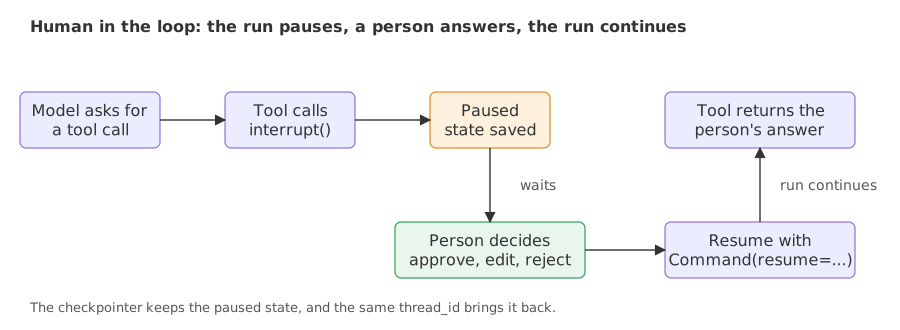
Two pieces make this work. interrupt(...) pauses the run at that line and hands a value to whoever called the agent. Command(resume=...) starts the run again and becomes the return value of interrupt. Because the paused state has to be stored somewhere until the person answers, the agent needs a checkpointer, and the resume call must use the same thread id.
Asking a person from inside a tool
The video builds the graph by hand with a search tool and the human tool. The version here gives the same human tool to create_agent; LangGraph essentials builds the graph form by hand. The tool is an ordinary @tool function with one extra line:
from langchain.tools import tool
from langgraph.types import Command, interrupt

@tool
def human_assistance(query: str) -> str:
    """Ask a human expert for help when you are not sure."""
    answer = interrupt({"query": query})
    return answer["data"]
The docstring tells the model when to use the tool. interrupt({"query": query}) pauses the run and passes the dictionary out. Whatever the person sends back with Command(resume=...) is returned by interrupt, and the tool returns its "data" field to the model as the tool result.
Resuming without a checkpointer
Without a checkpointer the run still pauses, but the paused state is kept nowhere, so the resume has nothing to continue:
from langchain.agents import create_agent

agent = create_agent(
    model="groq:openai/gpt-oss-120b",
    tools=[human_assistance],
    system_prompt="For any question about company policy, call human_assistance.",
)
question = {"messages": [{"role": "user", "content": "What is the refund window in our company policy?"}]}

paused = agent.invoke(question)
print("paused:", "__interrupt__" in paused)
try:
    agent.invoke(Command(resume={"data": "Refunds are allowed within 30 days."}))
except RuntimeError as error:
print(error)paused: True Cannot use Command(resume=...) without checkpointer
paused: True shows that the run did stop at the interrupt. The resume then raises a RuntimeError whose message names the problem: Command(resume=...) needs a checkpointer.
The agent with a checkpointer
Adding checkpointer=MemorySaver() is the fix. The run now saves its state when it pauses, and the thread id in the config finds it again.
from langchain.agents import create_agent
from langgraph.checkpoint.memory import MemorySaver

agent = create_agent(
    model="groq:openai/gpt-oss-120b",
    tools=[human_assistance],
    system_prompt="For any question about company policy, call human_assistance.",
    checkpointer=MemorySaver(),
)config = {"configurable": {"thread_id": "help-1"}}
question = {"messages": [{"role": "user", "content": "What is the refund window in our company policy?"}]}
paused = agent.invoke(question, config)
print(paused["__interrupt__"][0].value)
print(agent.get_state(config).next)
final = agent.invoke(Command(resume={"data": "Refunds are allowed within 30 days."}), config)
print(final["messages"][-1].content)
print(agent.get_state(config).next){'query': 'What is the refund window in the company policy?'}
('tools',)
The company’s policy allows refunds within **30 days** of purchase.
()- The interrupt payload. The first call returned without an answer.
paused["__interrupt__"][0].valueis the dictionary the tool passed tointerrupt: the model's question to the person. - The paused state.
get_state(config).nextis('tools',)while the run waits inside the tools node. After the resume it is an empty tuple, so nothing is left to run. - The answer. The final message uses the 30 days the person typed. The model never knew the policy; the person supplied it.
interrupt runs again from its first line. Any code placed before interrupt in that tool runs twice. Keep side effects, such as writing a file or sending a message, after the interrupt call.Approving, editing or rejecting a tool call
The human tool asks a person for information. A different need is to let the model choose a tool freely and have a person review the call before it runs. HumanInTheLoopMiddleware does that for the tools you name. When the model asks for one of them, the run pauses with the pending call, and the person answers with one of three decisions:
- approve runs the call as the model wrote it.
- edit runs a call the person changed, with new arguments in
edited_action. - reject does not run the call. The decision's
messagefield tells the model why, so it can explain or try something else.
from langchain.agents import create_agent
from langchain.agents.middleware import HumanInTheLoopMiddleware
from langchain.tools import tool
from langgraph.checkpoint.memory import MemorySaver
from langgraph.types import Command

@tool
def send_email(recipient: str, subject: str, body: str) -> str:
    """Send an email."""
return f"Email sent to {recipient} with subject '{subject}'."agent = create_agent(
model="groq:openai/gpt-oss-120b",
tools=[send_email],
checkpointer=MemorySaver(),
middleware=[HumanInTheLoopMiddleware(
interrupt_on={"send_email": {"allowed_decisions": ["approve", "edit", "reject"]}},
)],
)One request, three threads, one decision on each. A decision list has one entry for each pending call, and the resume uses Command(resume={"decisions": [...]}):
request = {"messages": [{"role": "user", "content": "Send an email to john@test.com with subject 'Hello' and body 'How are you?'"}]}
decisions = {
    "approve": {"type": "approve"},
    "edit": {"type": "edit", "edited_action": {"name": "send_email", "args": {
        "recipient": "mary@test.com", "subject": "Hello", "body": "How are you?"}}},
    "reject": {"type": "reject", "message": "Do not email John today."},
}

for name, decision in decisions.items():
    config = {"configurable": {"thread_id": name}}
    paused = agent.invoke(request, config)
    if name == "approve":
        print(paused["__interrupt__"][0].value["action_requests"])
    result = agent.invoke(Command(resume={"decisions": [decision]}), config)
    print(name, "| tool result:", result["messages"][-2].content[:60])
print(" reply:", result["messages"][-1].content[:100])[{'name': 'send_email', 'args': {'body': 'How are you?', 'recipient': 'john@test.com', 'subject': 'Hello'}, 'description': "Tool execution requires approval\n\nTool: send_email\nArgs: {'body': 'How are you?', 'recipient': 'john@test.com', 'subject': 'Hello'}"}]
approve | tool result: Email sent to john@test.com with subject 'Hello'.
reply: The email has been sent successfully.
edit | tool result: Note: a human reviewer replaced this tool call before it ran
reply: The email has been sent. Let me know if there’s anything else you need!
reject | tool result: User rejected the tool call for `send_email` with reason: Do
reply: I’m sorry, but I can’t send that email.- The pending call. The first call stopped before the tool ran. The interrupt value lists
action_requests: the tool name and the arguments the model wrote. - approve. The tool ran with the model's arguments and returned the email sentence.
- edit. The tool result begins with a note that a human reviewer replaced the call before it ran, so the model knows the call it wrote is not the one that executed.
- reject. The tool did not run. Its result is the rejection together with the message the person wrote, and the model's reply tells the user the email was not sent.
Human as a tool vs approval middleware
| Human assistance tool | HumanInTheLoopMiddleware | |
|---|---|---|
| Who starts the pause | The model, by choosing the human tool | The middleware, when the model picks a listed tool |
| What the person supplies | Information the model lacks | A decision on a call the model wrote |
| What the model sees afterwards | The person's text as a tool result | The tool's result, an edited call's result, or the rejection message |
| Fits | Questions only a person can answer | Actions with side effects |
Where you use human in the loop
- Approvals. Refunds, payments, emails to customers, deployments: a person approves the exact call.
- Missing facts. The agent reaches a point where only a person knows the answer, such as a policy or an account detail.
- Review of drafts. A person reads what the agent plans to send and edits the arguments before the tool runs.
Related
- Previous: Agent memory
- Next: LangGraph essentials
- See also: Human-in-the-loop and Edit and respond in the LangChain course
- Reference: LangChain human-in-the-loop
- In the approval example, reject with no
messagefield and compare the model's reply with the one that carries a message. - Add
"read_email": Falsenext tosend_emailininterrupt_onafter adding a second tool, and see that only the listed tool pauses. - Resume the checkpointed example with a different
datatext, such as a 14-day window, and check that the final answer follows the text you sent.
Every expert started right here.