
Structured output
Structured output makes a chat model return an object that matches a schema you define, such as a Pydantic class, instead of free text, so the rest of your program can use the fields directly.
Last updated: 08 Oct, 2026 · LangChain 1.4 · LangGraph 1.2
Every reply so far was text for a person to read. A program needs fields: a name to store, a number to compare, a flag to branch on. Structured output asks the model for those fields, and the library checks them.
Defining a schema with Pydantic
The video builds a Movie class with four fields: title as a string, year as an integer, director as a string and rating as a float. Each field has a Field(description=...), and the video explains why: a description tells the model which field the information belongs in. The class inherits from BaseModel, Pydantic's base class, which brings validation. model.with_structured_output(Movie) returns a new model, and calling invoke on it returns a Movie object. The video asks about the movie Inception, and the plain model returns a long paragraph where the structured one returns the four fields. The video ends on validation: a field declared as a string rejects an integer.
from pydantic import BaseModel, Field

class Movie(BaseModel):
    title: str = Field(description="The title of the movie")
    year: int = Field(description="The year the movie was released")
    director: str = Field(description="The director of the movie")
    rating: float = Field(description="The movie's rating out of 10")
Getting a Movie back with with_structured_output
from pydantic import BaseModel, Field
from langchain.chat_models import init_chat_model

class Movie(BaseModel):
    title: str = Field(description="The title of the movie")
    year: int = Field(description="The year the movie was released")
    director: str = Field(description="The director of the movie")
    rating: float = Field(description="The movie's rating out of 10")

model = init_chat_model("groq:openai/gpt-oss-120b", temperature=0)
structured = model.with_structured_output(Movie, include_raw=True)
result = structured.invoke("Provide details about the movie Inception")

print(repr(result["parsed"]))
print(type(result["parsed"]).__name__, result["parsing_error"])
print(result["raw"].tool_calls[0]["name"], result["raw"].tool_calls[0]["args"])Movie(title='Inception', year=2010, director='Christopher Nolan', rating=8.8)
Movie None
Movie {'director': 'Christopher Nolan', 'rating': 8.8, 'title': 'Inception', 'year': 2010}result["parsed"] is a Movie object with the four fields filled in: Inception, 2010, Christopher Nolan and 8.8. parsing_error is None, so the reply matched the schema. The rating is the model's recollection, not a looked-up figure. include_raw=True also keeps the AIMessage the model produced, and with this model its tool_calls show how the schema reached it: LangChain offered the schema as a function named Movie, the model called it with the four fields as arguments, and those arguments became the object.
Checking types with Pydantic validation
Pydantic checks every field when the object is built. A string where an integer is expected is accepted when it holds a whole number, and converted. An integer where a string is expected is an error.
from pydantic import BaseModel, ValidationError

class Movie(BaseModel):
    title: str
    year: int

print(Movie(title="Inception", year="2010"))
try:
    Movie(title=2010, year=2010)
except ValidationError as error:
print(error)title='Inception' year=2010
1 validation error for Movie
title
Input should be a valid string [type=string_type, input_value=2010, input_type=int]
For further information visit https://errors.pydantic.dev/2.13/v/string_typeThe first line shows year="2010", a string, converted to the integer 2010 because it holds a whole number. The second shows the error for title=2010: Pydantic does not turn an integer into a string, and reports 1 validation error for Movie with the field name title and the reason, Input should be a valid string.
Extracting fields from a customer email
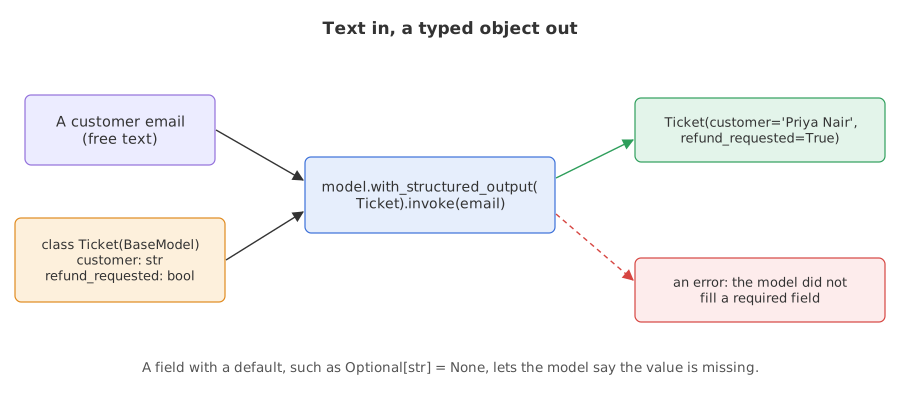
The video's movie question has the model recall facts. A task that comes up in real programs is extraction: reading a message and pulling out its fields. This schema describes a support ticket. Literal limits category to four values, which turns a free-text judgement into a choice.
from typing import Literal

from pydantic import BaseModel, Field
from langchain.chat_models import init_chat_model

class Ticket(BaseModel):
    customer: str = Field(description="Full name of the customer")
    order_id: str = Field(description="The order number")
    product: str
    category: Literal["defective", "late", "wrong_item", "other"]
    refund_requested: bool
    amount: float = Field(description="Amount paid")

email = """Hi, this is Priya Nair. I ordered a standing desk (order #48213) two weeks ago
and the left leg arrived bent. I paid 389.99 and I would like a refund, not a replacement."""

model = init_chat_model("groq:openai/gpt-oss-120b", temperature=0)
ticket = model.with_structured_output(Ticket).invoke(email)
print(repr(ticket))
print(ticket.amount * 2)Ticket(customer='Priya Nair', order_id='48213', product='standing desk', category='defective', refund_requested=True, amount=389.99) 779.98
The model filled all six fields from two sentences: the name, the order number 48213 without the #, the product, the category defective for the bent leg, refund_requested=True because the customer asked for a refund and not a replacement, and the amount 389.99. The amount is a real number: ticket.amount * 2 printed 779.98, which would not work on text.
Handling a field the text does not contain
A required field forces the model to produce a value, and a message that has none leaves it nothing true to produce. Here the same schema meets an email with no order number and no amount.
from typing import Literal, Optional

from pydantic import BaseModel, Field
from langchain.chat_models import init_chat_model

class Ticket(BaseModel):
    customer: str
    order_id: str
    product: str
    category: Literal["defective", "late", "wrong_item", "other"]
    refund_requested: bool
    amount: float

class TicketOptional(BaseModel):
    customer: str
    order_id: Optional[str] = Field(None, description="The order number, or null if the message has none")
    product: str
    category: Literal["defective", "late", "wrong_item", "other"]
    refund_requested: bool
    amount: Optional[float] = Field(None, description="Amount paid, or null if not stated")

email = "Hello, Sam Ortiz here. The headphones I bought stopped working after a week. I would like my money back."
model = init_chat_model("groq:openai/gpt-oss-120b", temperature=0)

try:
    print(model.with_structured_output(Ticket).invoke(email))
except Exception as error:
    print(type(error).__name__, str(error)[:80])
print(model.with_structured_output(TicketOptional).invoke(email))BadRequestError Error code: 400 - {'error': {'message': 'Tool choice is required, but model did
customer='Sam Ortiz' order_id=None product='headphones' category='defective' refund_requested=True amount=NoneThe first call failed. Groq returned a 400 BadRequestError saying that a tool choice was required and the model did not call a tool: the model did not call the function that carries the schema. The email has no order number or amount, and the schema required both. With both fields Optional, the same email gave a ticket with order_id=None and amount=None, so the model could say that the values were missing. The customer wrote I would like my money back, and the ticket has refund_requested=True.
Returning lists with nested schemas
A field can hold a list of other schemas. For nested schemas, pass method="json_schema" so the provider enforces the whole schema.
from pydantic import BaseModel
from langchain.chat_models import init_chat_model

class Item(BaseModel):
    name: str
    quantity: int

class Order(BaseModel):
    customer: str
    items: list[Item]

model = init_chat_model("groq:openai/gpt-oss-120b", temperature=0)
order = model.with_structured_output(Order, method="json_schema").invoke("Maya wants 2 notebooks and 3 pens, plus one stapler.")
print(order)
print(sum(item.quantity for item in order.items), "items in total")customer='Maya' items=[Item(name='notebook', quantity=2), Item(name='pen', quantity=3), Item(name='stapler', quantity=1)] 6 items in total
The nested schema came back as an Order holding three Item objects: notebook 2, pen 3 and stapler 1. The model split the quantities out of the sentence and used the singular for each name. Because the items are objects, sum(item.quantity for item in order.items) works and gave 6.
Pydantic vs TypedDict
The video also builds the schema as a TypedDict, a plain Python dictionary type, and later gives an agent a dataclass for its response format. A TypedDict schema returns a dictionary and does not check the types.
from typing_extensions import Annotated, TypedDict

from langchain.chat_models import init_chat_model

class MovieDict(TypedDict):
    title: Annotated[str, ..., "The title of the movie"]
    year: Annotated[int, ..., "The year the movie was released"]

model = init_chat_model("groq:openai/gpt-oss-120b", temperature=0)
result = model.with_structured_output(MovieDict).invoke("Provide details about the movie Inception")
print(type(result).__name__, result)dict {'title': 'Inception', 'year': 2010}The result printed as dict, a plain dictionary with the two keys. Nothing checks a TypedDict result, so a wrong type would pass through, where a Pydantic class raises an error.
| Pydantic class | TypedDict | |
|---|---|---|
| Returns | An object with attributes | A plain dictionary |
| Type checking | Yes: wrong types raise ValidationError | No: the dictionary is returned as it came |
| Defaults and extra rules | Field, Optional, validators | Annotations only |
| Use it for | Data you will compute with or store | A quick shape when no checking is needed |
Where you use structured output
- Extraction: tickets, invoices, resumes and emails into rows you can store.
- Classification: a
Literalfield gives one of a fixed set of labels. - Agent decisions: a reviewer that must return pass or fail with feedback, as in the loop lessons.
Optional, and numbers such as amounts should be checked against the source before they are used.Related
- Previous: Streaming and batch
- Next: A chatbot with memory
- Reference: Structured output
- Go deeper: Structured output and Structured output errors
- Add a field
urgent: booltoTicketand run the first email again. - Add a fifth value,
"billing", to theLiteraland write an email that should get it. - Remove the
descriptionfromcustomerand see whether the answer changes.
This is what real progress feels like.