
Multi-agent systems
A multi-agent system is a set of agents, each with its own instructions and tools, coordinated so that one task passes through several of them; in a supervisor design, one agent decides which worker acts next.
Last updated: 08 Oct, 2026 · LangGraph 1.2 · LangChain 1.4
One agent with many tools and a long prompt has a lot to keep straight. Splitting the work gives each agent a short prompt and a few tools, and gives the task a visible path: first the researcher, then the writer. The price is more model calls, so the split pays off only when the roles differ clearly.
A small supervisor can be built from pieces already seen: create_agent for the workers, and a LangGraph graph with a conditional edge for the coordination, as in LangGraph essentials. The task is a short note on a topic. A researcher finds the facts and a writer turns them into the note.
A supervisor and two workers
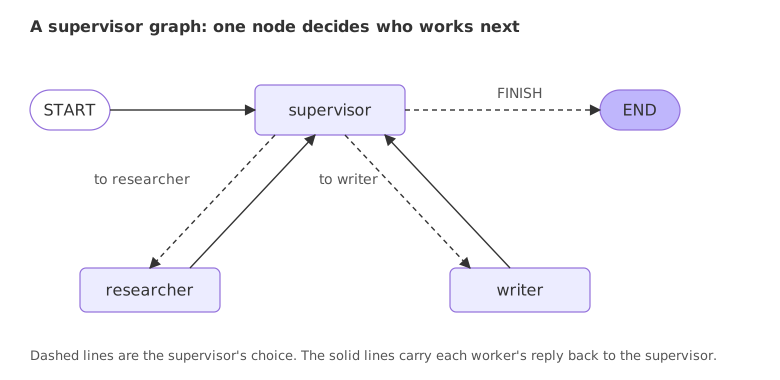
The graph has a supervisor node and two worker nodes. The supervisor reads the conversation and picks the next worker, or decides the work is finished. A conditional edge sends the run to the one it picked. Each worker, when it finishes, reports back to the supervisor, which decides again. The loop ends when the supervisor picks FINISH.
The research tool
The researcher needs one tool. wiki_search makes a single request to the Wikipedia API and returns the best-matching page's title, link and first sentences. It needs no key. Two habits from Tool calling apply: it returns a sentence when something goes wrong instead of raising, and it retries when Wikipedia answers that it is busy.
import json
import time
import urllib.error
import urllib.parse
import urllib.request

from langchain.tools import tool

@tool
def wiki_search(query: str) -> str:
    """Search Wikipedia. Returns the page title, its link and the first sentences of the page."""
    params = {"action": "query", "format": "json", "generator": "search", "gsrsearch": query, "gsrlimit": 1,
              "prop": "extracts", "exintro": 1, "explaintext": 1, "exsentences": 3}
    request = urllib.request.Request("https://en.wikipedia.org/w/api.php?" + urllib.parse.urlencode(params),
                                     headers={"User-Agent": "agent-course-demo/1.0 (learning project)"})
    for attempt in range(3):
        try:
            with urllib.request.urlopen(request, timeout=20) as response:
                pages = json.load(response).get("query", {}).get("pages", {})
            break
        except urllib.error.HTTPError as error:
            if error.code != 429:
                return f"Search failed with HTTP {error.code}."
            time.sleep(2 * (attempt + 1))
    else:
        return "Search is busy, try again later."
    if not pages:
        return "No page found."
    page = next(iter(pages.values()))
    title = page["title"]
    return f"{title} (https://en.wikipedia.org/wiki/{title.replace(' ', '_')}): {page['extract']}"
The two workers
Each worker is a create_agent agent. The researcher gets the search tool and is told to return facts only. The writer gets no tools and is told to use only the facts it is given.
from langchain.agents import create_agent
from langchain.chat_models import init_chat_model

llm = init_chat_model("groq:openai/gpt-oss-120b")

researcher_agent = create_agent(
    llm,
    tools=[wiki_search],
    system_prompt="You are a researcher. Use wiki_search to find facts. Reply with the facts only, in two sentences.",
)writer_agent = create_agent(
llm,
tools=[],
system_prompt="You are a writer. Write a three-sentence note using only the facts you are given.",
)The supervisor
The state and the supervisor's choice
The state holds the shared messages, with the add_messages reducer, and one more key, next, for the supervisor's choice. The choice is a structured output: a Pydantic class whose only field must be one of three strings. llm.with_structured_output(Route) makes the model answer in that shape, so the code never has to parse free text.
from typing import Annotated, Literal
from typing_extensions import TypedDict
from pydantic import BaseModel
from langgraph.graph.message import add_messages

class State(TypedDict):
    messages: Annotated[list, add_messages]
    next: str

class Route(BaseModel):
    next: Literal["researcher", "writer", "FINISH"]
The supervisor node
The node sends the instructions and the conversation to the model and stores the choice in next. The instructions name three outcomes in order. They also point at tags: each worker's report starts with [researcher reported] or [writer reported], so the supervisor has an exact text to look for. A looser rule such as "choose the writer once facts exist" can leave the supervisor unsure whether the work is finished, because the model re-reads the whole history at every hop; the last try-it changes this rule so that you can watch it.
from langchain_core.messages import HumanMessage, SystemMessage

INSTRUCTIONS = (
    "You are a supervisor with two workers: researcher (finds facts on Wikipedia) and writer (writes the final note from facts). "
    "Messages that start with [researcher reported] or [writer reported] come from the workers. "
    "Pick the next step: researcher if no [researcher reported] message exists, "
    "then writer if no [writer reported] message exists, then FINISH."
)

def supervisor(state: State):
    decision = llm.with_structured_output(Route).invoke([SystemMessage(INSTRUCTIONS)] + state["messages"])
    return {"next": decision.next}
The worker nodes and the router
run_worker turns an agent into a node. The node gives the agent the shared messages, takes the agent's last message and adds it back with the tag in front. It is added as a human message so the supervisor reads it as input. route is the router for the conditional edge: it returns whatever the supervisor stored in next.
def run_worker(agent, name):
    def node(state: State):
        result = agent.invoke({"messages": state["messages"]})
        report = f"[{name} reported] " + result["messages"][-1].content
        return {"messages": [HumanMessage(content=report, name=name)]}
    return node

def route(state: State) -> str:
    return state["next"]
Wiring the graph
The conditional edge leaves the supervisor, and its path map names the three outcomes. Plain edges bring each worker back to the supervisor. FINISH maps to END.
from langgraph.graph import StateGraph, START, END

builder = StateGraph(State)
builder.add_node("supervisor", supervisor)
builder.add_node("researcher", run_worker(researcher_agent, "researcher"))
builder.add_node("writer", run_worker(writer_agent, "writer"))
builder.add_edge(START, "supervisor")
builder.add_conditional_edges("supervisor", route, {"researcher": "researcher", "writer": "writer", "FINISH": END})
builder.add_edge("researcher", "supervisor")
builder.add_edge("writer", "supervisor")
app = builder.compile()
Running the supervisor
stream_mode="updates" prints one item per node as it finishes, so the order of the hops is visible:
task = {"messages": [("user", "Write a short note about the Eiffel Tower.")]}

for chunk in app.stream(task, stream_mode="updates"):
    for node, update in chunk.items():
        print(node, "->", update.get("next") or update["messages"][-1].content[:110])
        if node == "writer":
            note = update["messages"][-1].content.removeprefix("[writer reported] ")

print()
print(note)supervisor -> researcher researcher -> [researcher reported] The Eiffel Tower (EYE‑fəl; French: Tour Eiffel) is a lattice tower on the Champ de Mars supervisor -> writer writer -> [writer reported] The Eiffel Tower is a lattice tower located on the Champ de Mars in Paris, France. It is nam supervisor -> FINISH The Eiffel Tower is a lattice tower located on the Champ de Mars in Paris, France. It is named after the engineer Gustave Eiffel. His company designed and built the tower from 1887 to 1889.
- The order. Five items: supervisor, researcher, supervisor, writer, supervisor. A supervisor item prints its choice, and a worker item prints the start of its tagged report.
- The routing. The first choice was
researcherbecause no report existed yet. The second waswriterbecause the researcher's tagged report was now in the messages. The third wasFINISHbecause both tags were present. - The note. The writer's note has three sentences: the lattice tower on the Champ de Mars in Paris, named after Gustave Eiffel, built by his company from 1887 to 1889. The writer has no tools and was told to use only the facts it was given, so the researcher's report is its only source. The output prints only the start of each report; print the full text to compare them.
Agents as tools
There is a second way to coordinate workers that needs no graph. Each worker is wrapped in a tool, and a single agent, the boss, is given those tools. The boss decides what to call and in what order through ordinary tool calling. The workers keep their own prompts and tools, but the control flow is the model's, not yours.
from langchain.tools import tool

@tool
def ask_researcher(request: str) -> str:
    """Find facts about a topic on Wikipedia. Pass the topic as the request."""
    return researcher_agent.invoke({"messages": [("user", request)]})["messages"][-1].content

@tool
def ask_writer(facts: str) -> str:
    """Write a three-sentence note from the facts you pass in."""
return writer_agent.invoke({"messages": [("user", facts)]})["messages"][-1].contentboss = create_agent(
llm,
tools=[ask_researcher, ask_writer],
system_prompt="Get facts with ask_researcher, then pass them to ask_writer, then reply with the note.",
)result = boss.invoke({"messages": [("user", "Write a short note about the Eiffel Tower.")]})
for message in result["messages"]:
calls = [(c["name"], list(c["args"])) for c in message.tool_calls] if message.type == "ai" else []
print(message.type, "|", calls or message.content[:110])human | Write a short note about the Eiffel Tower.
ai | [('ask_researcher', ['request'])]
tool | The Eiffel Tower is a lattice tower on the Champ de Mars in Paris, France, designed and built by Gustave Eiffe
ai | [('ask_writer', ['facts'])]
tool | The Eiffel Tower is a lattice tower situated on the Champ de Mars in Paris, France. It was designed and built
ai | The Eiffel Tower is a lattice tower situated on the Champ de Mars in Paris, France. It was designed and built - The same task with no graph. The boss called
ask_researcher, got the facts back as a tool result, passed them toask_writer, and answered with the note. - Different control. The order came from the boss model's own choice, guided by its system prompt. A graph can force the researcher to run first; a prompt can only ask.
- The call count. The boss made three model calls, and each worker made its own calls inside its tool.
A supervisor graph vs agents as tools
| Supervisor graph | Agents as tools | |
|---|---|---|
| Who decides the next worker | A supervisor node plus a router you write | The boss agent, by calling a tool |
| How much code | A state, a router, nodes and edges | One tool per worker and one agent |
| Control over the path | Full: you can force an order, add a check or a pause | Little: the boss picks |
| What a worker sees | The shared message list you pass it | Only the text the boss passes as the tool argument |
| Fits | Fixed roles, review loops, approvals | Quick builds where the boss can be trusted with the order |
Other frameworks wrap the same ideas in their own words: handoffs between agents, and delegation inside a crew. The OpenAI Agents SDK and CrewAI courses cover those.
Where you use multi-agent systems
- Research then write. One agent gathers facts with search tools, another turns them into a report without any tools.
- Support routing. A supervisor reads a ticket and sends billing questions to one agent and technical ones to another.
- Review loops. A writer drafts, a reviewer checks, and the supervisor loops until the reviewer accepts.
recursion_limit in the config as a safety net.Related
- Previous: LangGraph essentials
- Next: Model Context Protocol (MCP)
- See also: Multi-agent supervisor in the LangGraph course, Handoffs: passing control to another agent in the OpenAI Agents SDK course and Delegation between agents in the CrewAI course
- Reference: LangChain multi-agent
- Change the task to a different topic and read the order of the hops in the printed updates.
- Add a third worker,
reviewer, that checks the note, and add it toRoute, the instructions, the nodes and the path map. - Change
[writer reported]in the instructions to a rule without a tag and run it a few times to see how the routing changes.
You understood something today that you didn't yesterday.