
Fine-tuning Llama with QLoRA
Fine-tuning Llama with QLoRA is supervised fine-tuning of Llama 2 7B chat, loaded in 4-bit, on 1,000 instruction examples by training LoRA adapters, which fits on a free 15 GB Colab T4 GPU.
Last updated: 08 Oct, 2026 · TRL 1.14
This lesson follows the notebook from the video step by step. No GPU run happens here: the training log and the generated reply are the output saved in that notebook, shown under its own code, and today's TRL and PEFT form of the same run follows as code that is not run. The concepts behind each setting are in LoRA and QLoRA.
Setting the QLoRA and bitsandbytes parameters
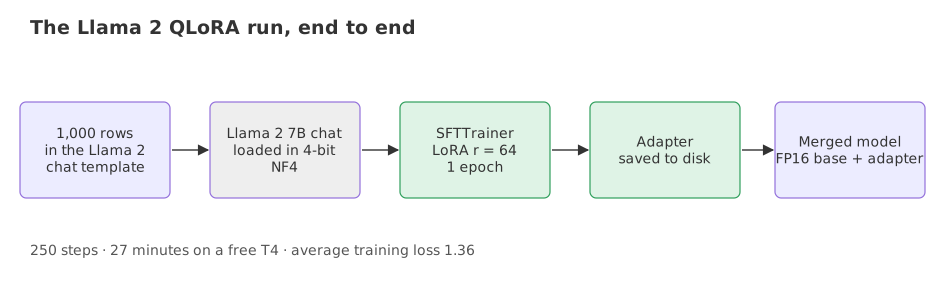
The model is the NousResearch copy of Llama 2 7B chat, a public mirror of Meta's gated release. The dataset is mlabonne/guanaco-llama2-1k: 1,000 rows from the OpenAssistant Guanaco set, each already written in the Llama 2 chat template, <s>[INST] question [/INST] answer </s>. The clip walks the settings in the order of the notebook.
The LoRA settings
Rank 64 with alpha 16 makes the update scale alpha / r = 0.25. Dropout of 0.1 is applied to the input of the LoRA path during training.
lora_r = 64            # rank of B and A
lora_alpha = 16        # scale = alpha / r
lora_dropout = 0.1     # dropout on the LoRA path
The 4-bit settings
The base is loaded in 4-bit with the NF4 type. The compute dtype is float16 because the T4 has no bfloat16 support. Double quantization is switched off.
use_4bit = True
bnb_4bit_quant_type = "nf4"
bnb_4bit_compute_dtype = "float16"     # T4 GPUs have no bf16
use_nested_quant = False              # double quantization off
The training settings
One epoch with batch size 4 over 1,000 rows is 250 steps. Gradient checkpointing trades compute for memory, the gradient norm is clipped at 0.3, the learning rate is 2e-4 with a cosine decay (a learning-rate schedule that follows a half cosine curve down) and 3% warm-up, and the paged 32-bit AdamW optimizer keeps its state pageable. Losses are logged every 25 steps.
num_train_epochs = 1
per_device_train_batch_size = 4
gradient_checkpointing = True
max_grad_norm = 0.3
learning_rate = 2e-4
weight_decay = 0.001
optim = "paged_adamw_32bit"
lr_scheduler_type = "cosine"
warmup_ratio = 0.03
group_by_length = True       # batch rows of similar length together
logging_steps = 25
Loading the dataset, the 4-bit model and the trainer
Dataset and quantization config
dataset = load_dataset("mlabonne/guanaco-llama2-1k", split="train")

bnb_config = BitsAndBytesConfig(
    load_in_4bit=True,
    bnb_4bit_quant_type="nf4",
    bnb_4bit_compute_dtype=torch.float16,
    bnb_4bit_use_double_quant=False,
)
Model and tokenizer
The tokenizer has no padding token, so the end-of-sequence token is used, and padding goes on the right.
model = AutoModelForCausalLM.from_pretrained(
    "NousResearch/Llama-2-7b-chat-hf",
    quantization_config=bnb_config,
    device_map={"": 0},          # the whole model on GPU 0
)
tokenizer = AutoTokenizer.from_pretrained("NousResearch/Llama-2-7b-chat-hf")
tokenizer.pad_token = tokenizer.eos_token
tokenizer.padding_side = "right"
The LoRA config and the trainer
The LoraConfig leaves target_modules unset; for Llama, peft then adapts q_proj and v_proj. SFTTrainer wraps the 4-bit model with the adapters and reads the "text" column of the dataset.
peft_config = LoraConfig(lora_alpha=16, lora_dropout=0.1, r=64,
                         bias="none", task_type="CAUSAL_LM")

trainer = SFTTrainer(model=model, train_dataset=dataset, peft_config=peft_config,
                     dataset_text_field="text", max_seq_length=None,
                     tokenizer=tokenizer, args=training_arguments, packing=False)
Running the notebook's training cell
The notebook pins accelerate 0.21.0, peft 0.4.0, bitsandbytes 0.40.2, transformers 4.31.0 and trl 0.4.7, so the block below is the code of 2024 and its saved output. It joins the notebook's import, settings and training cells in their original order and leaves out two imports the run never uses; the output under it is what the training cell printed. It does not run on a current Colab image without changes; the current form is given further down.
import os
import torch
from datasets import load_dataset
from transformers import (AutoModelForCausalLM, AutoTokenizer, BitsAndBytesConfig,
                          TrainingArguments, pipeline, logging)
from peft import LoraConfig
from trl import SFTTrainer

# The model that you want to train from the Hugging Face hub
model_name = "NousResearch/Llama-2-7b-chat-hf"

# The instruction dataset to use
dataset_name = "mlabonne/guanaco-llama2-1k"

# Fine-tuned model name
new_model = "Llama-2-7b-chat-finetune"

################################################################################
# QLoRA parameters
################################################################################

# LoRA attention dimension
lora_r = 64

# Alpha parameter for LoRA scaling
lora_alpha = 16

# Dropout probability for LoRA layers
lora_dropout = 0.1

################################################################################
# bitsandbytes parameters
################################################################################

# Activate 4-bit precision base model loading
use_4bit = True

# Compute dtype for 4-bit base models
bnb_4bit_compute_dtype = "float16"

# Quantization type (fp4 or nf4)
bnb_4bit_quant_type = "nf4"

# Activate nested quantization for 4-bit base models (double quantization)
use_nested_quant = False

################################################################################
# TrainingArguments parameters
################################################################################

# Output directory where the model predictions and checkpoints will be stored
output_dir = "./results"

# Number of training epochs
num_train_epochs = 1

# Enable fp16/bf16 training (set bf16 to True with an A100)
fp16 = False
bf16 = False

# Batch size per GPU for training
per_device_train_batch_size = 4

# Batch size per GPU for evaluation
per_device_eval_batch_size = 4

# Number of update steps to accumulate the gradients for
gradient_accumulation_steps = 1

# Enable gradient checkpointing
gradient_checkpointing = True

# Maximum gradient normal (gradient clipping)
max_grad_norm = 0.3

# Initial learning rate (AdamW optimizer)
learning_rate = 2e-4

# Weight decay to apply to all layers except bias/LayerNorm weights
weight_decay = 0.001

# Optimizer to use
optim = "paged_adamw_32bit"

# Learning rate schedule
lr_scheduler_type = "cosine"

# Number of training steps (overrides num_train_epochs)
max_steps = -1

# Ratio of steps for a linear warmup (from 0 to learning rate)
warmup_ratio = 0.03

# Group sequences into batches with same length
# Saves memory and speeds up training considerably
group_by_length = True

# Save checkpoint every X updates steps
save_steps = 0

# Log every X updates steps
logging_steps = 25

################################################################################
# SFT parameters
################################################################################

# Maximum sequence length to use
max_seq_length = None

# Pack multiple short examples in the same input sequence to increase efficiency
packing = False

# Load the entire model on the GPU 0
device_map = {"": 0}

# Load dataset (you can process it here)
dataset = load_dataset(dataset_name, split="train")

# Load tokenizer and model with QLoRA configuration
compute_dtype = getattr(torch, bnb_4bit_compute_dtype)

bnb_config = BitsAndBytesConfig(
    load_in_4bit=use_4bit,
    bnb_4bit_quant_type=bnb_4bit_quant_type,
    bnb_4bit_compute_dtype=compute_dtype,
    bnb_4bit_use_double_quant=use_nested_quant,
)

# Check GPU compatibility with bfloat16
if compute_dtype == torch.float16 and use_4bit:
    major, _ = torch.cuda.get_device_capability()
    if major >= 8:
        print("=" * 80)
        print("Your GPU supports bfloat16: accelerate training with bf16=True")
        print("=" * 80)

# Load base model
model = AutoModelForCausalLM.from_pretrained(
    model_name,
    quantization_config=bnb_config,
    device_map=device_map
)
model.config.use_cache = False
model.config.pretraining_tp = 1

# Load LLaMA tokenizer
tokenizer = AutoTokenizer.from_pretrained(model_name, trust_remote_code=True)
tokenizer.pad_token = tokenizer.eos_token
tokenizer.padding_side = "right" # Fix weird overflow issue with fp16 training

# Load LoRA configuration
peft_config = LoraConfig(
    lora_alpha=lora_alpha,
    lora_dropout=lora_dropout,
    r=lora_r,
    bias="none",
    task_type="CAUSAL_LM",
)

# Set training parameters
training_arguments = TrainingArguments(
    output_dir=output_dir,
    num_train_epochs=num_train_epochs,
    per_device_train_batch_size=per_device_train_batch_size,
    gradient_accumulation_steps=gradient_accumulation_steps,
    optim=optim,
    save_steps=save_steps,
    logging_steps=logging_steps,
    learning_rate=learning_rate,
    weight_decay=weight_decay,
    fp16=fp16,
    bf16=bf16,
    max_grad_norm=max_grad_norm,
    max_steps=max_steps,
    warmup_ratio=warmup_ratio,
    group_by_length=group_by_length,
    lr_scheduler_type=lr_scheduler_type,
    report_to="tensorboard"
)

# Set supervised fine-tuning parameters
trainer = SFTTrainer(
    model=model,
    train_dataset=dataset,
    peft_config=peft_config,
    dataset_text_field="text",
    max_seq_length=max_seq_length,
    tokenizer=tokenizer,
    args=training_arguments,
    packing=packing,
)

# Train model
trainer.train()Step Training Loss
25 1.408600
50 1.662100
75 1.215200
100 1.444100
125 1.176900
150 1.367300
175 1.174000
200 1.468100
225 1.158200
250 1.542700
TrainOutput(global_step=250, training_loss=1.361721710205078, metrics={'train_runtime': 1634.449, 'train_samples_per_second': 0.612, 'train_steps_per_second': 0.153, 'total_flos': 8755214190673920.0, 'train_loss': 1.361721710205078, 'epoch': 1.0})Reading the training log
The log lists the loss every 25 steps. The block computes the numbers the log implies, from the ten logged losses.
import numpy as np

losses = [1.4086, 1.6621, 1.2152, 1.4441, 1.1769, 1.3673, 1.1740, 1.4681, 1.1582, 1.5427]   # logged every 25 steps
print("logged points:", len(losses), "  steps:", len(losses) * 25)
print("lowest", min(losses), " highest", max(losses), " mean", round(float(np.mean(losses)), 4))
print("steps per epoch:", 1000 // 4, "  runtime:", round(1634.449 / 60, 1), "minutes")
print("LoRA scale alpha / r:", 16 / 64)
print("rows per second:", round(1000 / 1634.449, 3))logged points: 10 steps: 250 lowest 1.1582 highest 1.6621 mean 1.3617 steps per epoch: 250 runtime: 27.2 minutes LoRA scale alpha / r: 0.25 rows per second: 0.612
- 250 steps = 1,000 rows / batch size 4, one epoch, in 27.2 minutes of runtime on the T4 (the progress bar showed 26:57).
- The loss is noisy, not a smooth fall. The ten logged values run from 1.1582 to 1.6621 and the last one, 1.5427, is the second highest. Their mean, 1.3617, is the training_loss in TrainOutput. Each logged value averages the batches of 25 steps, and different batches differ in difficulty.
- The LoRA scale is alpha / r = 0.25, and with r = 64 on q_proj and v_proj the adapters hold 33,554,432 values (0.50% of the model), counted in LoRA and QLoRA.
- The adapter is saved with
trainer.model.save_pretrained(new_model). It holds only B and A, not the 7 billion base weights.
Generating with the adapter and the Llama 2 template
The clip saves the adapter and builds the prompt in the Llama 2 format; the text-generation pipeline returns a list whose first item holds the field generated_text. A chat model expects the prompt inside the template it was trained on, <s>[INST] ... [/INST].
# Ignore warnings
logging.set_verbosity(logging.CRITICAL)

# Run text generation pipeline with our next model
prompt = "What is a large language model?"
pipe = pipeline(task="text-generation", model=model, tokenizer=tokenizer, max_length=200)
result = pipe(f"<s>[INST] {prompt} [/INST]")
print(result[0]['generated_text'])<s>[INST] What is a large language model? [/INST] A large language model is a type of artificial intelligence (AI) model that is trained on a large dataset of text to generate human-like language outputs. everybody is talking about the large language models, but what are they? Large language models are neural networks that are trained on vast amounts of text data to predict the next word in a sequence of text. They are called "large" because they are trained on billions of words, and they are called "language models" because they are designed to predict the next word in a sequence of text. Large language models are trained on vast amounts of text data, such as books, articles, and websites. They are designed to predict the next word in a sequence of text, and they are trained to do this by learning the patterns and structures of language. Large language models are used in a variety of applications, such as chatb
The reply defines a large language model correctly, then repeats nearly the same two sentences, and it stops mid-word because max_length=200 caps the number of tokens. One epoch over 1,000 rows is a small run, so this output shows that the adapter works end to end, not that the model is better. Judging that needs rows held back from training, covered in Fine-tuning on custom data.
Merging the adapter into a 16-bit base model
The adapter alone is small. To get one standalone model, reload the base in 16-bit, not 4-bit, and fold B and A into it; merge_and_unload computes W0 + (alpha/r)BA and removes the adapter wrapper.
import torch
from transformers import AutoModelForCausalLM
from peft import PeftModel

base = AutoModelForCausalLM.from_pretrained(
    "NousResearch/Llama-2-7b-chat-hf", dtype=torch.float16, device_map="auto")
model = PeftModel.from_pretrained(base, "Llama-2-7b-chat-finetune")   # the saved adapter
model = model.merge_and_unload()                                      # fold B and A into W0
model.save_pretrained("Llama-2-7b-chat-merged")
The same run with today's TRL
The video's trainer call changed in current TRL: the training arguments and the SFT arguments are one SFTConfig, max_seq_length is max_length, tokenizer= is processing_class (the trainer loads it from the model id), the 4-bit config goes in quantization_config, warmup_ratio is a warmup_steps value below 1, group_by_length is train_sampling_strategy, and torch_dtype is dtype. This code is not run here.
The configs
import torch
from datasets import load_dataset
from peft import LoraConfig
from transformers import BitsAndBytesConfig
from trl import SFTConfig, SFTTrainer

dataset = load_dataset("mlabonne/guanaco-llama2-1k", split="train")
bnb = BitsAndBytesConfig(load_in_4bit=True, bnb_4bit_quant_type="nf4",
                         bnb_4bit_compute_dtype=torch.float16)
lora = LoraConfig(r=64, lora_alpha=16, lora_dropout=0.1, bias="none",
                  task_type="CAUSAL_LM")
The SFTConfig and the trainer
args = SFTConfig(
    output_dir="./results", num_train_epochs=1, per_device_train_batch_size=4,
    gradient_checkpointing=True, learning_rate=2e-4, weight_decay=0.001,
    optim="paged_adamw_32bit", lr_scheduler_type="cosine", max_grad_norm=0.3,
    warmup_steps=0.03, train_sampling_strategy="group_by_length", logging_steps=25,
    max_length=1024, dataset_text_field="text", packing=False,
    bf16=False,                          # T4 has no bf16
    model_init_kwargs={"dtype": torch.float16},
)trainer = SFTTrainer(
model="NousResearch/Llama-2-7b-chat-hf", args=args, train_dataset=dataset,
peft_config=lora, quantization_config=bnb,
)
trainer.train()The 2024 notebook vs today's TRL
| Video notebook (2024) | Current TRL and PEFT | |
|---|---|---|
| Training settings | TrainingArguments | SFTConfig |
| Sequence length | max_seq_length on SFTTrainer | max_length in SFTConfig |
| Tokenizer | tokenizer= | processing_class= (loaded from the model id when omitted) |
| 4-bit config | Passed to from_pretrained | quantization_config on SFTTrainer |
| Data format | A text column | A text column, or conversational messages with the chat template applied |
Where you use this recipe
- Tuning a 7B chat model on one GPU. Rank, alpha and the 4-bit config carry over to other models.
- Teaching a format. Instruction rows in the model's own template teach it how to answer.
- Producing a small adapter. The adapter folder is the deliverable; merge it only when one file is needed.
huggingface-cli login prompt or an environment variable, and revoke a token that was exposed.Related
- Previous: LoRA and QLoRA
- Next: Fine-tuning on custom data
- See also: Quantization
- In the arithmetic block, compute the LoRA scale for r = 16 with alpha = 32.
- Change logging_steps to 50 in the SFTConfig and decide how many losses the log would print for 250 steps.
- Replace the dataset line with your own dataset that has a "text" column in the Llama 2 template.
Slow is fine. Stopping is the only problem.