
AI agents
An AI agent is a program in which a language model decides the next step, calls tools to act on the outside world, and repeats until the task is done.
Last updated: 08 Oct, 2026 · LangChain 1.4
A language model on its own answers from what it learned in training. It cannot look up today's news or check a live price, and it cannot change anything outside the text it writes. An agent adds the missing pieces: tools that reach the outside world, and a loop that lets the model use them.
The examples call a hosted model through Groq. The key is set up in Installing Python for generative AI.
The model, the tools, the memory and the loop
The video starts from a plain generative AI application: an input goes to the model and an output comes back, for example a 200-word paragraph on artificial intelligence. Then it asks the model for today's AI news. The model cannot answer, because its training stopped at a cutoff date and it has never seen today's news. It has to depend on a tool, such as a third-party API or a web search. What the tool returns is called the context, and with that context the model writes the answer. The video calls this a basic agent.
Four parts make up that picture:
- Model. The part that decides. At every step it either answers or asks for a tool.
- Tools. Functions the model can ask for: a web search, a weather API, a calculator, a database query.
- Memory. The list of messages so far: the question, the tool calls, the tool results. The model reads the whole list at every step.
- Loop. After each tool result the model decides again. It stops when it answers without asking for a tool.
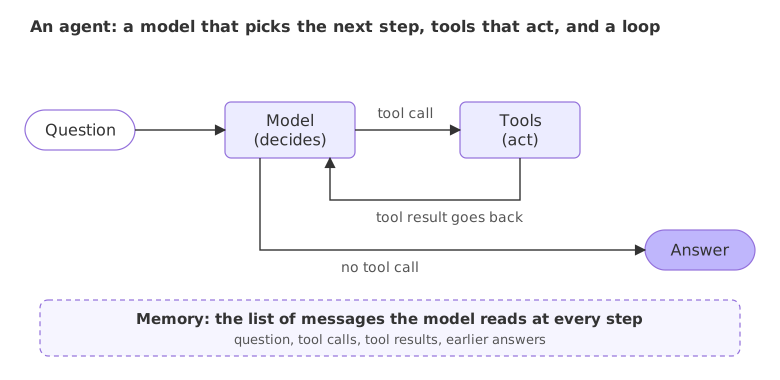
The model never runs a tool itself. It returns a request that names the tool and its arguments, and the code around it runs the function and hands the result back. Tool calling shows that exchange step by step.
Creating an agent with create_agent
LangChain's create_agent builds this loop for you. Syntax: create_agent(model, tools=[...], system_prompt="...") returns an agent you call with agent.invoke(...). The video adds a function as a tool and then watches the agent use it.
The video passes an OpenAI model name to create_agent. Here the model line is groq:openai/gpt-oss-120b, an open-weight model hosted on Groq, because a free Groq key is enough to run it. The rest of the call stays the same.
The tool
A tool starts as an ordinary Python function. The model sees three things about it: the function name, the type hints on its arguments, and the docstring. Together they tell the model what the tool is called, what it needs and when to use it. This one returns a fixed sentence, as in the video; a real tool would call an API here.
from langchain.agents import create_agent

def get_weather(city: str) -> str:
    """Get the weather for a city."""
    return f"The weather in {city} is sunny."
The agent
model is a provider name and a model name joined by a colon. tools is the list of functions the agent may call. system_prompt is the standing instruction the model sees before every conversation.
agent = create_agent(
    model="groq:openai/gpt-oss-120b",
    tools=[get_weather],
    system_prompt="You are a helpful assistant.",
)
Running the weather agent
An agent takes a dictionary with a messages key. Each message is a role and the content. The result is the same dictionary with the full conversation, including the tool call and the tool result.
from langchain.agents import create_agent

def get_weather(city: str) -> str:
    """Get the weather for a city."""
    return f"The weather in {city} is sunny."

agent = create_agent(
    model="groq:openai/gpt-oss-120b",
    tools=[get_weather],
    system_prompt="You are a helpful assistant.",
)

question = "What is the weather like in New York?"
result = agent.invoke({"messages": [{"role": "user", "content": question}]})

for message in result["messages"]:
print(type(message).__name__, "|", message.content or message.tool_calls)HumanMessage | What is the weather like in New York?
AIMessage | [{'name': 'get_weather', 'args': {'city': 'New York'}, 'id': 'fc_f13d065c-c3b9-4b8a-820b-991618e871e0', 'type': 'tool_call'}]
ToolMessage | The weather in New York is sunny.
AIMessage | The weather in New York is sunny.Reading the message list
- HumanMessage is the question as it was sent.
- AIMessage with a tool call. The model did not answer yet. Its content is empty and its
tool_callslist asks forget_weatherwith the argument{'city': 'New York'}. The model chose the tool from its name and docstring and filled the argument from the question. Theidties this request to its result. - ToolMessage holds what the function returned, the fixed sentence for New York. The agent ran the function; the model only asked for it.
- Final AIMessage is the answer, written by the model from the tool result. The wording is the model's own, so another run can phrase it differently.
Looking at the agent as a graph
The object create_agent returns is a graph: boxes called nodes joined by arrows called edges. The model call is one node and the tool calls are another. Printing the nodes and edges shows the loop from the picture above.
for name in agent.get_graph().nodes:
    print("node:", name)
for edge in agent.get_graph().edges:
    kind = "conditional" if edge.conditional else "always"
print(edge.source, "->", edge.target, f"({kind})")node: __start__ node: model node: tools node: __end__ __start__ -> model (always) model -> __end__ (conditional) model -> tools (conditional) tools -> model (conditional)
- __start__ and __end__ mark where a run begins and where it stops.
- model calls the language model. tools runs the tool calls the model asked for.
- model -> tools is taken when the last message holds a tool call, and model -> __end__ when it does not. tools -> model carries each result back, which closes the loop.
LangGraph lists an edge as conditional when a function chooses it at run time from the state, and most of the edges here are chosen that way. LangGraph essentials builds this same graph by hand.
Passing the input in the right shape
An agent expects a dictionary with a messages key. A plain string stops the run before the model is called:
try:
    agent.invoke("What is the weather in Delhi?")
except Exception as error:
print(type(error).__name__ + ":", str(error).splitlines()[0])InvalidUpdateError: Expected dict, got What is the weather in Delhi?
The fix is the shape used above: {"messages": [{"role": "user", "content": "..."}]}.
Model call vs workflow vs agent
| Plain model call | Workflow | Agent | |
|---|---|---|---|
| Who picks the next step | Nobody: one call, one answer | Your code, in a fixed order | The model, at every step |
| Tools | None | Called by your code at set points | Chosen by the model |
| Number of model calls | One | As many as the code has steps | As many as the model needs |
| Fits | Writing, summarising, answering from training | Tasks with known steps | Tasks where the steps depend on what a tool returns |
The difference between a workflow and an agent is covered in Generative AI vs AI agents vs agentic AI.
Where you use agents
- Questions that need live data. Weather, prices, news, order status: the model asks a tool and answers from the result.
- Multi-step lookups. Find a customer, then find their order, then check the refund rule. Each step depends on the one before.
- Actions with a function behind them. Send an email, create a ticket, update a row, when a person has approved it.
Related
- Previous: Project: chat with your documents
- Next: Tool calling
- See also: the full API in create_agent
- Reference: LangChain agents
- Change the system prompt to
"Answer in one short sentence."and run the weather agent again. Read how the final message changes while the tool call stays the same. - Ask about two cities in one question and count the tool calls in the message list.
- Ask a question the tool cannot help with, such as
"What is 12 times 12?", and check whether the agent callsget_weatherat all.
Little by little, you're building something great.