
Messages and prompts
Messages are the objects a chat model reads and writes: each one has a role (system, human, AI or tool), content and metadata, and a list of them is the conversation you send with invoke.
Last updated: 08 Oct, 2026 · LangChain 1.4 · LangGraph 1.2
The chat loop in Your first LLM app sent a bare string every time. A string is the simplest input, and a list of messages is how a program gives the model instructions, history and tool results.
Sending a text prompt
The video defines a message as the basic unit of context for a model in LangChain: it carries a role, which says what kind of message it is, content, and metadata. The input to the model is a human message and its output is an AI message. A text prompt is a plain string, which the video uses when the request is single and standalone, needs no conversation history and should take minimal code. A string passed to invoke is turned into a human message internally.
from langchain.chat_models import init_chat_model

model = init_chat_model("groq:openai/gpt-oss-120b", temperature=0)
reply = model.invoke("What is artificial intelligence? Answer in one sentence.")

print(type(reply).__name__)
print(reply.text)AIMessage Artificial intelligence is the field of computer science that creates systems capable of performing tasks that normally require human intelligence, such as learning, reasoning, perception, and decision‑making.
The reply is an AIMessage with a one-sentence answer, as the prompt asked. The string went to the model as a single human message.
Reading what a message carries
A message holds its type (the role), its content and optional metadata. A HumanMessage accepts a name and an id, and an AIMessage from a model also carries usage_metadata and response_metadata, which Your first LLM app printed.
from langchain.messages import HumanMessage

message = HumanMessage(content="Hello!", name="alice", id="msg_123")
print(message.type, message.name, message.id)
print(message.content)human alice msg_123 Hello!
The type is human, the role of the message. The name and id are labels you can attach, for example to tell two users apart in one conversation or to find a message again later.
Sending a list of messages
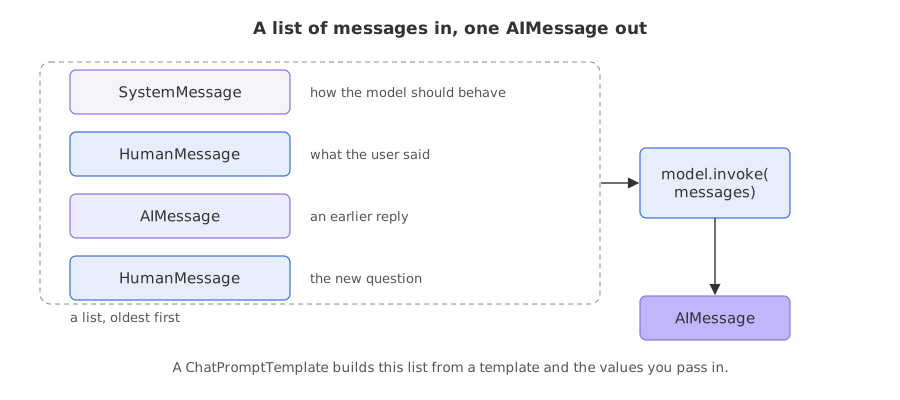
A message prompt is a list of message objects. The video names four kinds: a system message tells the model how to behave and gives context for the interaction, a human message is user input, an AI message is a response the model produced, and a tool message carries the output of a tool call. It imports the first three from langchain.messages and builds a list with a system message, You are a poetry expert, and a human message that asks for a poem on artificial intelligence.
from langchain.messages import HumanMessage, SystemMessage

messages = [
    SystemMessage("You are a poetry expert. Reply with a poem of four lines."),
    HumanMessage("Write a poem on artificial intelligence."),
]
The page adds a four-line limit to the system message so that the reply stays short. The video's poem came from a model that Groq has retired, so the reply below is from a fresh run.
from langchain.chat_models import init_chat_model
from langchain.messages import HumanMessage, SystemMessage

model = init_chat_model("groq:openai/gpt-oss-120b", temperature=0)
messages = [
    SystemMessage("You are a poetry expert. Reply with a poem of four lines."),
    HumanMessage("Write a poem on artificial intelligence."),
]
print(model.invoke(messages).text)Silicon dreams whisper through electric veins, Logic waltzes with the pulse of human thought, A mirror forged of code, reflecting hope and fear, Where mind and machine entwine in endless song.
The system message set the role and the format. The reply is a four-line poem with no introduction, an instruction the human message never contained.
Giving the model a conversation history
The video ends this part by saying that a list can also hold AI messages, as part of a conversation history. The model has no memory of earlier calls, so a history is the earlier messages that you put in the list. An AIMessage you build yourself works exactly like one the model returned.
from langchain.chat_models import init_chat_model
from langchain.messages import AIMessage, HumanMessage

model = init_chat_model("groq:openai/gpt-oss-120b", temperature=0)
messages = [
    HumanMessage("Hi, my name is Priya."),
    AIMessage("Nice to meet you, Priya. How can I help?"),
    HumanMessage("What is my name?"),
]
print(model.invoke(messages).text)Your name is Priya.
The model answered Your name is Priya. The name appears only in the first message of the list, so the model could answer because the history was part of the request. The AIMessage was written by hand, and the model treated it as its own earlier reply.
Passing a tool result back with ToolMessage
A model that wants a tool replies with an AIMessage whose tool_calls list names the tool, its arguments and an id. The program runs the tool and answers with a ToolMessage that carries the result and the same id in tool_call_id, which is how the model matches the result to its request. Tool calling builds the whole loop; here the two messages are written by hand.
from langchain.chat_models import init_chat_model
from langchain.messages import AIMessage, HumanMessage, ToolMessage

model = init_chat_model("groq:openai/gpt-oss-120b", temperature=0)
messages = [
    HumanMessage("What is the weather in San Francisco?"),
    AIMessage(content="", tool_calls=[{"name": "get_weather", "args": {"location": "San Francisco"}, "id": "call_123"}]),
    ToolMessage(content="Sunny, 22 C", tool_call_id="call_123"),
]
print(model.invoke(messages).text)The current weather in San Francisco is sunny with a temperature of about **22 °C**.
The model turned the tool result into a sentence: sunny, about 22 degrees. It called no function. The result arrived as a ToolMessage whose tool_call_id, call_123, matches the id in the tool_calls of the AIMessage before it.
Building messages from a template
When the same prompt is used many times with different values, a prompt template holds the messages with slots in curly braces, and invoke fills them. ChatPromptTemplate.from_messages takes a list of (role, text) pairs. Joining it to the model with |, as in LangChain essentials, gives a chain that takes the values and returns a reply.
from langchain.chat_models import init_chat_model
from langchain_core.prompts import ChatPromptTemplate

model = init_chat_model("groq:openai/gpt-oss-120b", temperature=0)
prompt = ChatPromptTemplate.from_messages([
    ("system", "You are a {role}. Answer in one sentence."),
    ("human", "{question}"),
])
values = {"role": "pirate", "question": "Why is the sky blue?"}

for message in prompt.invoke(values).to_messages():
    print(message.type, "|", message.content)
print((prompt | model).invoke(values).text)system | You are a pirate. Answer in one sentence. human | Why is the sky blue? Arr, the sky be blue because the sun’s light be scattered by the thin air, leavin’ the short‑wavelength blue hue to shine across the heavens.
The loop printed the two messages the template produced: the system message with {role} filled in as pirate, and the human message with the question. prompt | model sent those two messages and returned a one-sentence answer in the voice of a pirate.
Text prompt vs message list vs template
| Text prompt | List of messages | Prompt template | |
|---|---|---|---|
| Input | One string | A list of message objects | A dictionary of values |
| Sent to the model as | One human message | The list as written | A list built from the template |
| Roles and history | No | Yes | Yes, as written in the template |
| Use it for | A single standalone request | Instructions, history and tool results | The same prompt with changing values |
Where you use messages
- System prompts: fix the role, tone and rules of an assistant once, in the first message.
- Chat history: the message list is the conversation, and A chatbot with memory grows and trims it.
- Agents: tool calls and tool results travel as
AIMessageandToolMessagein the same list.
ToolMessage must carry the tool_call_id of the call it answers, which you copy from the AIMessage. The call above succeeded with a matching id; never make one up, because agents with several tool calls in one reply depend on the id to tell the results apart.Related
- Previous: Your first LLM app
- Next: Streaming and batch
- Reference: Messages
- Go deeper: Messages
- Change the system message in the poem example to
You are a pirateand compare the poem. - Delete the
AIMessagefrom the history example and run it again. Does the model still know the name? - Add a second slot,
{language}, to the template and pass it invalues.
You understood something today that you didn't yesterday.