
Streaming and batch
Streaming returns a model's reply in chunks as it is generated, and batching sends several independent requests at the same time and returns one reply for each.
Last updated: 08 Oct, 2026 · LangChain 1.4 · LangGraph 1.2
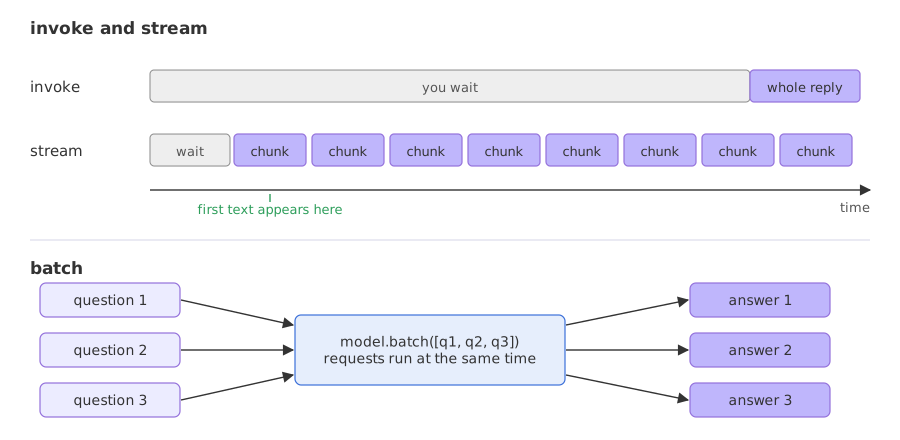
Every call so far waited for the whole reply. That is fine for a short answer and slow to watch for a long one, and a program with many questions loses time asking them one after another. stream and batch are the two calls that fix that.
Streaming a reply with stream
The video starts from a long request, a 200-word paragraph on artificial intelligence. With invoke the program waits until the reply is complete, and the video's point is that showing the output progressively improves the experience for long replies. stream returns an iterator that yields chunks of the reply, so a for loop receives each chunk as the model produces it. The video prints chunk.text with end set to a separator and flush=True so that the chunk boundaries are visible.
for chunk in model.stream("Write a 100 word paragraph about parrots."):
    if chunk.text:                       # skip chunks that carry no text
        print(chunk.text, end="|", flush=True)
The model here reasons before it answers, and its reasoning arrives as chunks with empty text, which is why the loop skips them. reasoning_effort="low", a setting of this model, keeps that phase short.
from langchain.chat_models import init_chat_model

model = init_chat_model("groq:openai/gpt-oss-120b", temperature=0, reasoning_effort="low")

for chunk in model.stream("Write a 100 word paragraph about parrots."):
    if chunk.text:
print(chunk.text, end="|", flush=True)Par|rots| are| vibrant|,| intelligent| birds| renowned| for| their| striking| plum|age| and| remarkable| vocal| abilities|.| Native| to| tropical| and| subt|ropical| regions| across| the| globe|,| they| inhabit| rain|fore|sts|,| sav|ann|as|,| and| even| ar|id| wood|lands|,| adapting| to| diverse| ecosystems|.| Their| curved| be|aks| are| perfectly| designed| for| cracking| nuts|,| seeds|,| and| fruit|,| while| their| z|yg|od|act|yl| feet|—|two| toes| forward|,| two| back|—|grant| exceptional| grip| on| branches|.| Many| species|,| such| as| the| African| grey| and| Amazon| mac|aws|,| exhibit| sophisticated| problem|‑|sol|ving| skills| and| can| mimic| human| speech|,| reflecting| advanced| social| cognition|.| Unfortunately|,| habitat| loss|,| illegal| pet| trade|,| and| climate| change| threaten| numerous| populations|,| prompting| urgent| conservation| efforts| worldwide|.|
Each | marks the end of a chunk. A chunk is a few characters or a short word, and the paragraph arrives as pieces such as Par, rots, are and vibrant. Only chunks that carried text were printed.
Streaming does not make the model finish sooner. It lets the first text appear sooner. The next example times both calls on a longer reply: when the first text arrives from stream, and when invoke returns the whole reply.
import time

from langchain.chat_models import init_chat_model

model = init_chat_model("groq:openai/gpt-oss-120b", temperature=0, reasoning_effort="low")
question = "Write a 250 word paragraph about parrots."

start = time.time()
first = None
for chunk in model.stream(question):
    if chunk.text and first is None:
        first = time.time() - start
print(f"stream: first text after {first:.2f}s, finished after {time.time() - start:.2f}s")

start = time.time()
reply = model.invoke(question)
print(f"invoke: {len(reply.text.split())} words, all there after {time.time() - start:.2f}s")stream: first text after 0.71s, finished after 1.55s invoke: 293 words, all there after 1.41s
In this run stream delivered the first text after 0.71 s and finished after 1.55 s, and invoke returned all 293 words after 1.41 s. The two finish at about the same time, because streaming does not make the model faster. What changes is when the reader has something to read: about 0.7 s into the wait, where invoke makes the reader sit through the full 1.4 s.
How long the first text takes depends on how much the model reasons first. The same stream at two settings shows it:
import time

from langchain.chat_models import init_chat_model

for effort in ["low", "medium"]:
    model = init_chat_model("groq:openai/gpt-oss-120b", temperature=0, reasoning_effort=effort)
    start, first, chunks, with_text = time.time(), None, 0, 0
    for chunk in model.stream("Write a 120 word paragraph about parrots."):
        chunks += 1
        if chunk.text:
            with_text += 1
            first = first or time.time() - start
print(f"{effort:>6}: {chunks} chunks, {with_text} with text, first text after {first:.2f}s")low: 245 chunks, 219 with text, first text after 0.61s medium: 1182 chunks, 174 with text, first text after 2.69s
At low, 245 chunks arrived and the first text appeared after 0.61 s. At medium, 1182 chunks arrived but only 174 carried text: about a thousand chunks were reasoning, and the first text came after 2.69 s. The reasoning chunks have empty text, which is why the loop checks chunk.text.
Keeping the whole reply from a stream
Chunks add up: adding one chunk to the next gives a chunk that holds the text so far, and the sum of all of them is the complete message, with the token counts the provider sent at the end. That is how a program shows text as it arrives and still stores the whole reply.
from langchain.chat_models import init_chat_model

model = init_chat_model("groq:openai/gpt-oss-120b", temperature=0)

full = None
for chunk in model.stream("Say hi in three words."):
    full = chunk if full is None else full + chunk

print(type(full).__name__)
print(full.text)
print(full.usage_metadata)AIMessageChunk
Hey there, friend!
{'input_tokens': 77, 'output_tokens': 89, 'total_tokens': 166, 'output_token_details': {'reasoning': 75}}Adding chunks gave an AIMessageChunk whose text is the whole reply, Hey there, friend!, and whose usage_metadata holds the token counts for the call: 77 in and 89 out, of which 75 were reasoning. A program can print chunks as they arrive and still keep one message with the complete text and the counts.
Sending several questions with batch
The video's second call is batch. It takes a list of inputs, here three questions, sends them to the model in parallel and returns a list with one reply for each, in the same order. A config argument with max_concurrency sets how many calls run at the same time: with ten questions and a limit of five, the model gets five and then five.
replies = model.batch(questions)
replies = model.batch(questions, config={"max_concurrency": 2})   # at most two calls at a time
A real model call takes a different time on every run, and a rate limit can make it longer, so the first example uses a runnable that sleeps for one second in place of a model call. Every runnable has batch, and the timing shows what it does.
import time

from langchain_core.runnables import RunnableLambda

def slow_square(x):
    time.sleep(1)          # one second, standing in for a model call
    return x * x

step = RunnableLambda(slow_square)

start = time.time()
print([step.invoke(n) for n in [1, 2, 3]], round(time.time() - start), "s one by one")

start = time.time()
print(step.batch([1, 2, 3]), round(time.time() - start), "s with batch")

start = time.time()
print(step.batch([1, 2, 3], config={"max_concurrency": 2}), round(time.time() - start), "s with max_concurrency=2")[1, 4, 9] 3 s one by one [1, 4, 9] 1 s with batch [1, 4, 9] 2 s with max_concurrency=2
Three one-second calls took 3 s one after another and 1 s with batch, because batch ran them at the same time. With max_concurrency set to 2, the third call had to wait for a free slot, and the batch took 2 s.
from langchain.chat_models import init_chat_model

model = init_chat_model("groq:openai/gpt-oss-120b", temperature=0, reasoning_effort="low")
questions = [
    "Why do parrots have colorful feathers? One sentence.",
    "How do airplanes fly? One sentence.",
    "What is quantum computing? One sentence.",
]

replies = model.batch(questions)
for question, reply in zip(questions, replies):
    print(question)
print(" ->", reply.text)Why do parrots have colorful feathers? One sentence. -> Parrots have colorful feathers because pigments (like psittacofulvins) and structural nanostructures evolved to aid in species recognition, sexual selection, and camouflage within the dappled light of tropical forests. How do airplanes fly? One sentence. -> Airplanes fly because their wings generate lift—air moving faster over the curved upper surface creates lower pressure than the slower air beneath, producing an upward force that, together with thrust, overcomes weight and drag. What is quantum computing? One sentence. -> Quantum computing is a paradigm of computation that uses quantum bits (qubits) and phenomena like superposition and entanglement to perform certain calculations exponentially faster than classical computers.
batch returned a list with one reply per question, in the order of the questions, so zip pairs each question with its answer.
invoke vs stream vs batch
| invoke | stream | batch | |
|---|---|---|---|
| Input | One prompt | One prompt | A list of prompts |
| Returns | One message, when complete | Chunks, as they are generated | A list of messages, one per prompt |
| Waiting | For the whole reply | For the first chunk only | For the slowest reply |
| Use it for | Short answers and steps inside a program | Chat screens and long replies | Many independent questions |
Where you use streaming and batch
- A chat screen: show text as it arrives, so the user is not looking at a blank box.
- A review of many items: classify or summarise a list of tickets with one
batchcall. - A test run: send a set of questions through a prompt and compare the replies.
batch sends its requests at the same moment, so a long list can reach the limit and fail with a rate-limit error. Set max_concurrency to a small number, as in the video, and keep batches short on a free key. Calls that depend on each other, such as a second question that uses the first answer, cannot be batched.Related
- Previous: Messages and prompts
- Next: Structured output
- Reference: Models
- Go deeper: invoke, batch and stream
- Change
end="|"toend=""in the stream loop and read the paragraph as it prints. - Add
config={"max_concurrency": 1}to the batch call and compare the time with the plain batch. - Add a fourth question to the batch and print the replies in order.
Slow is fine. Stopping is the only problem.