
Quantization
Quantization is a technique that stores a model's numbers in a format with fewer bits, such as 8-bit integers in place of 32-bit floats, so the model takes less memory and runs faster at a small cost in accuracy.
Last updated: 08 Oct, 2026 · NumPy
A language model is a very large pile of numbers called weights. Quantization changes how each number is written down. Below, the memory saving is counted first, then the mapping from floats to integers is built with a scale and a zero-point and run in NumPy.
Why storing fewer bits helps
The clip makes three points. A model with fewer bits per weight is smaller, so a bigger model fits on the machine you have. Every weight that is read takes fewer bytes to move, so inference is quicker on the same GPU. And a small model can go where a large one cannot: a phone, an edge device, a watch.
The cost is the one the clip ends on: rounding throws information away, so some accuracy is lost. The rest of the lesson is about keeping that loss small.
Counting model memory by number format
The weights of a model take parameters × bytes per weight. A 32-bit float is 4 bytes, a 16-bit float 2 bytes, an 8-bit integer 1 byte and a 4-bit integer half a byte.
params = {"7B model": 7e9, "70B model": 70e9}
formats = {"FP32": 4, "FP16 / BF16": 2, "INT8": 1, "INT4": 0.5}   # bytes per weight
print(f"{'format':12}" + "".join(f"{name:>12}" for name in params))
for fmt, nbytes in formats.items():
    row = "".join(f"{p * nbytes / 1e9:>9.1f} GB" for p in params.values())
print(f"{fmt:12}{row}")format 7B model 70B model FP32 28.0 GB 280.0 GB FP16 / BF16 14.0 GB 140.0 GB INT8 7.0 GB 70.0 GB INT4 3.5 GB 35.0 GB
A 7-billion-parameter model needs 28.0 GB at FP32, 14.0 GB at FP16 or BF16, 7.0 GB at INT8 and 3.5 GB at INT4; the 70-billion-parameter model needs ten times as much in every row. Llama 2 is published in 16-bit, not 32-bit: the notebook in the video downloads two checkpoint files of 9.98 GB and 3.50 GB, 13.48 GB in all, which is the FP16 row. So the saving from 8-bit is 2 times against the shipped weights, and from 4-bit it is 4 times.
Reading a float's bits
A floating-point number is stored as three fields: a sign bit S, an exponent E and a mantissa M. For FP32 the value is built like this, with 127 as the exponent bias:
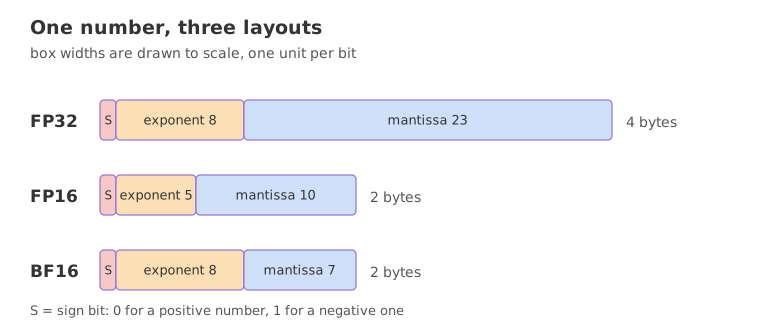
FP32 is called single precision and FP16 half precision. BF16 (bfloat16) keeps the 8 exponent bits of FP32 and cuts the mantissa to 7 bits, so it covers the same range as FP32 with less precision; it is the format most current models are published in. The next block takes apart 7.23 in each layout.
import numpy as np

x = np.float32(7.23)
bits = format(int(x.view(np.uint32)), "032b")
sign, exp, man = bits[0], bits[1:9], bits[9:]
print("FP32 bits:", sign, exp, man)
e = int(exp, 2)
value = (-1) ** int(sign) * 2.0 ** (e - 127) * (1 + int(man, 2) / 2**23)
print(f"exponent field {e} -> 2^{e - 127}; value = {value!r}")

h = np.float16(7.23)
hb = format(int(h.view(np.uint16)), "016b")
print("FP16 bits:", hb[0], hb[1:6], hb[6:])
print("FP16 stores:", float(h), " error:", round(float(h) - 7.23, 6))

u = int(x.view(np.uint32))
u = (u + 0x7FFF + ((u >> 16) & 1)) >> 16             # keep the top 16 bits, rounded
bf = np.uint32(u << 16).view(np.float32)
print("BF16 bits:", format(u, "016b")[0], format(u, "016b")[1:9], format(u, "016b")[9:])
print("BF16 stores:", float(bf))

print(f"largest FP16: {int(np.finfo(np.float16).max)} largest FP32: {float(np.finfo(np.float32).max):.3e}")FP32 bits: 0 10000001 11001110101110000101001 exponent field 129 -> 2^2; value = 7.230000019073486 FP16 bits: 0 10001 1100111011 FP16 stores: 7.23046875 error: 0.000469 BF16 bits: 0 10000001 1100111 BF16 stores: 7.21875 largest FP16: 65504 largest FP32: 3.403e+38
Reading the three layouts of 7.23
- The sign bit is 0 because 7.23 is positive; a negative number has a 1 there.
- The FP32 exponent field is 129, which means 2^2 after removing the bias of 127, and the 23 mantissa bits hold the fraction that scales it: 7.23 = 2^2 × 1.8075. The value stored is 7.230000019073486, the nearest FP32 number.
- FP16 stores 7.23046875, an error of 0.000469, and its largest value is 65504. FP32 reaches 3.403e+38.
- BF16 stores 7.21875: the same range as FP32 and a coarser step, because only 7 mantissa bits are left.
Mapping floats to integers with a scale and a zero-point
The clip works two ranges. The first maps floats from 0 to 1000 onto the unsigned 8-bit range 0 to 255. The second maps -20 to 1000 onto the same 0 to 255, which needs a shift as well as a scale. The clip calls the first range symmetric, because its zero-point is 0, and the second asymmetric, because its zero-point is 5. The video's formulas stop at the rounded integer; the code below also clamps to the integer range and maps back, so the rounding error can be seen.
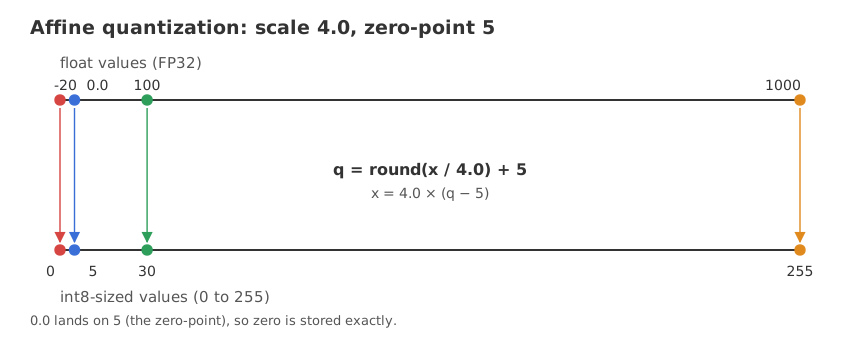
The scale and the zero-point
The scale is how many float units one integer step covers. The zero-point is the integer that stands for the float 0.0, so that zero is stored exactly. When the float range starts at 0, as in the first example, the zero-point is 0.
scale = (xmax - xmin) / (qmax - qmin)       # float units per integer step
zero = qmin - round(xmin / scale)            # the integer that means 0.0
Quantizing and dequantizing
q = np.clip(np.round(x / scale) + zero, qmin, qmax).astype(int)   # float -> integer
x_back = scale * (q - zero) # integer -> floatimport numpy as np
def quantize(x, xmin, xmax, qmin=0, qmax=255):
scale = (xmax - xmin) / (qmax - qmin)
zero = qmin - round(xmin / scale) # the integer that stands for 0.0
q = np.clip(np.round(np.asarray(x) / scale) + zero, qmin, qmax).astype(int)
return q, scale, zero
def dequantize(q, scale, zero):
return scale * (q - zero)
for lo, hi, probe in [(0, 1000, 250), (-20, 1000, -20)]:
q, s, z = quantize([probe, 0.0, hi], lo, hi)
back = dequantize(q, s, z)
print(f"range [{lo}, {hi}]: scale {s:.4f}, zero-point {z}")
print(f" {probe} -> {q[0]} -> {back[0]:.2f} 0.0 -> {q[1]} {hi} -> {q[2]}")
q, s, z = quantize(250, 0, 1000)
print("rounded scale 3.92 gives:", round(250 / 3.92), "from", round(250 / 3.92, 2))
print("exact scale gives:", round(250 / s, 2), "->", int(q), "-> dequantized", round(float(dequantize(q, s, z)), 2))range [0, 1000]: scale 3.9216, zero-point 0 250 -> 64 -> 250.98 0.0 -> 0 1000 -> 255 range [-20, 1000]: scale 4.0000, zero-point 5 -20 -> 0 -> -20.00 0.0 -> 5 1000 -> 255 rounded scale 3.92 gives: 64 from 63.78 exact scale gives: 63.75 -> 64 -> dequantized 250.98
Reading the two ranges
- Range 0 to 1000 has scale 3.9216 and zero-point 0. The video rounds the scale to 3.92 and gets 250 / 3.92 = 63.78, which rounds to 64. The exact scale gives 63.75, which also rounds to 64.
- 64 dequantizes to 250.98, not 250: the round trip loses 0.98. The error is at most half a step, 1.96 here.
- Range -20 to 1000 has scale 4.0000 and zero-point 5. The float -20 becomes 0, 0.0 becomes 5 and 1000 becomes 255, so the whole range uses all 256 integers.
- The zero-point is added after dividing. Without it, -20 / 4.0 = -5 would fall below 0, outside an unsigned integer.
Symmetric quantization to signed int8
Symmetric quantization fixes the zero-point at 0, as in the first range above, and for signed int8 maps [-a, a] onto [-127, 127], with a the largest absolute value, so the scale is a / 127. There is no zero-point to carry through the arithmetic, which makes the integer matrix multiply simpler; weights, which are spread roughly evenly around zero, are often quantized this way. Asymmetric quantization uses the zero-point to fit a skewed range tightly. The next block compares both on 10,000 numbers drawn between -20 and 1000.
import numpy as np

rng = np.random.default_rng(42)
x = rng.uniform(-20, 1000, 10_000)                    # skewed: more room above 0 than below

# asymmetric: [-20, 1000] -> [0, 255], zero-point 5
s_a = (x.max() - x.min()) / 255
z_a = -round(x.min() / s_a)
q_a = np.clip(np.round(x / s_a) + z_a, 0, 255)
err_a = np.abs(s_a * (q_a - z_a) - x)

# symmetric: [-a, a] -> [-127, 127], zero-point 0
a = np.abs(x).max()
s_s = a / 127
q_s = np.clip(np.round(x / s_s), -127, 127)
err_s = np.abs(s_s * q_s - x)

print(f"asymmetric: scale {s_a:.3f}, zero-point {z_a}, max error {err_a.max():.3f}")
print(f"symmetric : scale {s_s:.3f}, zero-point 0, max error {err_s.max():.3f}")
print(f"half a step: {s_a / 2:.3f} and {s_s / 2:.3f}")asymmetric: scale 3.999, zero-point 5, max error 1.999 symmetric : scale 7.874, zero-point 0, max error 3.936 half a step: 1.999 and 3.937
Both keep the error within half a step, 1.999 against 3.937. The asymmetric version has the smaller step, 3.999 against 7.874, because the symmetric one spends half of its 255 integers on negative values that barely occur in this data.
Why one outlier hurts and blocks help
One scale for a whole tensor is set by its largest value. A single outlier stretches the scale and every ordinary value is then rounded coarsely. Quantizing in small blocks, each with its own scale, confines the damage to one block. LLM weight formats such as the 4-bit ones in the next lessons work block by block, typically 64 weights to a block.
import numpy as np

rng = np.random.default_rng(0)
w = rng.normal(0, 0.02, 4096)                         # one row of weights
w[7] = 1.5                                            # a single outlier

def int8_roundtrip(v):
    s = np.abs(v).max() / 127
    return s * np.clip(np.round(v / s), -127, 127)

whole = int8_roundtrip(w)                             # one scale for all 4096 values
blocks = np.concatenate([int8_roundtrip(b) for b in w.reshape(-1, 64)])   # one scale per 64
print("mean error, one scale :", round(float(np.abs(whole - w).mean()), 6))
print("mean error, blocks of 64:", round(float(np.abs(blocks - w).mean()), 6))mean error, one scale : 0.002954 mean error, blocks of 64: 0.00014
The mean error is 0.002954 with one scale and 0.00014 with a scale per block of 64: the outlier at index 7 spoils the whole row in the first case and one block of 64 in the second.
Calibration, post-training quantization and quantization-aware training
Calibration is choosing the clipping range, x_min and x_max, that the scale is computed from. For weights the range comes from the weights themselves. For activations it comes from running sample data through the model and recording what the values do; common choices are the min and max, a percentile or an entropy-based range. The mapping itself is the quantization.
import numpy as np

rng = np.random.default_rng(1)
acts = np.concatenate([rng.normal(0, 1, 10_000), [40.0, -35.0]])   # sample activations with two outliers

def roundtrip(v, lo, hi):
    s = (hi - lo) / 255
    z = -round(lo / s)
    q = np.clip(np.round(v / s) + z, 0, 255)
    return s * (q - z)

bulk = acts[np.abs(acts) < 5]                         # the ordinary values
for name, lo, hi in [("min-max", acts.min(), acts.max()),
                     ("0.1th-99.9th percentile", *np.percentile(acts, [0.1, 99.9]))]:
    err = np.abs(roundtrip(bulk, lo, hi) - bulk).mean()
print(f"{name:24} range [{lo:6.2f}, {hi:6.2f}] mean error on ordinary values {err:.4f}")min-max range [-35.00, 40.00] mean error on ordinary values 0.0729 0.1th-99.9th percentile range [ -3.15, 3.25] mean error on ordinary values 0.0068
With two outliers in the sample, min-max gives the range -35.00 to 40.00 and a mean error of 0.0729 on the ordinary values. Percentiles give -3.15 to 3.25 and 0.0068. The price is that the two outliers are clipped to the edge of the range, so a range is a trade between rounding error and clipping error.
Post-training quantization (PTQ) takes a finished model, calibrates and converts it, with no further training. Quantization-aware training (QAT) puts the rounding into the forward pass during training, so the weights learn to survive it. LLM methods you will meet are PTQ methods such as GPTQ and AWQ, the LLM.int8() scheme that keeps outlier columns in 16-bit, and GGUF, the file format for quantized models in llama.cpp.
PTQ vs QAT
| Post-training quantization | Quantization-aware training | |
|---|---|---|
| Starts from | A trained model | A model being trained or fine-tuned |
| Training needed | None; a small calibration sample | A training run with the rounding in the forward pass |
| Cost | Minutes | As much as training |
| Accuracy at 4 bits and below | Drops more | Holds up better |
| Seen in | GPTQ, AWQ, GGUF, the 4-bit base of QLoRA | BitNet b1.58 (ternary weights in the forward pass) |
Where you use quantization
- Running a model locally. A 7B model that needs 14.0 GB at FP16 needs 3.5 GB of weights at 4 bits.
- Fine-tuning on a small GPU. QLoRA keeps the frozen base in 4-bit; see LoRA and QLoRA.
- Phones and edge devices. Smaller weights are the only way a large model runs there.
Related
- Previous: Project: a customer-support harness
- Next: 1-bit LLMs (BitNet b1.58)
- See also: LoRA and QLoRA
- In the scale example, change 250 to 999 and read the dequantized value and the error again.
- In the symmetric against asymmetric block, draw the data between -500 and 500 instead and compare the two max errors.
- In the outlier block, move the outlier from index 7 to index 4000 and run it again; only the block that holds it should change in the second line.
This is what real progress feels like.