
ReAct agents
A ReAct agent is an agent that repeats three steps, reasoning about what to do, acting by calling a tool, and observing the result, until it can answer.
Last updated: 08 Oct, 2026 · LangChain 1.4
An agent that calls one tool and stops can only answer questions with one lookup in them. Many questions need a second step that depends on the first: find a price, then multiply it. ReAct is the pattern that handles this, and create_agent from AI agents is built on it.
The video reaches the pattern from a mistake. Its chatbot graph is asked for the recent AI news and then to multiply 5 by 10. The model calls the search tool, the tool's output goes straight to the end of the graph, and only the first half of the question is answered. The clip shows why, and what changes.
Reason, act and observe
The name ReAct comes from a 2022 paper, ReAct: Synergizing Reasoning and Acting in Language Models. The clip lists the three terms as act, observe and reason. In the loop they run in this order:
- Reason. The model reads everything so far and decides what to do next: call a tool, or answer.
- Act. The model asks for a tool call and the tool runs.
- Observe. The tool result comes back and joins the messages. The model reads it and goes back to reasoning.
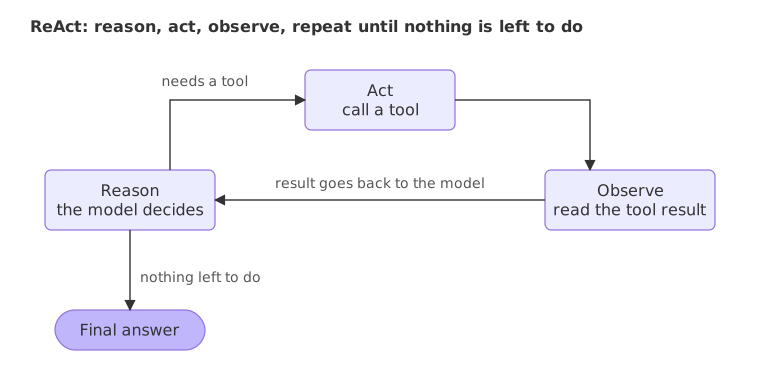
The loop ends when the model answers without a tool call. In the clip's example the model finds the news, then multiplies, then writes one answer that covers both parts. What stops the first graph from doing that is a single edge: the tool's output must return to the model, not to the end.
Building a ReAct agent with create_agent
The video builds the loop by hand in a graph, by changing one edge. The code here uses create_agent, which builds the same loop without writing the graph; the edge version is in LangGraph essentials. Older tutorials use create_react_agent from langgraph.prebuilt. That function is deprecated, and create_agent from langchain.agents replaces it.
Two tools where the second depends on the first
A shop catalogue gives get_price and a calculator gives multiply. The question "How much do 7 notebooks cost?" needs both, in order: the price first, then the product.
from langchain.tools import tool

PRICES = {"notebook": 45.0, "pen": 12.5, "bag": 650.0}

@tool
def get_price(item: str) -> float:
    """Get the price in rupees of one item from the shop catalogue: notebook, pen or bag."""
    return PRICES[item]

@tool
def multiply(a: float, b: float) -> float:
    """Multiply two numbers."""
    return a * b
The agent
The system prompt tells the model which tool to use for which job. Nothing forces a model to call a tool, and a short instruction makes it more likely.
from langchain.agents import create_agent

agent = create_agent(
    model="groq:openai/gpt-oss-120b",
    tools=[get_price, multiply],
    system_prompt="Use get_price for prices and multiply for every multiplication.",
)
Watching the loop run
Printing every message shows each pass: what the model asked for, and what came back.
question = "How much do 7 notebooks cost?"
result = agent.invoke({"messages": [{"role": "user", "content": question}]})

for message in result["messages"]:
    calls = [(c["name"], c["args"]) for c in message.tool_calls] if message.type == "ai" else []
print(message.type, "|", calls or message.content)human | How much do 7 notebooks cost?
ai | [('get_price', {'item': 'notebook'})]
tool | 45.0
ai | [('multiply', {'a': 7, 'b': 45})]
tool | 315.0
ai | The total cost for 7 notebooks is **₹ 315**.- Reason, then act. The first model message has no text, only a call to
get_pricewith{'item': 'notebook'}. - Observe. The tool message holds
45.0, the catalogue price. - Reason and act again. With the price in the messages, the model asks for
multiplywith 7 and 45. This second call depends on the first result, so the model could not have made it before the first tool ran. - Observe, then answer. The tool returns
315.0and the model writes the final message from it. The loop stopped because that last message holds no tool call.
Capping the loop with recursion_limit
Each pass through the model node and each pass through the tools node counts as one step. recursion_limit in the run's config sets the most steps one run may take, so an agent that keeps asking for tools cannot loop for ever. When the limit is reached before the agent finishes, LangGraph raises GraphRecursionError. A limit of 3 is too small for the two-tool question above:
from langgraph.errors import GraphRecursionError

try:
    agent.invoke({"messages": [{"role": "user", "content": question}]}, config={"recursion_limit": 3})
except GraphRecursionError as error:
    print(type(error).__name__)
print(str(error).splitlines()[0])GraphRecursionError Recursion limit of 3 reached without hitting a stop condition. You can increase the limit by setting the `recursion_limit` config key.
The run took a model step, a tools step and a second model step, then reached the limit before the second tool call could run. The error names the config key to raise. Choose a limit that fits the longest honest run of the task; a small multiple of the expected number of steps is a sensible safety net.
One tool call vs the ReAct loop
| Tool result goes to the end | Tool result goes back to the model | |
|---|---|---|
| Steps | Model, tool, stop | Model, tool, model, and again as needed |
| Two-step question | Only the first step is done | Each step is done in turn |
| Final message | The tool's output | The model's answer |
| Cost | Fewer model calls | One model call per pass |
LangGraph essentials builds both versions by hand, with one changed edge between them, and runs them side by side.
Where you use ReAct agents
- Chained lookups. Find a customer, then their latest order, then the refund rule for that order.
- Lookup then calculation. A price, a rate or a balance followed by arithmetic on it.
- Questions with an unknown number of steps. Research tasks where each result decides what to ask next.
recursion_limit, and read the message list when an answer looks off.Related
- Previous: Tool calling
- Next: Agent memory
- See also: Agent loop in the LangGraph course
- Reference: ReAct: Synergizing Reasoning and Acting in Language Models
- Ask
"What do 3 pens and 2 bags cost together?"and count the tool calls. On Groq, gpt-oss asks for one tool per reply, so more steps mean more rounds. - Raise
recursion_limitto 6 for the capped example and run it again. The run finishes. - Remove the system prompt and ask the same question. Check whether the agent still calls
multiply.
Slow is fine. Stopping is the only problem.