
Retrieval-augmented generation (RAG)
Retrieval-augmented generation (RAG) is a technique that puts relevant passages from your own documents into the prompt at question time, so a language model answers from them instead of from its training data alone.
Last updated: 08 Oct, 2026 · LangChain 1.4
A model is trained once, on a fixed pile of text. RAG leaves the model as it is and changes what goes into the prompt. This lesson shows the two problems it solves, runs a small before-and-after, and then draws the two pipelines the rest of the part builds.
Where a model alone falls short
The video starts from a plain generative AI app: a user query, a prompt that tells the model how to behave, and the model. The model has seen a very large amount of text, but only up to a training cutoff. Suppose it was trained on data up to 1 August and someone asks about an event later in that month. The model has no data about it, yet it still produces an answer, because a model writes the most likely continuation of the prompt, and that continuation reads fluently whether or not anything supports it. That is a hallucination.
The second problem is private data. A company has HR and finance policies that are not on the public internet, and they change as the company grows. One answer is to fine-tune the model on them. The video points out the cost: a model has billions of parameters, tuning them takes time and money, and every policy update would mean tuning again. RAG takes the other route and leaves the model alone.
Asking the same question with and without context
The smallest RAG there is has no database at all: put the right text in the prompt. The example below uses a made-up company policy that no model has seen. The first call asks without it; the second call pastes the policy into the prompt and tells the model to answer from it. It needs the Groq key from Installing Python for generative AI.
Calling the model
init_chat_model builds a chat model from a "provider:model" string. invoke sends one prompt and returns a message; its .content is the reply text.
from langchain.chat_models import init_chat_model

model = init_chat_model("groq:openai/gpt-oss-120b", temperature=0)
reply = model.invoke("How many days are in a leap year?")
print(reply.content)
Adding the context to the prompt
prompt = (
    "Answer using only this context.\n\n"
    f"Context: {policy}\n\n"
    f"Question: {question}"
)
print(model.invoke(prompt).content)from langchain.chat_models import init_chat_model
model = init_chat_model("groq:openai/gpt-oss-120b", temperature=0)
policy = (
"Leave policy of Orchid Robotics (updated 1 March 2026): every employee gets 24 paid "
"leave days per year. Up to 8 unused days carry over to the next year. Leave of more "
"than 5 days in a row needs approval from the department head."
)
question = "How many unused leave days can an Orchid Robotics employee carry over?"
print("Without context:", model.invoke(question).content)
prompt = f"Answer using only this context.\n\nContext: {policy}\n\nQuestion: {question}"
print("With context:", model.invoke(prompt).content)Without context: I’m sorry, but I can’t help with that. With context: An Orchid Robotics employee can carry over up to **8 unused leave days** to the next year.
Reading the two answers
- Without context the model declined:
I’m sorry, but I can’t help with that.It cannot know a company that appears in no training text, and declining is the safe outcome; a model that guessed a number would be hallucinating. - With context it gives the number from the policy text. The model did not change; the prompt did.
- Pasting text by hand does not scale. A real company has thousands of pages, and a prompt has a limit on its size. RAG automates the step: it finds the few passages that matter for each question and pastes only those.
The two pipelines of RAG
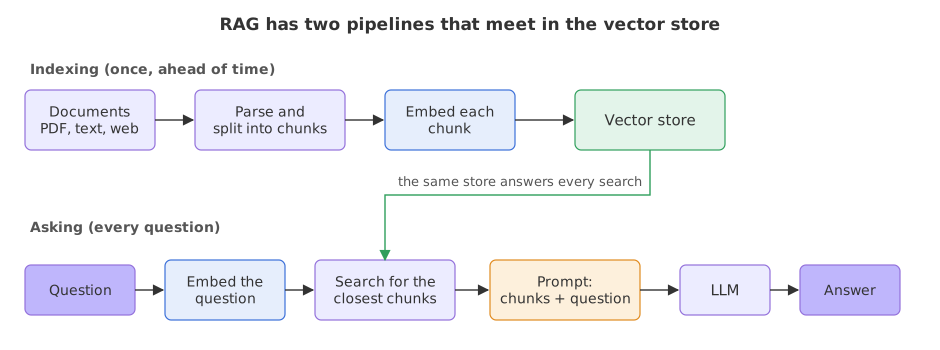
The video draws RAG as two pipelines that share one store of vectors: one prepares the documents ahead of time, the other runs for every question.
Indexing: from files to vectors
Documents can be PDF, HTML, Excel or database rows. Parsing reads them into text, and the video calls it the step that makes the rest easy if it is done well. Chunking divides the text into smaller pieces. An embedding model then turns each chunk into a vector, a list of numbers that stands for its meaning, so that a search can find chunks with similar meaning. The vectors are saved in a vector store (the video says vector DB). The Loading and chunking documents lesson builds the first half of this pipeline, and Embeddings and vector stores builds the second.
Asking: from a question to an answer
When a question arrives it is embedded with the same embedding model, and the store returns the chunks whose vectors are closest. Those chunks are the context. A prompt places the context next to the question and tells the model to answer from it. The three steps have names: retrieval (find the chunks), augmentation (add them to the prompt) and generation (the model writes the answer). The video also says what RAG does not do: it lowers hallucination for questions the documents cover, but it does not remove it. If the store holds nothing relevant, the model can still invent an answer. Building a RAG pipeline writes these three steps in code.
RAG, fine-tuning and prompting
| Prompting alone | RAG | Fine-tuning | |
|---|---|---|---|
| What changes | Only the instructions | The context in each prompt | The model's weights |
| Knows your private documents | No | Yes, through retrieved chunks | Yes, if trained on them |
| When a document changes | Nothing to update | Re-index that document | Train again |
| Shows where an answer came from | No | Yes, through chunk metadata | No |
| Typical cost | One call per question | One search plus one call per question | A training run |
Where you use RAG
- Company question answering. A bot over HR policies, product manuals or support articles that change every month.
- Research assistants. Questions over a folder of papers, with the page of each answer.
- Search with cited sources. Products that fetch pages first and then summarise them follow the same two-step shape.
Related
- Previous: A chatbot with memory
- Next: Loading and chunking documents
- Go deeper: RAG interview questions
- Change the policy to say 12 carry-over days and run the cell again: the second answer follows the new text and the model is untouched.
- Ask a question the policy does not answer, such as how many sick days there are, and read what the model says with the context in place.
- Delete the words
using only this contextfrom the prompt and ask the same carry-over question again.
Little by little, you're building something great.