
A chatbot with memory
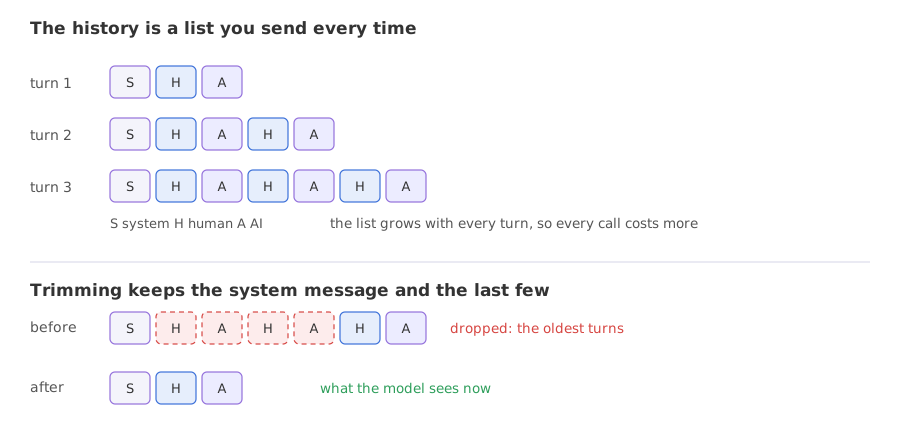
A chatbot with memory keeps the conversation so far as a list of messages and sends the whole list, or a trimmed or summarised version of it, with every new question.
Last updated: 08 Oct, 2026 · LangChain 1.4 · LangGraph 1.2
The chat loop in Your first LLM app forgot the first question as soon as it answered. This lesson fixes that with the history list from Messages and prompts, then deals with the next problem: a history grows with every turn.
Seeing that a model remembers nothing
Each invoke is a separate request. The model receives only what is in that request, and nothing from the calls before it.
from langchain.chat_models import init_chat_model

model = init_chat_model("groq:openai/gpt-oss-120b", temperature=0)

print(model.invoke("My name is Priya.").text)
print(model.invoke("What is my name?").text)Nice to meet you, Priya! How can I assist you today? I don’t have any information about your name. If you’d like me to address you a certain way, just let me know!
The first call was answered politely. The second, which asks for the name, got I don’t have any information about your name. The second request contained only the question, so the model had nothing to answer from.
Keeping a history list
Memory is a list that you keep and send. Each turn appends the user's message, calls the model with the whole list, and appends the reply. The first message is a SystemMessage that stays at the front.
history = [SystemMessage("You are a concise assistant.")]

def chat(text):
    history.append(HumanMessage(text))   # the user's message joins the list
    reply = model.invoke(history)        # the model sees every message so far
    history.append(reply)                # the reply joins the list too
return replyfrom langchain.chat_models import init_chat_model
from langchain.messages import HumanMessage, SystemMessage
model = init_chat_model("groq:openai/gpt-oss-120b", temperature=0)
history = [SystemMessage("You are a concise assistant.")]
def chat(text):
history.append(HumanMessage(text))
reply = model.invoke(history)
history.append(reply)
return reply
for text in ["My name is Priya and I live in Pune.", "I like chess.", "What is my name?"]:
reply = chat(text)
print(f"{len(history):>2} messages | {reply.usage_metadata['input_tokens']:>3} input tokens | {reply.text}")3 messages | 91 input tokens | Nice to meet you, Priya! How can I assist you today? 5 messages | 120 input tokens | That’s great! Do you have a favorite opening or a particular aspect of the game you enjoy most? 7 messages | 156 input tokens | Your name is Priya.
The third question was answered correctly, Your name is Priya., because the whole history went with it. The message count grows by two every turn: 3, 5 and 7. The input tokens grow too: 91, then 120, then 156, because each call sends everything so far again. The last question cost the tokens of the whole conversation, not of one question.
Trimming the history
A history that grows without limit eventually costs too much, slows every call and can exceed the model's context window, the most text it accepts in one request. trim_messages cuts a list down to a budget. strategy="last" keeps the most recent messages, include_system=True keeps the system message at the front, and start_on="human" makes sure the trimmed list starts with a human message, so that no reply is left without its question.
The budget is counted by token_counter. Passing len counts each message as one, so max_tokens=4 means four messages. For a real token budget, pass count_tokens_approximately from langchain_core.messages.utils, which estimates tokens from the text.
from langchain.messages import trim_messages

kept = trim_messages(
    history,
    max_tokens=4,            # four messages, because the counter is len
    strategy="last",
    token_counter=len,
    include_system=True,
    start_on="human",
)
Trimming and summarising an eight-message history
Trimming drops information. Here the name was given in the first turn and the budget keeps only the end of the conversation. The example compares three answers to the same question: with the full history, with the trimmed one, and with the older turns replaced by a one-sentence summary that the model writes. The summary goes in as a human message that starts Here is a summary of the conversation to date, the form the video's SummarizationMiddleware produces.
from langchain.chat_models import init_chat_model
from langchain.messages import AIMessage, HumanMessage, SystemMessage, trim_messages

model = init_chat_model("groq:openai/gpt-oss-120b", temperature=0)
history = [
    SystemMessage("You are a concise assistant."),
    HumanMessage("My name is Priya and I live in Pune."),
    AIMessage("Nice to meet you, Priya."),
    HumanMessage("I like chess."),
    AIMessage("Chess is a great game."),
    HumanMessage("I have a dog called Bruno."),
    AIMessage("Bruno is a lovely name."),
    HumanMessage("What is my name?"),
]

kept = trim_messages(history, max_tokens=4, strategy="last", token_counter=len, include_system=True, start_on="human")
print([m.type for m in kept])

older = history[1:5]                     # the turns the trim drops
summary = model.invoke([SystemMessage("Summarise the conversation in one sentence."), *older]).text
compact = [history[0], HumanMessage(f"Here is a summary of the conversation to date: {summary}"), *history[5:]]

print("summary   :", summary)
print("full      :", model.invoke(history).text)
print("trimmed   :", model.invoke(kept).text)
print("summarised:", model.invoke(compact).text)['system', 'human', 'ai', 'human'] summary : Priya from Pune introduced herself and shared that she enjoys playing chess. full : Your name is Priya. trimmed : I don’t have enough information to know your name. If you’d like to share it, feel free! summarised: Your name is Priya.
kept holds four messages: the system message, then human, AI and human, which are the dog turn and the question. The name was in the first turn, and the budget dropped it. The summary the model wrote from the four dropped messages was Priya from Pune introduced herself and shared that she enjoys playing chess., so it carries the name, the city and the hobby in one sentence. The three answers differ. With the full history the model answered Your name is Priya. With the trimmed list it said it did not have enough information to know the name. With the summary it answered Your name is Priya. again, at the price of one extra model call. A summary keeps only what the summarising model chose to keep, so the instruction that asks for it should name what matters.
Saving a conversation per user with a checkpointer
Keeping the list in a variable works for one user in one process. An agent can save it for you. create_agent, which AI agents covers, wraps a model in a loop; with no tools it is a model that can store its messages. A checkpointer saves the message list after each call, and the thread_id in the config says which conversation a call belongs to. InMemorySaver keeps the saved lists in memory, so they are lost when the program stops.
from langgraph.checkpoint.memory import InMemorySaver

agent = create_agent(model, tools=[], system_prompt="You are a concise assistant.", checkpointer=InMemorySaver())
config = {"configurable": {"thread_id": "priya"}}   # one id per conversation
agent.invoke({"messages": [{"role": "user", "content": "My name is Priya."}]}, config)from langchain.agents import create_agent
from langchain.chat_models import init_chat_model
from langgraph.checkpoint.memory import InMemorySaver
model = init_chat_model("groq:openai/gpt-oss-120b", temperature=0)
agent = create_agent(model, tools=[], system_prompt="You are a concise assistant.", checkpointer=InMemorySaver())
def say(text, thread):
config = {"configurable": {"thread_id": thread}}
result = agent.invoke({"messages": [{"role": "user", "content": text}]}, config)
return len(result["messages"]), result["messages"][-1].text
print("priya:", say("My name is Priya and I live in Pune.", "priya"))
print("priya:", say("What is my name?", "priya"))
print("sam :", say("What is my name?", "sam"))
print("priya:", say("Where do I live?", "priya"))priya: (2, 'Nice to meet you, Priya! How can I assist you today?') priya: (4, 'Your name is Priya.') sam : (2, 'I don’t have that information. Could you tell me your name?') priya: (6, 'You live in Pune.')
Thread priya remembers across calls: the second call returned Your name is Priya. with a message count of 4, because the checkpointer had stored the first turn and added the new pair. Thread sam started with nothing: 2 messages, and a question about the name that the model could not answer. Back on priya, the last call answered You live in Pune. with 6 messages. Each thread_id is its own conversation.
Trimming inside the agent
A checkpointer saves everything, so a long conversation grows without limit there as well. A before_model hook is a function that runs before each model call and may edit the stored messages. It receives state, a dictionary whose "messages" entry is the stored list, and runtime, which this hook does not use. Returning None changes nothing. Returning RemoveMessage(id=REMOVE_ALL_MESSAGES) followed by messages replaces the whole stored list with those messages. The hook is passed to create_agent in middleware=[...].
@before_model
def keep_last_four(state, runtime):
    messages = state["messages"]
    if len(messages) <= 4:
        return None                  # nothing to change
return {"messages": [RemoveMessage(id=REMOVE_ALL_MESSAGES), *messages[-4:]]}from langchain.agents import create_agent
from langchain.agents.middleware import before_model
from langchain.chat_models import init_chat_model
from langchain.messages import RemoveMessage
from langgraph.checkpoint.memory import InMemorySaver
from langgraph.graph.message import REMOVE_ALL_MESSAGES
@before_model
def keep_last_four(state, runtime):
messages = state["messages"]
if len(messages) <= 4:
return None
return {"messages": [RemoveMessage(id=REMOVE_ALL_MESSAGES), *messages[-4:]]}
model = init_chat_model("groq:openai/gpt-oss-120b", temperature=0)
agent = create_agent(model, tools=[], middleware=[keep_last_four], checkpointer=InMemorySaver())
config = {"configurable": {"thread_id": "t1"}}
for text in ["My name is Priya.", "I live in Pune.", "I like chess.", "I have a dog called Bruno.", "What is my name?"]:
result = agent.invoke({"messages": [{"role": "user", "content": text}]}, config)
print(len(result["messages"]), "messages |", result["messages"][-1].text[:60].replace("\n", " "))2 messages | Nice to meet you, Priya! How can I assist you today? 4 messages | Great! Pune is a wonderful city with a rich blend of culture 5 messages | That’s awesome! Chess is such a fantastic mix of strategy, c 5 messages | That’s wonderful—Bruno sounds like a great companion! 🐾 * 5 messages | I don’t have that information—could you let me know what you
The message counts show the hook at work: 2, 4, then 5, 5 and 5. Once the stored list holds more than four messages, each call keeps the last four, and the reply makes five. The first turn, which held the name, was cut on the third call. By the fifth question the model said it did not have the name. Trimming kept the list at a fixed size and lost the name, the same trade-off as in the trimming example.
Keeping all messages vs trimming vs summarising
| Keep everything | Trim | Summarise | |
|---|---|---|---|
| What the model sees | Every message | The system message and the latest few | A summary plus the latest few |
| Cost per call | Grows every turn | Stays flat | Stays flat, plus one extra call to write the summary |
| What is lost | Nothing, until the context window is full | Everything older than the window | Detail: only what the summary kept |
| Use it for | Short conversations | Chats where only recent turns matter | Long conversations where early facts matter |
Where you use conversation memory
- A support bot: the customer's name and order stay in the history for the whole chat.
- A tutor or coach: earlier answers shape the next explanation.
- Many users at once: one
thread_idper user or conversation keeps their histories apart.
InMemorySaver keeps conversations in the memory of the running program, so a restart erases them. Use a database-backed checkpointer when conversations must survive a restart. Memory also stores everything the user typed, so decide what you are allowed to keep before you save it.Related
- Previous: Structured output
- Next: Retrieval-augmented generation (RAG)
- Go deeper: Short-term memory, Trim and remove messages and Summarization; the video's agent demos summarise automatically with
SummarizationMiddleware
- Change
max_tokens=4tomax_tokens=8in the trimming example. Which messages stay, and does the trimmed answer change? - In the thread example, give the thread
samits own first message and ask both threads where they live. - Change both 4s in the hook to 10 and run the five questions again. Does the model remember the name now?
Every expert started right here.