
Loop engineering
Loop engineering is the design of an agent's retry-and-improve cycle: the agent produces work, a check judges it, the problems go back as feedback, and the agent tries again until the goal is met.
Last updated: 08 Oct, 2026 · LangChain 1.4
The agents in AI agents read a request, use tools and answer once. That is enough for a simple question and risky for a task with many requirements, because nothing checks the answer before the user sees it. Loop engineering adds that check, and a way back when the check fails.
Why one answer is not enough
The video starts from the agent most people build first: input goes in, the model reasons and picks tools, an output comes out. It calls this a one-shot agent, because the input goes straight to the output and nothing verifies the result.
The video's analogy is a student and a teacher. The student does a task, takes it to the teacher, and gets feedback: this part is wrong, or the work is fine and approved. A student who gets work marked learns far more than one who hands it in and never hears back. An agent without a verification layer is in the second position.
Coding agents such as Claude Code, Copilot, Cursor and Codex work the other way. After writing code they check whether it runs before they hand it over, because buggy code is worse than no code. The check is a separate step after the agent: the output goes to a verifier. If the output is fine, it is returned. If not, the verifier writes feedback and the feedback goes back to the agent. This cycle is the agentic loop.
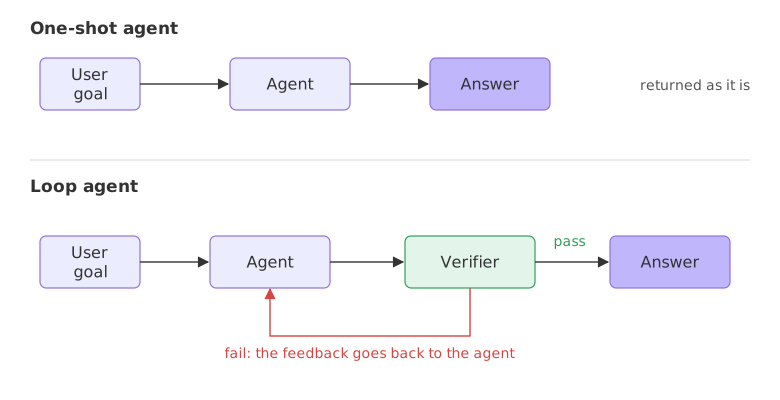
Nothing here replaces the agent. The video's own summary is that it is the same agent concept with a looping idea added: the output of one attempt is not trusted, it is checked.
Answering once or checking and improving
A normal call answers once and stops. The loop version generates, checks, improves and repeats. The video's example is a customer support reply. A person writes in, frustrated that they cannot find a job, and asks for career guidance. A reply of "I can't help you with that" has the wrong tone. A non-loop agent writes whatever it writes and stops, so the tone problem reaches the customer. With a verifier, the reply is checked against the customer's situation before it goes out, and a bad one is sent back for another attempt.
The rule of thumb from the slides is short: answer once is risky, check and improve is more reliable. A loop is not always needed. A trip-idea agent that only suggests places and food needs no verifier, and a coding agent does, so the problem decides.
Writing a one-shot call and a loop in Python
The task here is the support reply from the video, with an order. The reply must mention the order number, apologise, offer a replacement and stay under 45 words. The verifier is plain Python, and it has one rule the prompt never states: the reply must be ready to send, with no [placeholder] left in it. That is how a real verifier behaves, since a check usually knows more than the first prompt.
The task and the model
temperature=0 keeps the replies as steady as the model allows, and the model here is a small one on Groq, so the loop has something to catch.
import re
from langchain.chat_models import init_chat_model

llm = init_chat_model("groq:openai/gpt-oss-20b", temperature=0)
TASK = ("Write a customer support reply for order #48213. The customer received a "
        "cracked mug. Apologise, offer a replacement and keep it under 45 words.")
The verifier
check returns a list of problems. An empty list means the reply passes. Each problem is written as an instruction, so it can go straight back to the model as feedback.
def check(text):
    problems = []
    if "48213" not in text:
        problems.append("mention order 48213")
    if "sorry" not in text.lower() and "apolog" not in text.lower():
        problems.append("apologise")
    if "replacement" not in text.lower():
        problems.append("offer a replacement")
    if re.search(r"\[[^\]]+\]", text):
        problems.append("remove the [placeholder]; the reply must be ready to send")
    if len(text.split()) >= 45:
        problems.append(f"shorten it to under 45 words (it has {len(text.split())})")
    return problems
Asking the model
ask takes a list of messages and returns the reply text with the tokens the call used. The messages are (role, text) pairs, and usage_metadata is where LangChain reports the token count.
def ask(messages):
    reply = llm.invoke(messages)
    return reply.content, reply.usage_metadata["total_tokens"]
Running the one-shot call, then the loop
The loop starts from the one-shot reply. If the check finds problems, the loop adds the draft and the problems to the conversation, asks again, and checks again, for at most three attempts.
first, one_shot_tokens = ask(TASK)
print("ONE SHOT:", first)
print("problems:", check(first))
print("tokens:", one_shot_tokens)
print()

draft, total = first, one_shot_tokens
messages = [("user", TASK)]
for attempt in range(1, 4):                      # at most 3 attempts
    problems = check(draft)
    print(f"attempt {attempt}: {problems if problems else 'passed'}")
    if not problems or attempt == 3:
        break
    messages += [("assistant", draft),
                 ("user", "Fix these problems and return only the new reply: " + "; ".join(problems))]
    draft, used = ask(messages)
    total += used
print("LOOP:", draft)
print("tokens in total:", total)ONE SHOT: Hi [Name], we’re sorry you received a cracked mug for order #48213. We’ll ship a replacement right away. Please return the damaged item at no cost. Thank you for your patience. problems: ['remove the [placeholder]; the reply must be ready to send'] tokens: 474 attempt 1: ['remove the [placeholder]; the reply must be ready to send'] attempt 2: passed LOOP: Hi, we’re sorry you received a cracked mug for order #48213. We’ll ship a replacement right away. Please return the damaged item at no cost. Thank you for your patience. tokens in total: 1129
What the run shows
- The one-shot reply was almost right. It names order #48213, apologises and offers a replacement, but it opens with
Hi [Name]. A reply with a placeholder cannot be sent, andcheckfound that one problem. - One round of feedback fixed it. The problem went back to the model in one sentence, and attempt 2 passed: the same reply with the placeholder gone.
- The fix has a price. The one-shot call used 474 tokens and the loop used 1129 in total, because the second call carries the conversation so far, the draft and the problem list, as well as the new reply.
One-shot agent vs loop agent
| One-shot agent | Loop agent | |
|---|---|---|
| Calls the model | Once | Once per attempt, up to the limit |
| Checks the result | No | After every attempt |
| Cost | Lowest | Higher: every retry spends tokens |
| Speed | Fastest | Slower: waits for each retry |
| Best for | Simple, low-risk answers | Tasks with several requirements, code, plans |
Where you use loop engineering
- Coding agents. Write the code, run the tests, read the errors, fix, run again.
- Writing agents. A reviewer checks the draft against a style guide before it goes out.
- Planning agents. A check confirms the plan fits the budget and the dates before it is shown.
Related
- Previous: Project: a research agent
- Next: Verifiers and stop conditions
- Go deeper: Loops and recursion limit
- Change
45to30in the task and incheck, and read how the loop reacts to a tighter limit. - Add a rule to
checkthat the reply must contain the wordrefundorreplacement, then run it again. - Change
range(1, 4)torange(1, 2)and see what the loop returns when it is allowed one attempt only.
Little by little, you're building something great.