
LangChain essentials
LangChain is an open-source Python framework that gives every model provider the same interface, so you write messages, prompts, tools and agents once and change only a model string to move from Groq to Gemini or any other provider.
Last updated: 08 Oct, 2026 · LangChain 1.4 · LangGraph 1.2
The first part placed generative AI, agents and agentic AI side by side. LangChain is the toolkit the rest of the course builds them with. This lesson lists what it contains, so that every later lesson can use one piece without a detour.
What LangChain covers in version 1
The video opens its LangChain chapter at the documentation. The docs hold three modules, LangChain, LangGraph and Deep Agents, and the LangChain part changed a lot in version 1: how to create agents, how to connect several different models, how to call a tool, how to get structured output, the message types (AI message, human message, tool message), short-term memory, streaming, middleware and guardrails. The second part of this course takes those topics one at a time, with the same calls the video uses.
LangChain, LangGraph and Deep Agents
The LangChain docs describe how the three libraries relate:
| Library | What it is for | Where this course uses it |
|---|---|---|
| LangChain | create_agent, a minimal and customisable agent harness built from a model, tools, a prompt and middleware | Every model call, and the agents in AI agents |
| LangGraph | Low-level orchestration: steps that share state, with memory, pauses and branches. LangChain agents run on it | LangGraph essentials |
| Deep Agents | A batteries-included agent with planning, a virtual file system and subagents, built on LangChain agents | Deep agents |
| LangSmith | Tracing, debugging and evaluating agents built with any of the three | Not needed to follow the lessons |
The packages behind the imports
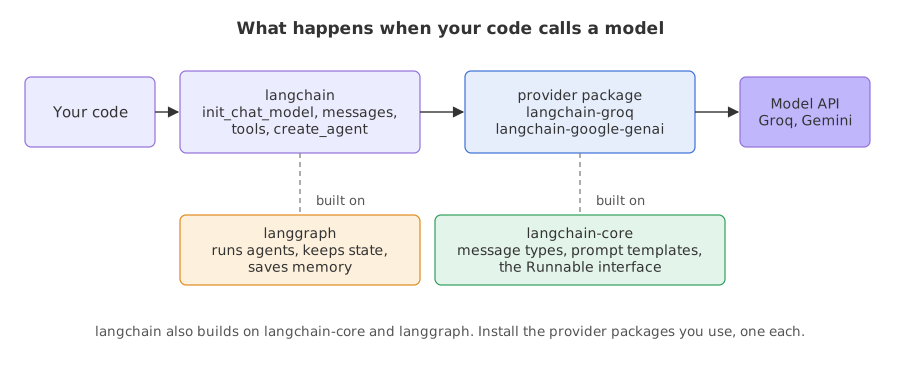
LangChain is split into packages so that you install only the integrations you use. The install docs call them independent provider packages: one for Groq, one for Google, and so on. What the langchain package itself needs can be read from the installed metadata.
from importlib.metadata import requires

for requirement in requires("langchain"):
    if "extra ==" not in requirement:    # skip the optional provider extras
print(requirement)langchain-core<2.0.0,>=1.6.3 langgraph<1.3.0,>=1.2.11 pydantic<3.0.0,>=2.7.4
langchain declares three requirements: langchain-core, langgraph and pydantic. Everything else is a separate package:
| Package | What it holds | Where it appears |
|---|---|---|
langchain | init_chat_model, the message classes, @tool, create_agent, middleware | Installed in Installing Python for generative AI |
langchain-core | The base classes: messages, prompt templates, output parsers, the Runnable interface | Comes with langchain |
langchain-groq | ChatGroq, the chat model for models hosted on Groq | Installed in the setup lesson |
langchain-google-genai | ChatGoogleGenerativeAI and GoogleGenerativeAIEmbeddings for Gemini | Installed in the setup lesson |
langgraph | The runtime that executes agents and graphs and saves their memory | Comes with langchain |
langchain-text-splitters | Classes that split long text into chunks | The RAG lessons |
langchain-community | Document loaders and many third-party integrations | The RAG lessons |
langchain-community emits a deprecation warning on import saying that it is being sunset in favour of standalone integration packages. The lessons that load documents and stores name the package each import comes from.
Choosing a model with init_chat_model
The video loads its keys with python-dotenv, then imports init_chat_model, which it describes as one of the functions used to initialise any kind of chat model, and passes a model name. The video's first model is an OpenAI model, which needs a paid key and the langchain-openai package. This course passes a Groq model instead, and the rest of the code stays the same.
Syntax: one string holds the provider and the model name, and extra settings follow as keyword arguments.
from langchain.chat_models import init_chat_model

model = init_chat_model("<provider>:<model name>", temperature=0)
reply = model.invoke("a string, or a list of messages")
print(reply.text)| Model string | Package it needs | Class it returns | Key |
|---|---|---|---|
groq:openai/gpt-oss-120b | langchain-groq | ChatGroq | GROQ_API_KEY |
google_genai:gemini-2.5-flash-lite | langchain-google-genai | ChatGoogleGenerativeAI | GOOGLE_API_KEY |
Write the provider prefix every time. Without it, LangChain guesses the provider from the start of the name, and a guess can pick the wrong one. A provider whose package is not installed raises an ImportError.
Messages and the reply
A chat model takes messages in and returns one message out. There are four kinds, and a plain string passed to invoke is treated as a single human message.
- SystemMessage tells the model how to behave.
- HumanMessage carries what the user said.
- AIMessage is what the model returned: text, any tool calls it asked for, and token counts.
- ToolMessage carries the result of a tool call back to the model.
Messages and prompts builds each of them. The reply is always an AIMessage, and reply.text is its text.
Runnables and the pipe operator
Chat models, prompt templates and output parsers are all runnables. Each one has invoke for one input, stream for chunks as they arrive and batch for several inputs, and the pipe operator | joins runnables so that the output of one is the input of the next. A prompt template that fills in values, a model, and a parser that returns the reply's text as a string make a chain of three.
from langchain.chat_models import init_chat_model
from langchain_core.output_parsers import StrOutputParser
from langchain_core.prompts import ChatPromptTemplate

model = init_chat_model("groq:openai/gpt-oss-120b", temperature=0)
print(type(model).__module__, type(model).__name__)

prompt = ChatPromptTemplate.from_messages([("system", "Answer in {language}."), ("human", "{question}")])
chain = prompt | model | StrOutputParser()
print(chain.invoke({"language": "French", "question": "Say good morning."}))langchain_groq.chat_models ChatGroq Bonjour ! 🌞
Reading the chain
- The first line shows that
init_chat_modelreturned the provider's own class, from thelangchain-groqpackage. LangChain is the shared interface; the provider package does the talking. - The second line is the chain's answer, a French greeting. The values in the dictionary filled the
{language}and{question}slots, the model replied, andStrOutputParserturned the reply message into plain text.
Importing from the right package
Many older tutorials and notebooks import from modules that no longer exist in LangChain 1.x. The error is the first sign that a snippet was written for an older release.
from langchain.text_splitter import RecursiveCharacterTextSplitterTraceback (most recent call last):
File "main.py", line 1, in <module>
from langchain.text_splitter import RecursiveCharacterTextSplitter
ModuleNotFoundError: No module named 'langchain.text_splitter'The text splitters live in their own package now:
from langchain_text_splitters import RecursiveCharacterTextSplitter

print(RecursiveCharacterTextSplitter.__module__)langchain_text_splitters.character
The same move happened to langchain.document_loaders, which became langchain_community.document_loaders, and to langchain.prompts and langchain.schema, whose contents are in langchain_core and langchain.messages.
Where each piece is taught
| LangChain piece | What it does | Taught in |
|---|---|---|
init_chat_model, invoke | Create a model and call it | Your first LLM app |
SystemMessage, HumanMessage, ChatPromptTemplate | Build the input | Messages and prompts |
stream, batch | Chunks as they arrive; several questions at once | Streaming and batch |
with_structured_output | Get a typed object instead of text | Structured output |
trim_messages, InMemorySaver, thread_id | Conversation memory | A chatbot with memory |
| Loaders, text splitters | Read files and cut them into chunks | Loading and chunking documents |
| Embeddings, vector stores | Search by meaning | Embeddings and vector stores |
Document, retrievers | Text with metadata, and a search over a store that returns documents | Building a RAG pipeline |
@tool, tool calls | Let the model ask for a function | Tool calling |
create_agent | A model that loops over tools | AI agents and ReAct agents |
| Summarisation and approval middleware | Memory limits and a human check | Agent memory and Human in the loop |
| LangGraph graphs | Custom flows with shared state | LangGraph essentials |
LangChain vs calling a provider's own SDK
| LangChain | A provider's own SDK | |
|---|---|---|
| Switching provider | Change the model string | Rewrite the calls in that provider's format |
| Message format | One set of message classes for every provider | Each provider has its own dictionaries |
| Tools, agents, memory | Included | You write the loop |
| Control and size | One more layer to learn, and versions move | Fewer layers, tied to one provider |
Where you use LangChain
- Switching models: try the same prompt on Groq and on Gemini by changing one string.
- Building agents:
create_agentgives a tool-calling loop with memory and approval steps ready to configure. - Connecting your data: loaders, splitters, embeddings and vector stores share one interface.
Related
- Previous: How LLMs are built
- Next: Your first LLM app
- Reference: LangChain overview
- Go deeper: LangChain
- Change the model string in the chain to
groq:openai/gpt-oss-20band run it again. What changes in the answer, and what stays the same? - Change
FrenchtoSpanishin the dictionary passed tochain.invoke. - Remove
| StrOutputParser()from the chain and print the result. Which type do you get now?
Every expert started right here.