
LangGraph essentials
LangGraph is a library for building agent workflows as graphs: a shared state, nodes that are functions that update it, and edges that decide which node runs next.
Last updated: 08 Oct, 2026 · LangGraph 1.2 · LangChain 1.4
The agents in the last lessons came from create_agent, which hands back a graph already built: a model node and a tools node. Building a graph by hand lets you add steps that the ready-made one has no place for, such as a supervisor that picks who works next, a pause for a person, or a step that writes a report. The pieces are state, nodes, edges, conditional edges, tools_condition and a checkpointer with a thread id.
The graph, its nodes, its edges and its state
The video explains the pieces with a task of its own: turn a YouTube video into a blog post. The work has three steps. Take the transcript out of the video. Write a title from the transcript. Write the blog content from the title and the transcript. Each step becomes a node, the arrows between them are edges, and the transcript, title and content are variables that live in the state.
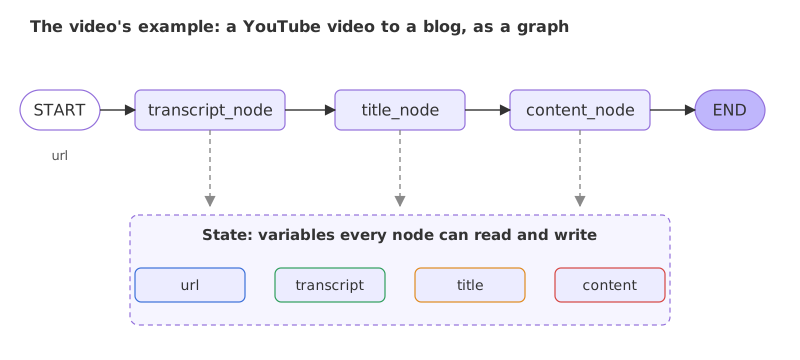
In the clip the title and content steps each call a model with a prompt, and the transcript step uses a YouTube loader. The code below uses plain functions in those places, so every run gives the same output and the graph's mechanics are easy to see. A later example puts a real model inside a node.
- Node. A function that does one piece of the work. It takes the state and returns the part of the state it changed.
- Edge. The flow of information from one node to the next. It names the node to run after this one.
- State. The variables every node can read and write. A node writes its output into the state, and the next node reads it from there.
The video notes that this shared state is what makes it a state graph, and that it is not the same thing as a chatbot's memory across conversations, which comes at the end of this lesson.
Writing the state
The state is a schema: the names of its variables and their types. LangGraph reads it from a TypedDict, which is a plain dictionary with named, typed keys. The video's blog state has four.
from typing_extensions import TypedDict

class BlogState(TypedDict):
    url: str
    transcript: str
    title: str
    content: str
A node does not have to return all four keys. It returns a dictionary with the keys it changed, and LangGraph merges that into the state.
Reducers decide how an update is merged
By default an update replaces the old value of its key. A reducer changes that: it is a function that combines the old value with the update. The video needs this for a chatbot, where each new message must be added to the list of earlier ones instead of replacing them. A reducer is attached to a key with Annotated, which adds a note to a type: Annotated[list, add_messages].
Any function that takes the old and new values can be a reducer. operator.add joins two lists, and add_messages is the one made for chat messages. The same node, writing ["b"] into a list that already holds ["a"], gives different states under the two rules:
import operator
from typing import Annotated
from typing_extensions import TypedDict
from langgraph.graph import StateGraph, START, END

class Plain(TypedDict):
    notes: list

class WithReducer(TypedDict):
    notes: Annotated[list, operator.add]

def add_b(state):
    return {"notes": ["b"]}

for schema in (Plain, WithReducer):
    builder = StateGraph(schema)
    builder.add_node("add_b", add_b)
    builder.add_edge(START, "add_b")
    builder.add_edge("add_b", END)
print(schema.__name__, builder.compile().invoke({"notes": ["a"]}))Plain {'notes': ['b']}
WithReducer {'notes': ['a', 'b']}- Plain. The node wrote
["b"]and the old["a"]was replaced:{'notes': ['b']}. - WithReducer.
operator.addjoined the old and the new list:{'notes': ['a', 'b']}. The node returned the same update in both cases; the reducer did the merging.
add_messages does the same for messages, and it also turns a plain string into a human message. Calling it directly shows the merge:
from langchain_core.messages import AIMessage, HumanMessage
from langgraph.graph.message import add_messages

old = [HumanMessage("hi how are you")]
update = [AIMessage("I am good")]
for message in add_messages(old, update):
print(message.type, "|", message.content)human | hi how are you ai | I am good
Both messages are kept, in order. This is the chat state used by every chat graph below: messages: Annotated[list, add_messages].
Adding nodes and edges, then compiling
The clip builds a one-node chatbot with the same three moves used for the blog graph: write the node functions, register them with add_node under a name, connect the names with add_edge, and call compile(). Two details from the clip matter. Edges refer to a node by the name given to add_node, not by the function's name. And a graph must be compiled before it can run.
The node functions
Each node takes the state and returns the keys it sets.
def get_transcript(state: BlogState):
    return {"transcript": "words spoken in " + state["url"]}

def make_title(state: BlogState):
    return {"title": "Title from: " + state["transcript"]}

def make_content(state: BlogState):
    return {"content": state["title"] + " | blog text from the transcript"}
Wiring the nodes and compiling
START and END are the entry and exit of the graph. Syntax: builder.add_node(name, function) and builder.add_edge(from_name, to_name).
from langgraph.graph import StateGraph, START, END

builder = StateGraph(BlogState)
builder.add_node("transcript_node", get_transcript)
builder.add_node("title_node", make_title)
builder.add_node("content_node", make_content)
builder.add_edge(START, "transcript_node")
builder.add_edge("transcript_node", "title_node")
builder.add_edge("title_node", "content_node")
builder.add_edge("content_node", END)
graph = builder.compile()
Running the graph
The input is a dictionary shaped like the state. A key the input leaves out is missing from the state until a node sets it. invoke returns the final state, and stream yields as it goes. With stream_mode="updates" each item holds what one node returned, under the node's name. With stream_mode="values" each item is the whole state after a step.
print(graph.invoke({"url": "youtu.be/abc"}))

for update in graph.stream({"url": "youtu.be/abc"}, stream_mode="updates"):
    print("update:", update)

for state in graph.stream({"url": "youtu.be/abc"}, stream_mode="values"):
print("state:", sorted(state)){'url': 'youtu.be/abc', 'transcript': 'words spoken in youtu.be/abc', 'title': 'Title from: words spoken in youtu.be/abc', 'content': 'Title from: words spoken in youtu.be/abc | blog text from the transcript'}
update: {'transcript_node': {'transcript': 'words spoken in youtu.be/abc'}}
update: {'title_node': {'title': 'Title from: words spoken in youtu.be/abc'}}
update: {'content_node': {'content': 'Title from: words spoken in youtu.be/abc | blog text from the transcript'}}
state: ['url']
state: ['transcript', 'url']
state: ['title', 'transcript', 'url']
state: ['content', 'title', 'transcript', 'url']- invoke returned the final state with all four keys filled. Each node read what the one before it wrote: the title contains the transcript, and the content contains the title.
- updates printed three items, one per node, each keyed by the node's name and holding only the key that node returned.
- values printed four states. The first holds only the input,
url, and each later state has one more key, so the last has all four.
The graph can also be printed. The video draws it as a picture with draw_mermaid_png(), which fetches the image from a web service. draw_mermaid() returns the same diagram as text, with no network call, and any Mermaid viewer renders it:
print(graph.get_graph().draw_mermaid())---
config:
flowchart:
curve: linear
---
graph TD;
__start__([<p>__start__</p>]):::first
transcript_node(transcript_node)
title_node(title_node)
content_node(content_node)
__end__([<p>__end__</p>]):::last
__start__ --> transcript_node;
title_node --> content_node;
transcript_node --> title_node;
content_node --> __end__;
classDef default fill:#f2f0ff,line-height:1.2
classDef first fill-opacity:0
classDef last fill:#bfb6fcThe text lists the nodes first and then every edge as an arrow. A Mermaid viewer turns it into the same boxes and arrows as the picture above.
Choosing the next node with conditional edges
A plain edge always leads to the same node. A conditional edge calls a function, a router, with the state, and goes to the node the router names. Syntax: builder.add_conditional_edges(from_name, router, path_map). The path map turns each value the router can return into a node name, or into END. A router that sends the run back to an earlier node makes a loop.
This graph writes a draft, then asks the router whether three rounds are done. The router returns "again" or "done":
class LoopState(TypedDict):
    draft: str
    rounds: int

def write(state: LoopState):
    return {"draft": state["draft"] + "!", "rounds": state["rounds"] + 1}

def route(state: LoopState) -> str:
return "again" if state["rounds"] < 3 else "done"builder = StateGraph(LoopState)
builder.add_node("write", write)
builder.add_edge(START, "write")
builder.add_conditional_edges("write", route, {"again": "write", "done": END})
graph = builder.compile()for update in graph.stream({"draft": "hi", "rounds": 0}, stream_mode="updates"):
print(update){'write': {'draft': 'hi!', 'rounds': 1}}
{'write': {'draft': 'hi!!', 'rounds': 2}}
{'write': {'draft': 'hi!!!', 'rounds': 3}}- Three updates, one per pass through
write. The draft grows by one exclamation mark each time androundscounts up. These keys have no reducer, so each update replaces the old value. - The exit. After the third pass the router returned
"done", which the path map turns intoEND. The entry"again": "write"is the edge that closed the loop.
tools_condition, a ready-made router
Agents need one particular router: if the model's last message asks for a tool, run the tool; otherwise stop. LangGraph ships it as tools_condition. It looks at the last message in state["messages"] and returns "tools" when that message has tool calls, and END when it does not:
from langchain_core.messages import AIMessage
from langgraph.prebuilt import tools_condition

wants_tool = {"messages": [AIMessage("", tool_calls=[{"name": "multiply", "args": {"a": 2, "b": 3}, "id": "call-1"}])]}
plain_answer = {"messages": [AIMessage("The answer is 6.")]}

print(tools_condition(wants_tool))
print(tools_condition(plain_answer))tools __end__
A message that asks for a tool gives tools, and a plain answer gives __end__, the value of END. That is the whole logic of the video's conditional edge. add_conditional_edges("tool_calling_llm", tools_condition) needs no path map because the router already returns a node name and END.
A chat graph with a model and tools
Now a model goes inside a node. The video's whiteboard: a chatbot node with a model that has tools bound to it, and a separate tool node. When the model's output asks for a tool, the run goes to the tool node.
Binding tools was covered in Tool calling: llm.bind_tools([...]) sends each tool's name, description and arguments with the request, so the model can ask for one. The tool node is ToolNode, built from the same list of tools. It runs the calls in the model's last message and adds the results as tool messages.
The state and the tools
from typing import Annotated
from typing_extensions import TypedDict
from langchain_core.tools import tool
from langgraph.graph import StateGraph, START, END
from langgraph.graph.message import add_messages

class State(TypedDict):
messages: Annotated[list, add_messages]@tool
def multiply(a: int, b: int) -> int:
"""Multiply a and b."""
return a * b
@tool
def add(a: int, b: int) -> int:
"""Add a and b."""
return a + bThe node that calls the model
The model is created as before and bound to the tools. The node puts a short instruction in front of the message list, passes it to the model and returns the reply, which add_messages appends. The instruction makes the model use the tools for arithmetic instead of answering from memory. The video's tool node must be named "tools" for tools_condition to find it.
from langchain.chat_models import init_chat_model
from langchain_core.messages import SystemMessage

llm = init_chat_model("groq:openai/gpt-oss-120b")
llm_with_tools = llm.bind_tools([multiply, add])

def tool_calling_llm(state: State):
    messages = [SystemMessage("Use the tools for every calculation.")] + state["messages"]
    return {"messages": [llm_with_tools.invoke(messages)]}
Wiring the tool graph
Two nodes, the model node and ToolNode. One plain edge into the model. A conditional edge out of it with tools_condition. And an edge out of the tool node, which the video first points at END.
from langgraph.prebuilt import ToolNode, tools_condition

builder = StateGraph(State)
builder.add_node("tool_calling_llm", tool_calling_llm)
builder.add_node("tools", ToolNode([multiply, add]))
builder.add_edge(START, "tool_calling_llm")
builder.add_conditional_edges("tool_calling_llm", tools_condition)
builder.add_edge("tools", END)
graph = builder.compile()
With tools leading to END, the run stops as soon as a tool has run. A question that needs two tool calls, one after the other, shows the cost. Changing one edge, builder.add_edge("tools", "tool_calling_llm"), sends each result back to the model, and the model decides again. That change is the ReAct loop from ReAct agents, and it is what create_agent builds.
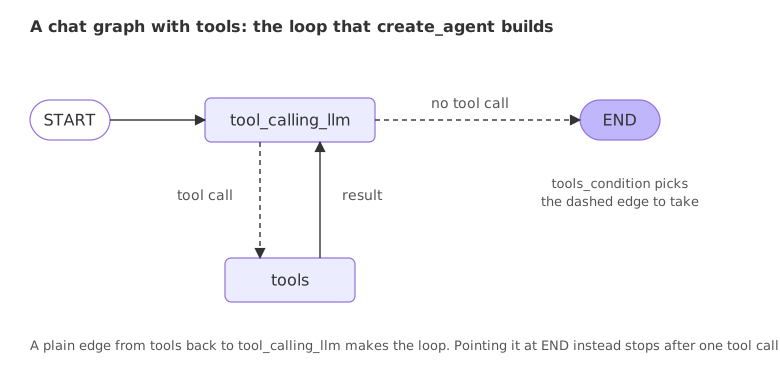
Both versions run on one question. The string in {"messages": "..."} becomes a human message through add_messages:
def build(loop_back):
    builder = StateGraph(State)
    builder.add_node("tool_calling_llm", tool_calling_llm)
    builder.add_node("tools", ToolNode([multiply, add]))
    builder.add_edge(START, "tool_calling_llm")
    builder.add_conditional_edges("tool_calling_llm", tools_condition)
    builder.add_edge("tools", "tool_calling_llm" if loop_back else END)
    return builder.compile()

question = {"messages": "What is 6 times 7, and then add 100 to the result?"}
for loop_back in (False, True):
    print("tools -> tool_calling_llm" if loop_back else "tools -> END")
    for message in build(loop_back).invoke(question)["messages"]:
        calls = [(c["name"], c["args"]) for c in message.tool_calls] if message.type == "ai" else []
print(" ", message.type, "|", calls or message.content)tools -> END
human | What is 6 times 7, and then add 100 to the result?
ai | [('multiply', {'a': 6, 'b': 7})]
tool | 42
tools -> tool_calling_llm
human | What is 6 times 7, and then add 100 to the result?
ai | [('multiply', {'a': 6, 'b': 7})]
tool | 42
ai | [('add', {'a': 42, 'b': 100})]
tool | 142
ai | 6 × 7 = 42, and adding 100 gives **142**.- tools -> END. The model asked for
multiply, the tool returned 42, and the run stopped. The last message is the tool's output, not an answer, and the second step, adding 100, never ran. This is the half-answered result the video shows. - tools -> tool_calling_llm. After 42 the model asked for
addwith 42 and 100, the tool returned 142, and the model wrote the answer. The second call used the first result, which is why the loop matters. On Groq, gpt-oss asks for one tool per reply, so the two steps take two rounds.
Remembering a conversation with a checkpointer and thread_id
A graph run starts from the state it is given. To carry a conversation across calls, compile the graph with a checkpointer: builder.compile(checkpointer=MemorySaver()). The checkpointer saves the state after every node. Each call then passes a thread id in its config, {"configurable": {"thread_id": "a"}}, and LangGraph loads the saved state for that id, adds the new input, and runs. A different id is a different conversation.
MemorySaver keeps the saved states in a dictionary inside the running program, so they are gone when the program ends. Agent memory shows how to keep them on disk.
from typing import Annotated
from typing_extensions import TypedDict
from langchain.chat_models import init_chat_model
from langgraph.checkpoint.memory import MemorySaver
from langgraph.graph import StateGraph, START, END
from langgraph.graph.message import add_messages

class State(TypedDict):
    messages: Annotated[list, add_messages]

llm = init_chat_model("groq:openai/gpt-oss-120b")

def chatbot(state: State):
    return {"messages": [llm.invoke(state["messages"])]}

builder = StateGraph(State)
builder.add_node("chatbot", chatbot)
builder.add_edge(START, "chatbot")
builder.add_edge("chatbot", END)
graph = builder.compile(checkpointer=MemorySaver())

thread_a = {"configurable": {"thread_id": "a"}}
thread_b = {"configurable": {"thread_id": "b"}}
turns = [("Hi, my name is Asha. Keep replies short.", thread_a), ("What is my name?", thread_a), ("What is my name?", thread_b)]
for text, config in turns:
    reply = graph.invoke({"messages": text}, config)["messages"][-1].content
    print(config["configurable"]["thread_id"], "|", reply)
print(len(graph.get_state(thread_a).values["messages"]), "messages saved on thread a")a | Hi Asha! Nice to meet you. a | Your name is Asha. b | I don’t have any information about your name. If you’d like me to address you a certain way, just let me know! 4 messages saved on thread a
- Thread a. The second answer, "Your name is Asha.", comes from the first turn, which the checkpointer saved and loaded again.
- Thread b. A different id starts from an empty state, and the model says it has no information about the name.
- The saved state.
get_state(thread_a)holds four messages, two questions and two replies. Thread b has its own separate state.
create_agent vs a graph you build
| create_agent | A graph you build with StateGraph | |
|---|---|---|
| What you write | A model, a tools list, a system prompt | A state, node functions and the edges between them |
| Shape of the run | Model, tools, model, until no tool call | Whatever the edges describe |
| Extra steps | Middleware hooks around the model and tools | Any node: a router, a worker, a reviewer, a pause for a person |
| Loops | The model and tools loop only | Any loop a conditional edge can close |
| Fits | A tool-using agent | Supervisors, review loops, fixed pipelines with a model in some steps |
Where you use LangGraph
- Pipelines with a model in some steps. Fetch, summarise, check, publish: the order is fixed and a model does some of the work.
- Routing. A node decides which specialist handles a request, and conditional edges send it there.
- Loops with a stop rule. A writer and a reviewer repeat until the reviewer accepts or the rounds run out.
add_node, not by the function's name, and a graph that is not compiled cannot run. tools_condition sends the run to a node called "tools"; if the tool node has another name, pass a path map as the third argument to add_conditional_edges. A loop with no exit runs until LangGraph's recursion limit stops it.Related
- Previous: Human in the loop
- Next: Multi-agent systems
- See also: StateGraph, Conditional edges and Checkpointer in the LangGraph course
- Reference: LangGraph graph API
- In the loop example, change
3in the router to5and count the updates printed. - In the blog graph, swap the order of
title_nodeandcontent_nodeand read the error or the wrong output. - Rename the tool node from
"tools"to"tool_runner"and run the tool graph. Then fix it with a path map:{"tools": "tool_runner", END: END}.
Little by little, you're building something great.