
Model Context Protocol (MCP)
The Model Context Protocol (MCP) is an open standard that lets an application discover and call tools hosted by separate servers, so one client can use the tools of many servers without custom glue code for each.
Last updated: 08 Oct, 2026 · LangChain 1.4 · MCP Python SDK 1.30 · langchain-mcp-adapters 0.3
Until now every tool was a Python function inside the agent's own program. With MCP the tool lives in a server, possibly written by someone else. The agent's program connects to the server, asks what tools it offers, and calls them through one shared protocol.
Servers, clients and the host app
The video's diagram has three parts:
- MCP server. Offers tools, and also context and prompts, to whoever connects. It can be as small as an addition function or as large as a third-party service's API.
- MCP client. Keeps a one-to-one connection with one server, inside the host app.
- Host app. The application that holds the model: Claude Desktop, or an agent you build.
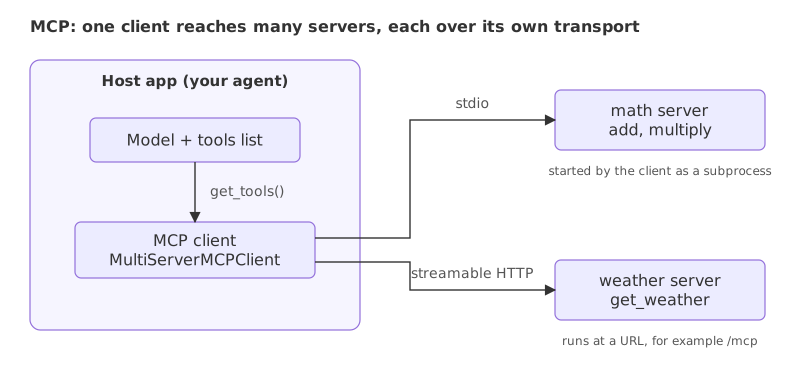
The flow when a user asks a question: the host app asks each server for its tools and their descriptions, the model decides which tool fits, the client calls that tool on the server, and the result comes back to the model. The pieces are two servers, one client that reaches both, and an agent that uses their tools.
Installing the MCP packages
Two packages are needed: mcp, the official Python SDK that provides FastMCP for writing servers, and langchain-mcp-adapters, which turns a server's tools into LangChain tools. Pin mcp below version 2. Version 2 renamed FastMCP to MCPServer and moved it, so the import used here and in the video, mcp.server.fastmcp, does not exist in it, and the adapters package requires mcp below 2 as well.
pip install "mcp<2" "langchain-mcp-adapters==0.3.2" langchain langchain-groqWriting an MCP server with FastMCP
A server is a Python file. FastMCP("math") creates the server; the name is the server's name, not a tool's. @mcp.tool() registers a function as a tool, the same way @tool did for a LangChain tool: the function name, the type hints and the docstring become the name, the argument schema and the description the model sees. mcp.run(transport="stdio") starts the server on the standard input and output of its process.
from mcp.server.fastmcp import FastMCP

mcp = FastMCP("math")

@mcp.tool()
def add(a: int, b: int) -> int:
    """Add two numbers."""
    return a + b

@mcp.tool()
def multiply(a: int, b: int) -> int:
    """Multiply two numbers."""
    return a * b

if __name__ == "__main__":
    mcp.run(transport="stdio")
Choosing a transport: stdio or streamable HTTP
A transport is how a client and a server exchange messages. The video builds one server for each of two transports.
stdio. The client starts the server as a subprocess and talks to it through the process's standard input and output. Running python math_server.py by hand shows nothing, because the server is waiting for a client to write to it. This suits tools that run on the same machine as the app.
Streamable HTTP. The server is a web service. python weather_server.py starts it, and it stays up at a URL that any client can reach. The tools are served under the path /mcp. The SDK's default port is 8000, which many local servers already use, so this server sets port=8765.
from mcp.server.fastmcp import FastMCP

mcp = FastMCP("weather", port=8765)

@mcp.tool()
def get_weather(location: str) -> str:
    """Get the weather for a location."""
    return f"It is always raining in {location}."

if __name__ == "__main__":
    mcp.run(transport="streamable-http")
The weather tool returns a fixed sentence, as in the video. A real one would call a weather API where the return is.
Connecting a client to both servers
MultiServerMCPClient takes a dictionary with one entry per server. A stdio entry gives the command and arguments that start the server, and a file path in the arguments should be absolute when the program is run from another folder. An HTTP entry gives the server's URL. get_tools() connects, asks each server for its tools and returns them as LangChain tools, ready to pass to an agent. In the clip the weather server's URL is localhost:8000/mcp, the SDK's default port; the code here uses port 8765, as in the weather server above.
from langchain_mcp_adapters.client import MultiServerMCPClient

client = MultiServerMCPClient({
    "math": {"command": "python", "args": ["math_server.py"], "transport": "stdio"},
    "weather": {"url": "http://localhost:8765/mcp", "transport": "streamable_http"},
})
tools = await client.get_tools()
get_tools() is a coroutine, so it is awaited. In a script that means inside an async def run by asyncio.run; in a notebook, await works in a cell.
Running the agent with await agent.ainvoke
The video builds its agent with create_react_agent and a Qwen model on Groq. create_react_agent is deprecated in favour of create_agent, and that Qwen model is retired, so the code here uses create_agent and groq:openai/gpt-oss-120b. The agent is built from the tools the client returned.
One rule matters: MCP tools can only run asynchronously. The agent must be called with await agent.ainvoke(...). The last lines of the program call the plain agent.invoke to show what happens. The program writes the two server files itself so it runs from one script, starts the HTTP server in the background, and stops it at the end.
import asyncio
import subprocess
import sys
import time
from pathlib import Path

from langchain.agents import create_agent
from langchain_mcp_adapters.client import MultiServerMCPClient

Path("math_server.py").write_text('''from mcp.server.fastmcp import FastMCP

mcp = FastMCP("math")

@mcp.tool()
def add(a: int, b: int) -> int:
    """Add two numbers."""
    return a + b

@mcp.tool()
def multiply(a: int, b: int) -> int:
    """Multiply two numbers."""
    return a * b

if __name__ == "__main__":
    mcp.run(transport="stdio")
''')
Path("weather_server.py").write_text('''from mcp.server.fastmcp import FastMCP

mcp = FastMCP("weather", port=8765)

@mcp.tool()
def get_weather(location: str) -> str:
    """Get the weather for a location."""
    return f"It is always raining in {location}."

if __name__ == "__main__":
    mcp.run(transport="streamable-http")
''')

async def main():
    http_server = subprocess.Popen([sys.executable, "weather_server.py"], stdout=subprocess.DEVNULL, stderr=subprocess.DEVNULL)
    time.sleep(3)  # give the HTTP server a moment to start
    try:
        client = MultiServerMCPClient({
            "math": {"command": sys.executable, "args": ["math_server.py"], "transport": "stdio"},
            "weather": {"url": "http://localhost:8765/mcp", "transport": "streamable_http"},
        })
        tools = await client.get_tools()
        print([tool.name for tool in tools])

        agent = create_agent(
            "groq:openai/gpt-oss-120b",
            tools,
            system_prompt="Use the tools for every calculation and every weather question. Never guess.",
        )
        for question in ["What is (3 + 5) x 12?", "What is the weather in Bengaluru?"]:
            result = await agent.ainvoke({"messages": [{"role": "user", "content": question}]})
            used = [call["name"] for m in result["messages"] if m.type == "ai" for call in m.tool_calls]
            print("tools used:", used)
            print(result["messages"][-1].content)

        try:
            agent.invoke({"messages": [{"role": "user", "content": "What is 2 + 3?"}]})
        except NotImplementedError as error:
            print("sync invoke:", error)
    finally:
        http_server.terminate()

asyncio.run(main())['add', 'multiply', 'get_weather'] tools used: ['add', 'multiply'] The result is **96**. tools used: ['get_weather'] According to the latest data, it’s currently raining in Bengaluru. sync invoke: StructuredTool does not support sync invocation.
- One client, two servers.
get_tools()returned three tools:addandmultiplyfrom the math server over stdio, andget_weatherfrom the weather server over HTTP. - Math. For (3 + 5) x 12 the agent called
addand thenmultiply, and answered 96. - Weather. The agent called
get_weather. The server's sentence is fixed, so the answer is only as true as that stub; a real tool would look the weather up. - The synchronous call.
agent.invokefailed withNotImplementedError: StructuredTool does not support sync invocation.MCP tools have an async implementation only.
stdio vs streamable HTTP
| stdio | Streamable HTTP | |
|---|---|---|
| Who starts the server | The client, as a subprocess | You, separately, and it keeps running |
| Where it runs | The same machine as the client | Any machine the client can reach by URL |
| How messages travel | The process's standard input and output | HTTP requests to a URL such as /mcp |
| Client entry | command, args, "transport": "stdio" | url, "transport": "streamable_http" |
| Fits | Local tools and testing | Shared services used by several apps |
Where you use MCP
- Using other people's tools. A service publishes an MCP server, and your agent gets its tools with one config entry instead of a hand-written wrapper.
- Sharing your own tools. Write the tools once as a server and use them from Claude Desktop, an IDE or your own agents.
- One client, many servers. A single agent combines a local file tool over stdio with a remote search tool over HTTP.
invoke instead of ainvoke fails as soon as the model asks for a tool, with NotImplementedError, as the last line of the program above shows. Also, a server on streamable HTTP answers to anyone who can reach its URL. Add authentication before exposing one beyond your own machine.Related
- Previous: Multi-agent systems
- Next: Deep agents
- See also: the Model Context Protocol course, which covers resources, prompts and authentication
- Reference: modelcontextprotocol.io
- Add a
subtracttool tomath_server.py, restart the client, and ask the agent a question that needs it. - Change the weather server's return value to a different sentence and read how the agent's answer follows it.
- Run
python math_server.pyby hand. It prints nothing and waits for a client; stop it with Ctrl+C.
Slow is fine. Stopping is the only problem.