
Loading and chunking documents
Loading and chunking is the first half of indexing: a loader reads files into Document objects, and a text splitter cuts those documents into chunks small enough to embed.
Last updated: 08 Oct, 2026 · LangChain 1.4
The Retrieval-augmented generation (RAG) lesson drew the indexing pipeline as parse, chunk, embed, store. This lesson builds the first two boxes on real PDFs: three public arXiv papers that the code downloads by URL.
Documents: page_content and metadata
The video explains the Document as the shape every loader returns, whether it comes from a PDF, CSV, web-page or directory loader. It has two parts: page_content, the text of the file, and metadata, extra information such as the file name, the page count or a timestamp. Everything later in the pipeline works on Documents, so a chunk, a stored vector and a retrieved result all carry the metadata of the file they came from. That is what lets an answer say which file and page it used, and what lets a search be limited to one file.
Creating a Document by hand
from langchain_core.documents import Document

doc = Document(
    page_content="RAG gives a model access to documents it was never trained on.",
    metadata={"source": "notes.txt", "page": 1, "author": "A. Writer"},
)from langchain_core.documents import Document
doc = Document(
page_content="RAG gives a language model access to documents it was never trained on.",
metadata={"source": "notes.txt", "page": 1, "author": "A. Writer"},
)
print(doc.page_content)
print(doc.metadata)
print(doc)RAG gives a language model access to documents it was never trained on.
{'source': 'notes.txt', 'page': 1, 'author': 'A. Writer'}
page_content='RAG gives a language model access to documents it was never trained on.' metadata={'source': 'notes.txt', 'page': 1, 'author': 'A. Writer'}Reading what the Document holds
page_contentis a plain string, the text a model will later read.metadatais a plain dictionary. The keys are free, so you can addauthor,departmentordatenow and filter on them later.- Printing the object shows both fields, which is how a loader's result is usually inspected.
Loading text files with TextLoader and DirectoryLoader
A loader takes a path and returns a list of Documents. The video uses TextLoader for one file and DirectoryLoader for a whole folder. The video imports them from langchain.document_loaders, which no longer exists in LangChain 1.x; they live in langchain_community.document_loaders, and the loaders need pip install langchain-community.
One file, then a folder
from langchain_community.document_loaders import TextLoader, DirectoryLoader

one = TextLoader("text_files/python_intro.txt", encoding="utf-8").load()

many = DirectoryLoader(
    "text_files",                       # the folder to read
    glob="**/*.txt",                    # which files to pick up, here every .txt below it
    loader_cls=TextLoader,              # the loader to use for each file
    loader_kwargs={"encoding": "utf-8"},
).load()import os
from langchain_community.document_loaders import TextLoader, DirectoryLoader
os.makedirs("text_files", exist_ok=True)
notes = {
"python_intro.txt": "Python is a high-level programming language.\nIt is used for web apps, data science and automation.",
"machine_learning.txt": "Machine learning lets computers learn patterns from data.\nSupervised learning uses labelled examples.",
}
for name, text in notes.items():
with open(f"text_files/{name}", "w", encoding="utf-8") as f:
f.write(text)
one = TextLoader("text_files/python_intro.txt", encoding="utf-8").load()
print(len(one), one[0].metadata)
many = DirectoryLoader(
"text_files", glob="**/*.txt", loader_cls=TextLoader, loader_kwargs={"encoding": "utf-8"}
).load()
print(len(many), sorted(d.metadata["source"] for d in many))1 {'source': 'text_files/python_intro.txt'}
2 ['text_files/machine_learning.txt', 'text_files/python_intro.txt']What the two loaders returned
- One Document per text file.
TextLoaderreturned a list of length 1, and the directory loader returned one Document for each of the two files. - The metadata holds the path. The loader filled
sourceitself; nothing was typed by hand. - The glob decides what is read.
**/*.txtreaches into sub-folders; changing the pattern to*.mdreads Markdown files instead.
Loading PDFs one page at a time
The video writes a function that walks a folder, loads each PDF with PyPDFLoader, adds its own metadata keys (the source file and the file type) and collects everything in one list. The same loop is below on three public papers, and it downloads them first so that the example runs with no files on disk. PyPDFLoader needs pip install pypdf.
Downloading a PDF by URL
import os, urllib.request

if not os.path.exists("attention.pdf"):
    urllib.request.urlretrieve("https://arxiv.org/pdf/1706.03762", "attention.pdf")
One Document for each page, with extra metadata
from langchain_community.document_loaders import PyPDFLoader

docs = PyPDFLoader("attention.pdf").load()    # one Document per page
for d in docs:
d.metadata["source_file"] = "attention.pdf" # a key of our own, beside the loader's keysimport os, urllib.request
from langchain_community.document_loaders import PyPDFLoader
PAPERS = {"attention": "1706.03762", "qzhou": "2508.21632", "objdet": "1807.05511"}
pages = []
for name, arxiv_id in PAPERS.items():
if not os.path.exists(f"{name}.pdf"):
urllib.request.urlretrieve(f"https://arxiv.org/pdf/{arxiv_id}", f"{name}.pdf")
docs = PyPDFLoader(f"{name}.pdf").load()
for d in docs:
d.metadata["source_file"] = f"{name}.pdf"
pages += docs
for name in PAPERS:
print(name, sum(d.metadata["source_file"] == f"{name}.pdf" for d in pages), "pages")
print("total documents:", len(pages))
print(sorted(pages[0].metadata))
print(pages[0].metadata["source_file"], pages[0].metadata["page"], pages[0].metadata["total_pages"])attention 15 pages qzhou 27 pages objdet 21 pages total documents: 63 ['author', 'creationdate', 'creator', 'keywords', 'moddate', 'page', 'page_label', 'producer', 'ptex.fullbanner', 'source', 'source_file', 'subject', 'title', 'total_pages', 'trapped'] attention.pdf 0 15
Reading the loaded pages
- One Document per page. The three PDFs have 15, 27 and 21 pages, and the list holds one Document for each page, 63 in all.
- The loader fills metadata for free. The sorted key list shows what
PyPDFLoaderwrote (page,total_pages,sourceand the PDF's own properties) next to thesource_filekey added here. - The page number counts from 0. The first page of a PDF is
page0, so a citation for people should add 1.
Checking the text a parser returned
A parser turns the page layout into a string, and the string is not always clean. Different parsers (PyPDF, PyMuPDF) extract text differently, so the safe habit is to print a piece of what your own PDFs give. Here is one stretch of the QZhou report:
import os, urllib.request
from langchain_community.document_loaders import PyPDFLoader

PAPERS = {"attention": "1706.03762", "qzhou": "2508.21632", "objdet": "1807.05511"}
pages = []
for name, arxiv_id in PAPERS.items():
    if not os.path.exists(f"{name}.pdf"):
        urllib.request.urlretrieve(f"https://arxiv.org/pdf/{arxiv_id}", f"{name}.pdf")
    docs = PyPDFLoader(f"{name}.pdf").load()
    for d in docs:
        d.metadata["source_file"] = f"{name}.pdf"
    pages += docs

qzhou_first = next(d for d in pages if d.metadata["source_file"] == "qzhou.pdf" and d.metadata["page"] == 0)
start = qzhou_first.page_content.index("ranking")
print(repr(qzhou_first.page_content[start - 30:start + 50]))'e M TEB and CMTEB\nbenchmarks, ranking first on both leaderboards(August 27, 2 025'
The printed text has a ligature character in place of the letters f and i in first, a date split as 2 025 and a benchmark name broken as M TEB. Retrieval still works on text like this, but exact-match search (see Better retrieval (hybrid search, reranking, query rewriting)) can miss a name that the parser split.
Why documents are split into chunks
The video gives the main reason: an embedding model and an LLM both accept a limited amount of text at once. A 100-page PDF cannot go in whole, so the text is divided into chunks that fit. There is a second reason that comes from search. One vector per 15-page paper blurs every topic in it into a single point; one vector per few paragraphs lets a question land on the paragraph that answers it.
Splitting with RecursiveCharacterTextSplitter
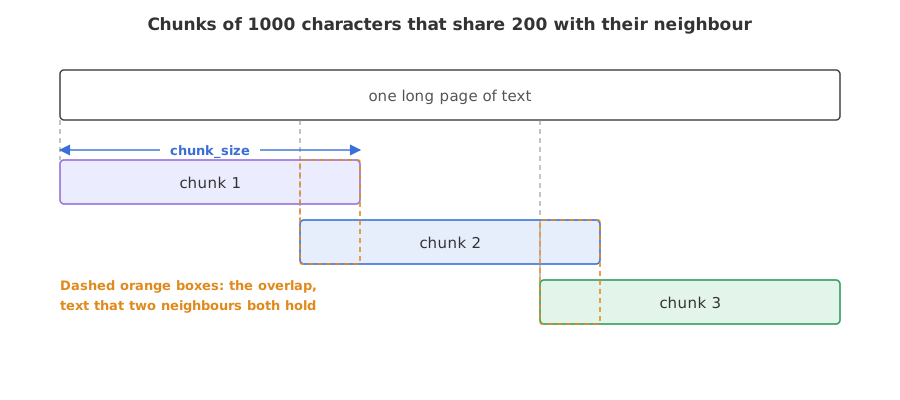
RecursiveCharacterTextSplitter cuts text to at most chunk_size characters. It prefers to cut at a paragraph break, then at a line break, then at a space, then between characters, so chunks tend to end where a thought ends. In the video the same kind of settings turn four PDFs of 64 pages into 359 chunks; the example below prints the counts for the three papers used here. chunk_overlap repeats the last characters of one chunk at the start of the next, so a sentence cut at the boundary still appears whole in one of the two. The splitter lives in langchain_text_splitters (pip install langchain-text-splitters); the video imports it from langchain.text_splitter, which LangChain 1.x no longer has.
Creating the splitter and splitting the pages
from langchain_text_splitters import RecursiveCharacterTextSplitter

splitter = RecursiveCharacterTextSplitter(chunk_size=1000, chunk_overlap=200)
chunks = splitter.split_documents(pages) # a list of Documents, metadata copied to eachimport os, urllib.request
from langchain_community.document_loaders import PyPDFLoader
PAPERS = {"attention": "1706.03762", "qzhou": "2508.21632", "objdet": "1807.05511"}
pages = []
for name, arxiv_id in PAPERS.items():
if not os.path.exists(f"{name}.pdf"):
urllib.request.urlretrieve(f"https://arxiv.org/pdf/{arxiv_id}", f"{name}.pdf")
docs = PyPDFLoader(f"{name}.pdf").load()
for d in docs:
d.metadata["source_file"] = f"{name}.pdf"
pages += docs
from langchain_text_splitters import RecursiveCharacterTextSplitter
splitter = RecursiveCharacterTextSplitter(chunk_size=1000, chunk_overlap=200)
chunks = splitter.split_documents(pages)
print(len(pages), "pages ->", len(chunks), "chunks")
sizes = [len(c.page_content) for c in chunks]
print("shortest", min(sizes), "longest", max(sizes), "average", sum(sizes) // len(sizes))
print(chunks[5].metadata["source_file"], chunks[5].metadata["page"])
for size, overlap in [(500, 100), (1000, 200), (2000, 200), (1000, 0)]:
n = len(RecursiveCharacterTextSplitter(chunk_size=size, chunk_overlap=overlap).split_documents(pages))
print(f"chunk_size={size}, chunk_overlap={overlap}: {n} chunks")63 pages -> 355 chunks shortest 196 longest 1000 average 901 attention.pdf 1 chunk_size=500, chunk_overlap=100: 692 chunks chunk_size=1000, chunk_overlap=200: 355 chunks chunk_size=2000, chunk_overlap=200: 175 chunks chunk_size=1000, chunk_overlap=0: 309 chunks
Reading the chunk counts
- 63 pages became 355 chunks. Chunk lengths run from 196 to 1000 characters with an average of 901, so the limit of 1000 holds and most chunks sit close to it.
- Each chunk keeps its page's metadata. Chunk 5 reports
attention.pdfand page 1, the second page of that PDF. - Smaller chunks mean more of them. A size of 500 with overlap 100 gives 692 chunks; a size of 2000 with overlap 200 gives 175.
- Overlap costs chunks. With overlap 0 the same pages make 309 chunks, 46 fewer than with overlap 200.
Seeing the overlap
A short text makes the overlap visible. With a chunk size of 90 characters and an overlap of 30, each chunk starts with words that ended the one before:
from langchain_text_splitters import RecursiveCharacterTextSplitter

text = (
    "RAG splits long documents into chunks. Each chunk is embedded and stored. "
    "At question time the closest chunks are retrieved. They are placed in the prompt. "
    "The model then answers from them."
)
splitter = RecursiveCharacterTextSplitter(chunk_size=90, chunk_overlap=30)
for chunk in splitter.split_text(text):
print(repr(chunk))'RAG splits long documents into chunks. Each chunk is embedded and stored. At question time' 'and stored. At question time the closest chunks are retrieved. They are placed in the' 'They are placed in the prompt. The model then answers from them.'
Chunk 2 starts with and stored. At question time, the last words of chunk 1, and chunk 3 starts with They are placed in the, the last words of chunk 2. Both repeated pieces fit in the 30-character overlap, and the splitter cut at spaces, never inside a word.
Small chunks vs large chunks
| Small chunks (about 500 characters) | Large chunks (about 2000 characters) | |
|---|---|---|
| Matches a question | Tightly, one idea per chunk | Loosely, several ideas per chunk |
| Context for the model | May cut an explanation in two | Keeps more of the surrounding text |
| Number of vectors to store | More | Fewer |
| Tokens sent to the model per question | Fewer | More |
Where you use loading and chunking
- Every RAG app. Whatever the file type, the Document list that comes out of loading is the input of the embedding step.
- Mixed folders. A
DirectoryLoaderwith a glob per file type brings PDFs, text and CSV files into one list, each with its own source in the metadata. - Tuning retrieval. When answers cite the wrong passage, chunk size and overlap are the first settings to change.
chunk_size counts characters, not tokens, and the splitter cuts on structure first, so chunks are often shorter than the limit. A chunk that is too small drops the context an answer needs; one that is too large buries the match among other topics. Check a few chunks by eye before you embed anything.Related
- Previous: Retrieval-augmented generation (RAG)
- Next: Embeddings and vector stores
- Go deeper: Documents and text splitting
- Change
chunk_sizeto 300 and read how many chunks the 63 pages become. - Set
chunk_overlap=0in the short-text example and compare where the three chunks start. - Pass
separators=["\n\n", "\n", " ", ""]to the splitter, the list the video shows, and check the count is unchanged for the default case.
You understood something today that you didn't yesterday.