
Deep agents
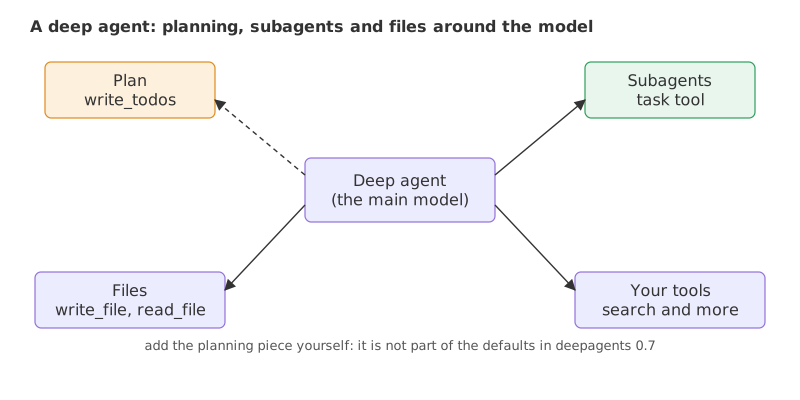
A deep agent is an agent built for long, multi-step tasks: besides the model and its tools it has a plan it can write and update, subagents it can hand work to, and a file system where it keeps notes and results.
Last updated: 08 Oct, 2026 · deepagents 0.7 · LangChain 1.4
A tool-using agent keeps everything in one message list. On a long task that list grows, early results get buried, and the agent has no written plan to come back to. The deepagents library from LangChain wraps an agent with the pieces a long task needs.
Shallow agents and their limits
The video starts with what it calls a shallow agent: a model that either answers or calls a tool, takes the tool's output, and finishes. Its problems, as the clip lists them, are no explicit planning, trouble with a complex question that must be split into smaller ones, and little context carried along. It then draws the ReAct agent from ReAct agents, where the tool result goes back to the model and the loop can repeat, and calls that shallow too: there is still no planning, no state management and no persistent memory. In the first picture the tool result ends the run, while create_agent already feeds each result back to the model.
The video describes the planning tool and a Claude-Code-style system prompt as built in. In deepagents 0.7.23, the version used here, they are not. The default tools are ls, read_file, write_file, edit_file, delete, glob, grep, execute and task, which hands work to a subagent. There is no default write_todos tool and no default system prompt: the planning tool is added as middleware, and the prompt is whatever you pass in.
Planning, subagents, a system prompt and files
The clip names four parts, using Claude Code as the model of a deep agent:
- A planning tool. Before acting, the agent writes a to-do list for the task. A holiday booking becomes a list of days and things to book, and the list tells it what is done and what is left.
- Subagents. The to-do items are carried out by other agents, each suited to its item: one that searches the internet, one that reads research papers, one that writes, one that checks.
- A system prompt. Instructions that set the agent's tone and way of working.
- A file system. A shared place where every subagent can save results, which works as memory that lasts through the task.
Installing deepagents
pip install "deepagents==0.7.23"Creating a deep agent with create_deep_agent
create_deep_agent takes the same kind of arguments as create_agent and a few more. Syntax: create_deep_agent(model=..., tools=[...], system_prompt="...", subagents=[...], middleware=[...]). The video passes a Qwen model on Groq, which Groq has retired; the code here passes groq:openai/gpt-oss-20b with max_retries=8, because a deep agent sends long prompts and Groq's free tier limits tokens per minute; the client waits and retries instead of stopping at the first rate-limit reply. Always pass a model: leaving it out falls back to a default that is deprecated.
The video's agent has a search tool and the system prompt "Act as a researcher", and it prints the built agent to compare with create_agent. A quick way to see what a deep agent carries is to list the tools its tool node holds. The second agent adds the planning middleware:
from deepagents import create_deep_agent
from langchain.agents.middleware import TodoListMiddleware
from langchain.chat_models import init_chat_model

model = init_chat_model("groq:openai/gpt-oss-20b", max_retries=8)

plain = create_deep_agent(model=model, tools=[])
planned = create_deep_agent(model=model, tools=[], middleware=[TodoListMiddleware()])

for name, agent in [("default", plain), ("with TodoListMiddleware", planned)]:
print(name, "->", sorted(agent.nodes["tools"].bound.tools_by_name))default -> ['delete', 'edit_file', 'execute', 'glob', 'grep', 'ls', 'read_file', 'task', 'write_file'] with TodoListMiddleware -> ['delete', 'edit_file', 'execute', 'glob', 'grep', 'ls', 'read_file', 'task', 'write_file', 'write_todos']
- The default agent has nine tools: the file tools
ls,read_file,write_file,edit_file,delete,globandgrep, thenexecute, andtask, which hands work to a subagent.write_todosis not among them. - With
TodoListMiddlewarethe same nine tools are there, pluswrite_todos.
Adding a plan with TodoListMiddleware
TodoListMiddleware is the same middleware create_agent accepts. It gives the agent a write_todos tool and keeps the list in the agent's state under todos, where a person or a later step can read it. Pass it in middleware=[...], as in the second agent above.
Handing work to a subagent
A subagent is a dictionary: a name, a description that tells the main agent when to use it, a system_prompt, and its own tools. The main agent reaches it through the built-in task tool, which sends the subagent a description of the job and returns its final message. The subagent works in its own message list, so its searches do not fill the main agent's list. This one looks facts up on Wikipedia, with the wiki_search tool from Multi-agent systems:
import json
import time
import urllib.error
import urllib.parse
import urllib.request

from langchain.tools import tool

@tool
def wiki_search(query: str) -> str:
    """Search Wikipedia. Returns the page title, its link and the first sentences of the page."""
    params = {"action": "query", "format": "json", "generator": "search", "gsrsearch": query, "gsrlimit": 1,
              "prop": "extracts", "exintro": 1, "explaintext": 1, "exsentences": 3}
    request = urllib.request.Request("https://en.wikipedia.org/w/api.php?" + urllib.parse.urlencode(params),
                                     headers={"User-Agent": "agent-course-demo/1.0 (learning project)"})
    for attempt in range(3):
        try:
            with urllib.request.urlopen(request, timeout=20) as response:
                pages = json.load(response).get("query", {}).get("pages", {})
            break
        except urllib.error.HTTPError as error:
            if error.code != 429:
                return f"Search failed with HTTP {error.code}."
            time.sleep(2 * (attempt + 1))
    else:
        return "Search is busy, try again later."
    if not pages:
        return "No page found."
    page = next(iter(pages.values()))
    title = page["title"]
return f"{title} (https://en.wikipedia.org/wiki/{title.replace(' ', '_')}): {page['extract']}"subagents = [{
"name": "researcher",
"description": "Looks facts up on Wikipedia. Give it one question at a time.",
"system_prompt": "Search Wikipedia and answer in two sentences.",
"tools": [wiki_search],
}]Giving the agent files
The file tools work on a virtual file system kept in the agent's state, so nothing is written to disk. write_file creates a file, read_file and edit_file change it, and the files come back in the result under files. Large tool results are also moved into files, so the message list stays short. In the video's run, result["files"] held a large tool result saved by the agent itself.
Running the deep agent
The agent below has a system prompt that lists the steps in order, the planning middleware, and the researcher subagent. The task needs all three: plan, look something up through the subagent, and save the result. A deep agent decides for itself which of its tools to use, so the prompt spells the steps out.
agent = create_deep_agent(
    model=model,
    system_prompt=(
        "Follow these steps in order. 1: call write_todos with your plan. "
        "2: get facts only by calling the task tool with the researcher subagent. "
        "3: save the result with write_file. 4: call write_todos again to mark the steps completed."
    ),
    middleware=[TodoListMiddleware()],
    subagents=subagents,
)task = "Find out when the Eiffel Tower was built and for which event, then save a one-line note to /note.md."
result = agent.invoke({"messages": [{"role": "user", "content": task}]})
for message in result["messages"]:
calls = [call["name"] for call in message.tool_calls] if message.type == "ai" else []
if calls:
print("calls:", calls)
print("files:", list(result["files"]))
print(result["files"].get("/note.md", {}).get("content"))
print("todos:", result.get("todos"))calls: ['write_todos']
calls: ['task']
calls: ['write_file']
calls: ['write_todos']
files: ['/note.md']
The Eiffel Tower was built in 1887-1889 for the 1889 Exposition Universelle (World's Fair).
todos: [{'content': 'Get facts about Eiffel Tower construction and event', 'status': 'completed'}]- The calls. They follow the prompt:
write_todosto plan,taskto give the lookup to the researcher subagent,write_fileto save the note, andwrite_todosagain to mark the step completed. Only the tool names are printed. A looser prompt leaves these choices to the model, which may skip the plan and the subagent and answer from memory. - The file.
result["files"]holds/note.mdwith the one-line note the agent wrote from what the subagent returned. The file lives in the agent's state, not on disk. - The plan.
result.get("todos")holds the to-do list as it ended, here one item with the statuscompleted. It isNonewhen the agent never calledwrite_todos. - One subagent at a time. Subagents can run in parallel when the model asks for several
taskcalls in one reply. On Groq, gpt-oss asks for one tool call per reply, so they run one after another.
create_agent vs create_deep_agent
| create_agent | create_deep_agent | |
|---|---|---|
| Built-in tools | Only the tools you pass | File tools and the task tool for subagents, plus the tools you pass |
| Planning | None unless you add middleware | Add TodoListMiddleware |
| Delegation | You write it, for example agents as tools | Subagents through the subagents list |
| Context growth | Every result stays in the message list | Large results move to files, subagents keep their own lists |
| Fits | A few tool calls | Long tasks with research and written results |
Where you use deep agents
- Deep research. A plan of questions, a researcher subagent per question, and a written report saved to a file.
- Coding and analysis assistants. Read files, edit them, run checks, and keep notes between steps.
- Long writing tasks. A plan, a drafting subagent and a reviewing subagent, with the draft kept in a file.
tool_use_failed error. Run the cell again, or switch the model line to groq:openai/gpt-oss-120b.Related
- Previous: Model Context Protocol (MCP)
- Next: Project: a research agent
- See also: the Deep Agents course, which covers backends, memory, skills and approvals
- Reference: Deep Agents overview
- Remove
middleware=[TodoListMiddleware()]and run the task again. Check thatwrite_todosis gone from the calls andtodosis missing from the result. - Ask for a second note at
/second.mdand printlist(result["files"]). - Change the researcher's system prompt to answer in one sentence and read how the saved note changes.
This is what real progress feels like.