Padding and stride
Padding is a ring of extra pixels added around an image before a convolution, and stride is the number of cells the filter jumps at each step; together with the filter size they decide the size of the output.
Last updated: 05 Oct, 2026 · NumPy
In Convolution and filters a 6×6 image came out of a 3×3 filter as a 4×4 map. Padding stops that shrinking, and a larger stride shrinks the output when a smaller map is wanted.
Calculating the output size without padding
With an image of size n and a filter of size f, the filter fits in n − f + 1 positions along each side. For the board's image, n = 6 and f = 3, so 6 − 3 + 1 = 4: the 4×4 output.
Adding padding to keep the image size
The image shrinks from 6×6 to 4×4 in a single convolution, which means some information is lost. The fix is padding, which the video describes as building a compound around the image: one more ring of cells all round turns the 6×6 image into 8×8.
Two kinds of value can fill the ring. Zero padding fills it with zeros. The other kind copies the nearest value, so next to a column of 1s the ring holds 1s. With the ring in place, 8 − 3 + 1 = 6, and the output is 6×6, the same size as the original image. For p rings of padding the formula becomes n + 2p − f + 1 = 6 + 2 − 3 + 1 = 6.
The interview question at the end of the clip is “what is the importance of padding?” The answer: it prevents the loss of information at the image's border. Without padding the corner pixel is covered by one window and a middle pixel by nine; with one ring of padding the corner is covered by four.
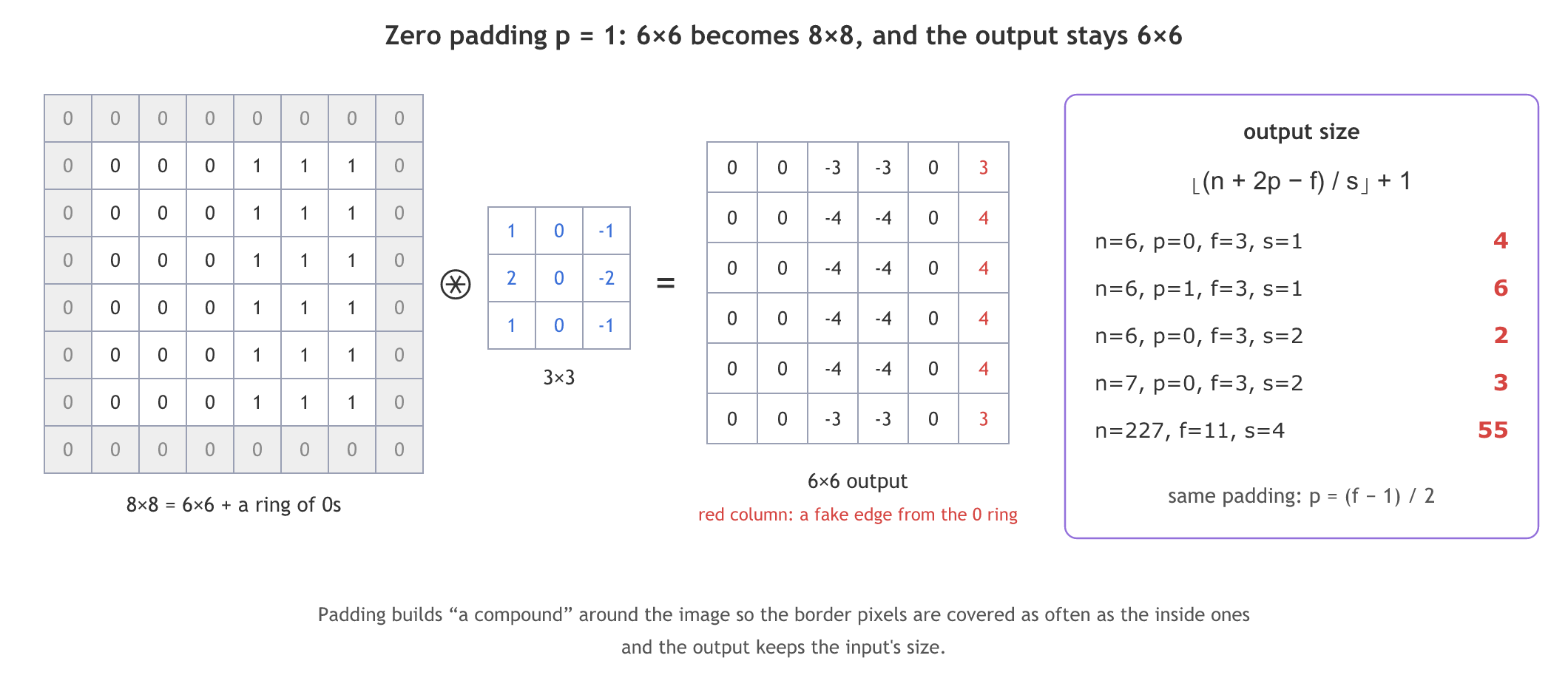
The board leaves the border cells of the padded output empty. Worked out with zero padding, the middle rows read 0 0 −4 −4 0 4 and the top and bottom rows 0 0 −3 −3 0 3. The 4 in the last column is a fake edge: the image's 1s meet the padding's 0s there. Copying the nearest value instead (replicate padding) gives 0 0 −4 −4 0 0 with no fake edge. Keras Conv2D with padding='same' always pads with zeros.
Solving for same padding
The course notes turn the formula round to find the padding that keeps the size: 6 − 3 + 2p + 1 = 6 gives 2p = 2, so p = 1. In general, for a stride of 1 the output equals the input when n + 2p − f + 1 = n:
The notes' exercise asks how much padding keeps a 7×7 image at 7×7 with a 3×3 filter: p = (3 − 1) / 2 = 1. An even filter size would need half a ring, one reason filters are 3×3, 5×5 or 7×7.
Moving the filter with a stride
With a stride of 2 the filter jumps two cells at a time, so it fits fewer times and the output is smaller. The board writes the formula as (n + 2p − f + 1) / s, which is wrong; the correct one is:
The two agree for n = 6, f = 3, s = 2 (both give 2) but not in general: for n = 7 the board's version gives 2.5 and the correct one 3. The floor is there because the last window must fit inside the padded image. On the board's 6×6 image, the vertical filter with a stride of 2 gives a 2×2 output, 0 −4 in both rows.
Checking the formula on AlexNet
The Transfer Learning AlexNet notebook in the course materials starts with Conv2D(96, (11, 11), strides=(4, 4)) on input_shape=(227, 227, 3), and its saved summary prints an output of (None, 54, 54, 96). The formula gives ⌊(227 − 11) / 4⌋ + 1 = 55, not 54. 54 is what a 224×224 input gives: ⌊(224 − 11) / 4⌋ + 1 = 54, so the saved output came from a run on 224 and the code was changed to 227 afterwards. The original AlexNet paper has the same mix-up: it states 224×224 inputs, but its 55×55 maps need 227. The layer's 34,944 parameters, 11·11·3·96 + 96, do not depend on the input size.
Computing output sizes in NumPy
The output-size formula
def out_size(n, f, p=0, s=1):
    return (n + 2 * p - f) // s + 1      # floor((n + 2p - f) / s) + 1
Zero and replicate padding
np.pad adds the ring: with zeros by default, or with copies of the nearest value with mode="edge".
zero = np.pad(img, 1)                  # 8x8, ring of 0s
edge = np.pad(img, 1, mode="edge")    # 8x8, ring copies the nearest value
A convolution with a stride
def conv2d(img, k, s=1):
    f = k.shape[0]
    n = (img.shape[0] - f) // s + 1
    return np.array([[(img[i*s:i*s+f, j*s:j*s+f] * k).sum() for j in range(n)]
                     for i in range(n)])
The board's sizes, padding and strides in one run
import numpy as np

def out_size(n, f, p=0, s=1):
    return (n + 2 * p - f) // s + 1                    # floor((n + 2p - f) / s) + 1

def conv2d(img, k, s=1):
    f = k.shape[0]
    n = (img.shape[0] - f) // s + 1
    return np.array([[(img[i*s:i*s+f, j*s:j*s+f] * k).sum() for j in range(n)] for i in range(n)])

for n, f, p, s in [(6, 3, 0, 1), (6, 3, 1, 1), (6, 3, 0, 2), (7, 3, 0, 2), (227, 11, 0, 4), (224, 11, 0, 4)]:
    print(f"n={n:3} f={f:2} p={p} s={s} -> {out_size(n, f, p, s):3}   board (n+2p-f+1)/s = {(n + 2*p - f + 1) / s:g}")

img = np.array([[0, 0, 0, 1, 1, 1]] * 6)
vertical = np.array([[1, 0, -1], [2, 0, -2], [1, 0, -1]])
print("zero padding:")
print(conv2d(np.pad(img, 1), vertical))
print("replicate padding, row 2:", conv2d(np.pad(img, 1, mode="edge"), vertical)[1])
print("stride 2:")
print(conv2d(img, vertical, s=2))

def coverage(n, f, p):
    c = np.zeros((n + 2 * p, n + 2 * p), dtype=int)
    for i in range(n + 2 * p - f + 1):
        for j in range(n + 2 * p - f + 1):
            c[i:i + f, j:j + f] += 1                   # count the windows over each cell
    return c[p:p + n, p:p + n]                         # the image's own pixels
for p in (0, 1):
    print(f"p={p}: windows over the corner {coverage(6, 3, p)[0, 0]}, over a middle pixel {coverage(6, 3, p)[2, 2]}")

for f in (3, 5, 7):
    print(f"same padding for f={f}: p={(f - 1) // 2}, 7x7 stays {out_size(7, f, (f - 1) // 2)}x{out_size(7, f, (f - 1) // 2)}")
print("AlexNet conv1 parameters:", 11 * 11 * 3 * 96 + 96)n= 6 f= 3 p=0 s=1 -> 4 board (n+2p-f+1)/s = 4 n= 6 f= 3 p=1 s=1 -> 6 board (n+2p-f+1)/s = 6 n= 6 f= 3 p=0 s=2 -> 2 board (n+2p-f+1)/s = 2 n= 7 f= 3 p=0 s=2 -> 3 board (n+2p-f+1)/s = 2.5 n=227 f=11 p=0 s=4 -> 55 board (n+2p-f+1)/s = 54.25 n=224 f=11 p=0 s=4 -> 54 board (n+2p-f+1)/s = 53.5 zero padding: [[ 0 0 -3 -3 0 3] [ 0 0 -4 -4 0 4] [ 0 0 -4 -4 0 4] [ 0 0 -4 -4 0 4] [ 0 0 -4 -4 0 4] [ 0 0 -3 -3 0 3]] replicate padding, row 2: [ 0 0 -4 -4 0 0] stride 2: [[ 0 -4] [ 0 -4]] p=0: windows over the corner 1, over a middle pixel 9 p=1: windows over the corner 4, over a middle pixel 9 same padding for f=3: p=1, 7x7 stays 7x7 same padding for f=5: p=2, 7x7 stays 7x7 same padding for f=7: p=3, 7x7 stays 7x7 AlexNet conv1 parameters: 34944
What the sizes and values show
- The correct formula gives 4, 6, 2, 3, 55 and 54. The board's version gives 2.5 for n = 7 and 54.25 for AlexNet's 227, neither of which can be a size.
- Zero padding keeps the 6×6 size, and its last column of 3s and 4s is the fake edge from the zero ring.
- Replicate padding gives 0 0 −4 −4 0 0: the real edge only.
- Stride 2 leaves a 2×2 output, [0 −4] in both rows.
- Coverage: without padding the corner pixel is seen by 1 window and a middle pixel by 9; with p = 1 the corner is seen by 4.
- Same padding p = (f − 1) / 2 keeps a 7×7 image at 7×7 for f = 3, 5 and 7.
Valid vs same padding
| padding='valid' (Keras default) | padding='same' | |
|---|---|---|
| Padding added | none, p = 0 | zeros, p = (f − 1) / 2 for stride 1 |
| 6×6 image, 3×3 filter | 4×4 | 6×6 |
| Border pixels | covered by fewer windows | covered as often as most others |
| Side effect | the map shrinks every layer | zero ring can add fake edges at the border |
| Used in | the CIFAR-10 model (32 → 30) | VGG16 (224 stays 224 inside a block) |
Where you use padding and stride
- Same padding in deep networks such as VGG16, so a stack of 3×3 convolutions keeps the size and only the pooling layers shrink it.
- A large stride early on to cut the size fast, as AlexNet's first layer does with an 11×11 filter and a stride of 4.
- Valid padding in small models such as the CIFAR-10 CNN, where losing a pixel at each border does not matter.
Related
- Previous: Convolution and filters
- Next: Max pooling
- Add
(32, 3, 0, 1)and(15, 3, 0, 1)to the list and check the 30 and 13 of the CIFAR-10 model's summary. - Pad with
mode="reflect"instead of"edge"and compare the border values. - Change the stride in
conv2d(img, vertical, s=2)to 3 and predict the output size without_sizefirst.
Every expert started right here.