
Serving an API and scaling it
Scaling an LLM API is making one endpoint serve many requests at once without falling over: more worker processes, more copies of the container behind a load balancer, and the serving layer adding copies as traffic rises.
Last updated: 15 Oct, 2026 · LLMOps
The Packaging the app in a container lesson produced one image that serves the app. One copy handles a handful of requests; a real load needs the endpoint to grow. The Detailed LLMOps Project Lifecycle video lists scaling strategies as part of the deployment stage, and the Deploy open-source LLMs on AWS SageMaker video points at the auto scaling control on a model endpoint, where you scale to whatever you want based on the charges. This lesson covers what truly scales an LLM API.
From one process to many
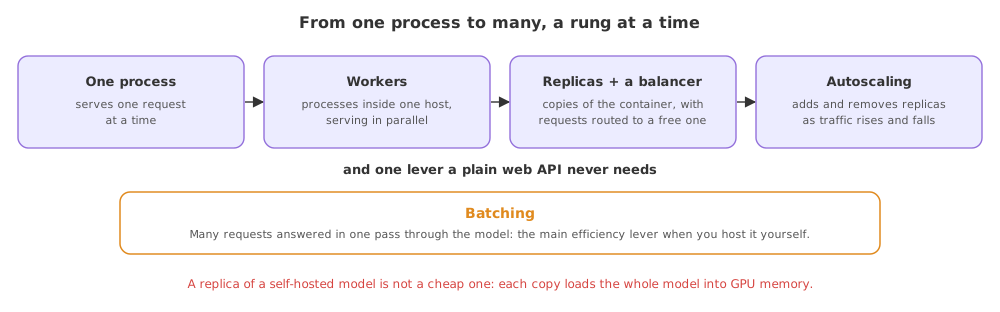
The endpoint is a server process holding your app. The first lever is concurrency inside one host: a server such as uvicorn or gunicorn runs several worker processes, so a slow model call in one worker does not block the others. Past what one host can hold, you run several copies of the container and put a load balancer in front, which spreads incoming requests across them.
- Workers are processes inside one host, each serving requests in parallel, so the host uses all its cores instead of one.
- Replicas are copies of the whole container, run on one or many hosts, so capacity grows past a single machine.
- A load balancer sits in front of the replicas and routes each request to a free one, so no single copy is overwhelmed.
- Autoscaling watches a signal such as request rate or GPU use and adds or removes replicas on its own, which is the control the SageMaker video points at on the endpoint.
Batching, the lever unique to a model
A plain web API scales by adding replicas. A model endpoint has one more lever: batching, where the server groups several requests arriving close together and runs them through the model in one pass. A GPU is far more efficient on a batch than on one request at a time, so batching raises how many requests the same hardware serves, at the cost of a small wait while a batch fills.
What scales a web API against a model API
| Lever | A plain web API | An LLM model API |
|---|---|---|
| Workers | Yes, per host | Yes, but each holds a heavy model |
| Replicas + load balancer | Yes | Yes, each on a GPU instance |
| Autoscaling on | CPU and request rate | GPU use and request rate |
| Batching requests | Rarely useful | The main efficiency lever |
| Cost of a replica | A CPU instance | A GPU instance, far dearer |
Where scaling matters
- A spiky load, where autoscaling adds replicas for a peak and removes them after, so you do not pay for idle GPUs.
- A latency target, where enough workers and replicas keep the slow tail inside the time a user will wait.
- A self-hosted model, where batching squeezes more requests out of each expensive GPU instance before you add another.
Related
- Previous: Packaging the app in a container
- Next: Controlling the cost of API calls
- Deploying a model endpoint on a GPU: Deploying an open-source LLM on SageMaker
- Start the app under
uvicornwith several workers and watch two requests be served at once. - Sketch the path of a request through a load balancer to one of three replicas, and mark where a request could queue.
- For a model endpoint you know, find the autoscaling setting and the minimum replica count, and note what signal it scales on.
Little by little, you're building something great.