
Why an LLM app needs ops
An LLM in a notebook and an LLM in production are different problems. The notebook asks whether the model can answer; production asks what it costs, whether the answer is still good next week, and whether you can show what it did when someone asks.
Last updated: 15 Oct, 2026 · LLMOps
From MLOps to LLMOps: what changes set out what is new once you operate an LLM. This lesson makes the case for why the rest of the course exists: a demo that works once is a long way from a service people depend on, and the gap is exactly the operational work.
What a notebook demo hides
A notebook run shows one call, on one input, with the result read by the person who wrote it. Production removes all three comforts. The call happens thousands of times on inputs you never saw, the answers are read by customers, and no one is watching each one. The LLMOps Project Lifecycle video frames the whole subject around this: the real requirement in industry is taking an LLM application into production and monitoring it, not building it once.
The four things that bite
- Cost. Every call spends tokens, and spend can run away quietly. The induction video recounts token usage leaping to a scale no one intended in a single day, which is the kind of surprise only metering and limits catch.
- Bad answers. The model can be confidently wrong, and with non-deterministic output you cannot assume an answer that was fine yesterday is fine today. Without evaluation in place, the first to notice is a user.
- Drift. The world moves under the app: documents go stale, a provider updates a model, traffic changes shape. Quality slides unless you monitor and re-check it.
- No record. When something goes wrong, you need to see what was asked, what the model chose and what it cost. A demo keeps none of that; a production app has to.
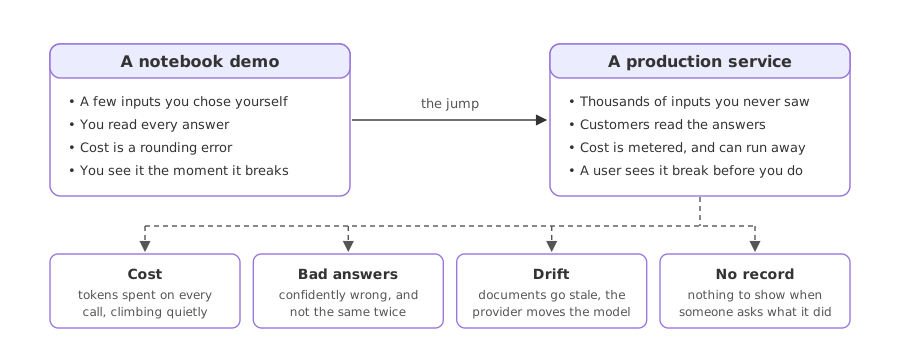
Notebook demo vs a production service
| Notebook demo | Production service | |
|---|---|---|
| Inputs | A few you chose | Many you never saw |
| Who reads the output | You | Customers |
| Cost | A rounding error | Metered, can run away |
| When it breaks | You see it | A user sees it first |
| Record of what happened | None | Logs, traces, an audit trail |
Where ops earns its keep
- Anything customer-facing, where a wrong or costly answer reaches a real person and has a real price.
- Anything on a budget, where token spend has to be metered, capped and attributed rather than discovered on the bill.
- Anything you must account for, where support, compliance or a post-mortem needs a record of what the app did and why.
Related
- Previous: From MLOps to LLMOps: what changes
- Next: The LLMOps project lifecycle
- Take an LLM demo you have run and write down what it would cost at ten thousand calls a day.
- For that same demo, name how you would know if an answer was wrong once a customer, not you, was reading it.
- List what you would want recorded for every call if you had to explain one of them to an auditor.
You understood something today that you didn't yesterday.