
LangGraph and AutoGen Studios
LangGraph Studio and AutoGen Studio are visual tools for building and debugging agentic apps: you see the agent's graph of nodes, step through a run, and inspect the state at each hop rather than reading it from logs.
Last updated: 15 Oct, 2026 · LLMOps
Tracing in Tracing a run with LangSmith recorded a chain after it ran. The studios work on the harder case: an agent that loops, branches and calls tools, where a flat trace is hard to follow. The Detailed LLMOps Project Lifecycle video names both while listing monitoring and debugging tools, and calls LangGraph Studio probably the best studio for an agentic application. They are named here, not run, because each needs its own install and a running agent to attach to.
What each studio gives you
- LangGraph Studio draws the agent as the graph of nodes and edges you defined, runs it, and lets you watch the state move from node to node and step through or replay a run.
- AutoGen Studio is the visual front end for AutoGen's multi-agent conversations: you compose agents and their tools in a UI and watch them talk, so you can debug who said what without writing the orchestration by hand.
- Both target the same problem: an agent's control flow is a graph, and a graph is far easier to debug as a picture than as a stream of log lines.
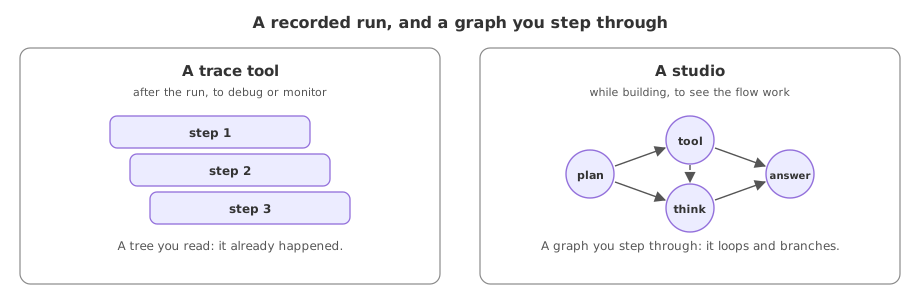
The studios next to a trace tool
| A trace tool (LangSmith) | The studios | |
|---|---|---|
| Shows | A recorded run as a tree | The live agent graph you can step through |
| Best for | Chains and single requests | Looping, branching agentic apps |
| When you reach for it | After a run, to debug or monitor | While building, to see the flow work |
Where you use the studios
- Building a LangGraph agent, where seeing the node graph makes a wrong edge or a stuck loop obvious.
- An AutoGen multi-agent setup, where the bug is in which agent spoke when, not in any one model call.
- Explaining an agent to a team, where the graph is the clearest way to show what the app does.
Related
- Previous: Tracing a run with LangSmith
- Next: The signals to watch
- Reference: LangGraph Studio documentation
- Look up how LangGraph Studio attaches to a graph you have built and what it needs installed to run.
- Compare AutoGen Studio's UI to writing the same multi-agent setup in code, and note what the picture makes easier.
- For an agent you know, sketch its node graph on paper and mark where you would most want to pause a run.
You understood something today that you didn't yesterday.