
A prompt library in one place
A prompt library is a single module of named prompt templates the app renders with values at run time, so a prompt is written down and reviewed in one place rather than copied into the code that calls the model.
Last updated: 15 Oct, 2026 · LLMOps
The Custom exceptions you can trace lesson gave the app its own errors. Prompts deserve the same treatment: in the repo, prompt_library/prompt.py holds one SYSTEM_PROMPT that the agent imports. A prompt is part of the app's behaviour, so it belongs in source, named and versioned, not pasted inline each time the model is called.
Named templates in one module
The library is a dict of named templates with placeholders, and one function to render them. The shop assistant's answer prompt holds the retrieved facts and the customer's question; the call site names the template and passes the values.
SUPPORT_ANSWER = """You are a shop support assistant. Answer only from the facts.

Facts:
{context}

Customer question: {question}"""

# every prompt the app uses lives here, named and versioned in one file
PROMPTS = {"support_answer": SUPPORT_ANSWER}

def render(name, **values):
    return PROMPTS[name].format(**values)
Rendering a prompt with values
The caller renders the template by name, filling the context and the question for this turn. The wording of the prompt is not at the call site at all, only the values are.
from prompts import render

# fill the named template with this turn's values
prompt = render("support_answer",
                context="Refunds are issued within 30 days of delivery.",
                question="Can I still get a refund after three weeks?")
print(prompt)You are a shop support assistant. Answer only from the facts. Facts: Refunds are issued within 30 days of delivery. Customer question: Can I still get a refund after three weeks?
What keeping prompts together gave you
- The prompt lives in one module, so changing the assistant's instructions is one edit, reviewed like any code, instead of hunting for copies.
- The call site passes values, not wording, so the code that talks to the model stays about the flow and not about the text.
- Templates are named, so a second prompt for a different task is added by name, and the app renders whichever one it needs.
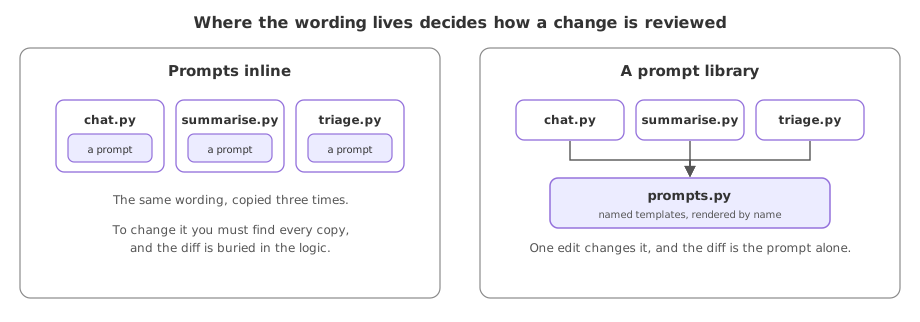
Inline strings against a prompt library
| Prompts inline | A prompt library | |
|---|---|---|
| Where the wording lives | At each call site | One named module |
| Change the wording | Find every copy | Edit one template |
| Review a change | Buried in logic | A diff in the library |
| Reuse a prompt | Copy it again | Render it by name |
Where a prompt library helps
- An app with more than one prompt, such as a system prompt and a summarise prompt, kept side by side and named.
- A wording change that needs review, where the diff is the prompt alone.
- Versioning a prompt, where a new variant sits next to the old one and the app chooses by name.
str.format, so a stray brace in the template is read as a placeholder and raises a KeyError; escape it as {{ and }}. A brace inside a value you pass in is safe: format does not re-scan what it substitutes, so a fact containing {REF30} renders unchanged.Related
- Previous: Custom exceptions you can trace
- Next: The app entry point and its API
- Reference: The AI_Trip_Planner project
- Add a second template named
summariseand render it from the same library. - Put a literal brace in the template and watch the
KeyError, then escape it as{{. Pass one in the facts instead and confirm it renders unchanged. - Read the repo's
prompt.pyand note the system prompt is one object the agent imports.
You understood something today that you didn't yesterday.