
Logging you can operate on
Operational logging is logging written for the person running the app, not the person writing it: one configured logger, structured lines carrying the fields an operator filters on, sent to a place a log system can read.
Last updated: 15 Oct, 2026 · LLMOps
The Config, not hard-coded constants lesson moved settings into a file. Logging is the next concern the layout gives its own folder. A print is fine while you build; in production you need lines an operator can search, filter by level and feed to a dashboard. The repo keeps this in a logger/ package so every component shares one configured logger, which is the practice this lesson builds.
A formatter that writes structured lines
A plain log line is hard to query. This formatter writes each record as one JSON object, with the level, the logger name, the event text and any extra fields the caller attached. One line is one object a log store can index.
import json, logging, sys

class JsonFormatter(logging.Formatter):
    def format(self, record):
        # one JSON object per line, easy to grep or ship to a log store
        line = {"level": record.levelname, "logger": record.name,
                "event": record.getMessage()}
        line.update(getattr(record, "fields", {}))
        return json.dumps(line)
One logger the app shares
get_logger builds that logger once: it sets the level, attaches a single handler that writes to standard output, and turns off propagation so a line is not printed twice. Clearing the handlers first keeps a re-import from stacking a second handler on.
def get_logger(name="assistant"):
    logger = logging.getLogger(name)
    logger.setLevel(logging.INFO)

    logger.handlers.clear()                # one handler, even on re-import
    handler = logging.StreamHandler(sys.stdout)
    handler.setFormatter(JsonFormatter())
    logger.addHandler(handler)

    logger.propagate = False
    return logger
Logging a request and a warning
The assistant logs an ordinary request and a warning, each with structured fields. The fields ride in extra under a fields key, which the formatter folds into the JSON.
from applog import get_logger

log = get_logger()

# structured context travels as fields, not baked into the message text
log.info("chat request received", extra={"fields": {"user": "C-5", "intent": "refund"}})
log.warning("retrieval returned few hits", extra={"fields": {"query": "refund", "hits": 1}}){"level": "INFO", "logger": "assistant", "event": "chat request received", "user": "C-5", "intent": "refund"}
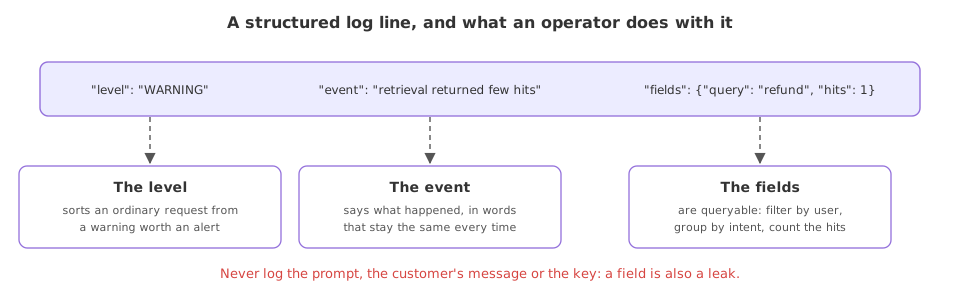
{"level": "WARNING", "logger": "assistant", "event": "retrieval returned few hits", "query": "refund", "hits": 1}What the structured lines give an operator
- Each line is one JSON object, so a log system can index it and a query can filter by
levelor by any field without a regular expression over free text. - The context is in fields, not in the sentence, so
intent=refundis a value to group and count on, rather than words to parse out of a message. - The level is explicit, so the warning about thin retrieval stands apart from the ordinary request and can raise an alert on its own.
A print against an operational log
| A print | An operational log line | |
|---|---|---|
| Goes to | Standard output only | A handler you choose, here stdout |
| Has a level | No | INFO, WARNING, ERROR and more |
| Carries fields | Baked into the string | Structured, queryable fields |
| Can be filtered | By text search | By level and by field |
Where operational logging helps
- Finding one request in a flood, by filtering on a field such as the user or the session.
- Raising an alert, where a rising count of WARNING or ERROR lines trips a monitor.
- Measuring behaviour, by counting a field such as the chosen tool or the retrieval hit count over time.
Related
- Previous: Config, not hard-coded constants
- Next: Custom exceptions you can trace
- See also: The app entry point and its API
- Add a
sessionfield to one of the log calls and watch it appear in the JSON. - Lower the level to
logging.WARNINGand confirm the INFO line stops printing. - Swap the handler for a
FileHandlerand read the same JSON lines from a file.
Every expert started right here.