
Custom exceptions you can trace
A custom exception is the app's own error type that carries the context a failure happened in, such as the query and the index, so a caught error tells you what to fix instead of only that something broke.
Last updated: 15 Oct, 2026 · LLMOps
The Logging you can operate on lesson wrote lines an operator can read. Errors are the lines that matter most, and a bare ValueError rarely says enough. The repo gives the app its own exception/ package for this reason. This lesson builds one exception type for the shop assistant that holds the context of the failure, so the line you log and the line you catch both carry it.
An exception that holds context
AssistantError takes a message and any number of keyword fields. It keeps the fields on the error and renders them alongside the message, so printing the error shows both at once.
class AssistantError(Exception):
    """An error that carries the context it happened in."""

    def __init__(self, message, **context):
        super().__init__(message)
        self.context = context             # the where and what, kept on the error

    def __str__(self):
        parts = " ".join(f"{k}={v}" for k, v in self.context.items())
        return f"{self.args[0]} ({parts})" if parts else self.args[0]
Raising and catching it
A retrieval step fails and raises the error with the query, the depth and the index it was working against. The caller catches it, prints it, and reaches into the context for a single field.
from errors import AssistantError

def retrieve(query, top_k):
    # a failure deep in retrieval, raised with the inputs that caused it
    raise AssistantError("vector index is empty",
                         query=query, top_k=top_k, index="shop-faq")

try:
    retrieve("how do I return an item?", top_k=4)
except AssistantError as err:
    print("caught:", err)
print("index was:", err.context["index"])caught: vector index is empty (query=how do I return an item? top_k=4 index=shop-faq) index was: shop-faq
What the context did for the caller
- The message named the failure and the inputs, so
vector index is empty (query=... top_k=4 index=shop-faq)is enough to reproduce it without a debugger. - The fields stayed reachable, so the handler read
err.context["index"]and could branch on it, rather than parsing a string. - One type covers the app's failures, so a caller catches
AssistantErrorand knows it came from the assistant, not from a library it happened to call.
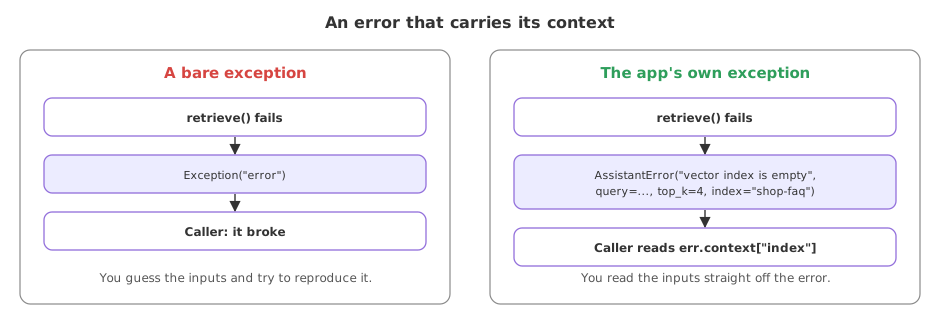
A bare exception against one that carries context
| A bare exception | A custom exception with context | |
|---|---|---|
| Tells you | That it broke | What broke and on which inputs |
| Reproduce it | Guess the inputs | Read them off the error |
| Handle it | Catch a broad type | Catch the app's own type |
| In a log | A line of text | A line plus queryable fields |
Where a context-carrying error helps
- A retrieval or model call that fails, where the query and settings are what you need to see.
- A boundary that wraps a library, turning a third-party error into the app's own type with the call's inputs attached.
- A log line for an operator, where the error renders its own context so the log carries the fields to filter on.
Related
- Previous: Logging you can operate on
- Next: A prompt library in one place
- See also: Logging you can operate on
- Add a
statusfield to the error and read it back in the handler. - Wrap a call that raises a
KeyErrorand re-raise it as anAssistantErrorwith the key as context. - Log the caught error with the operational logger from the previous lesson and see its context in the line.
Little by little, you're building something great.