
A production project layout
A production project layout is the set of folders an LLM app grows into once it leaves a notebook: one place for configuration, one for prompts, one for logging, one for the app's own errors, and a single entry point that wires them together.
Last updated: 15 Oct, 2026 · LLMOps
Part 3 ended with the pieces of an LLM app chosen: a model, its tools, and a data pipeline. Those pieces still live in a notebook, where every value is a literal and every helper is a cell. This part turns them into a project you can run, log, test and deploy. The shape used here is the one from the Day 1 to 3 Agentic AI project, the AI_Trip_Planner repository, read as a template for structure rather than for its travel-agent logic.
From one notebook to a tree of folders
A notebook keeps everything in reach, which is what makes it good for trying an idea and bad for running one. A model name buried in a cell cannot be changed without editing code; a prompt copied into three cells drifts out of step; an error prints a stack trace no operator can act on. The project layout gives each of those concerns its own home, so a change to one does not reach into the others.
ai-trip-planner/
|-- agent/
|   `-- agentic_workflow.py    the graph that wires the model to its tools
|-- config/
|   `-- config.yaml            model names and settings, kept out of code
|-- prompt_library/
|   `-- prompt.py              the system prompt, written down in one place
|-- tools/                     one file per tool the agent can call
|-- utils/
|   `-- config_loader.py       reads config.yaml into a plain dict
|-- logger/                    one configured logger for the whole app
|-- exception/                 the app's own exception type
|-- notebook/
|   `-- experiments.ipynb      throwaway exploration, kept out of the app
|-- main.py                    the FastAPI entry point
|-- requirements.txt           the dependency list
|-- setup.py                   makes the folders an installable package
`-- pyproject.toml             project metadata
What each folder is for
config/holds aconfig.yamlof model names and settings. The app reads it at start-up, so the same code runs against a different model by editing a file, not the source.prompt_library/keeps every prompt in one module. In the repo this isprompt.pywith a singleSYSTEM_PROMPT, so a wording change happens in one spot and is reviewed like any other code.logger/configures one logger the whole app shares, so every component writes the same kind of line to the same place.exception/defines the app's own exception type, so a failure carries the context that caused it instead of a bare message.utils/holds small helpers such asconfig_loader.py, the function that reads the YAML into a dict.agent/is the application logic:agentic_workflow.pybuilds the graph that binds the model to its tools.tools/is one file per tool it can call.main.pyis the entry point, a FastAPI app that exposes the assistant over HTTP.setup.pyandpyproject.tomlmake the whole thing an installable, versioned package.
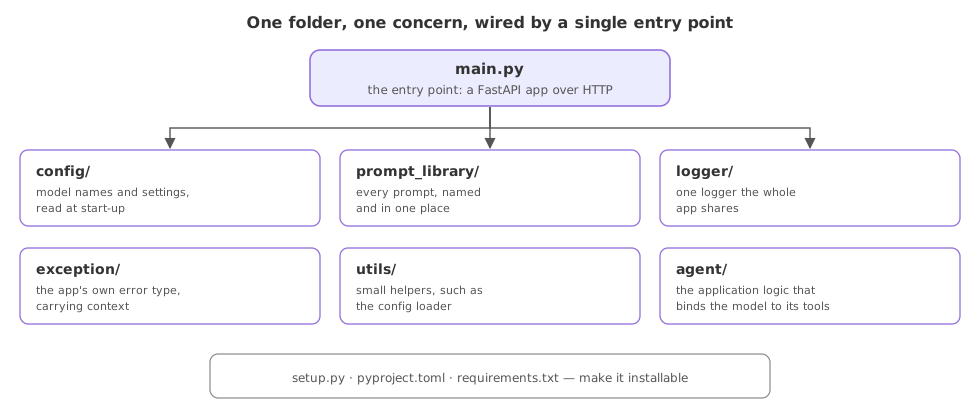
A notebook against a project
| A notebook | A production project | |
|---|---|---|
| Configuration | Literals in a cell | A config.yaml read at start-up |
| Prompts | Copied where needed | One prompt library module |
| Failures | A raw stack trace | The app's own exception with context |
| Run it | Cell by cell, by hand | One entry point, under a server |
| Ship it | Not installable | A versioned package |
Where this layout earns its keep
- A handover, where a second engineer can find the model setting, the prompt and the entry point without reading every cell.
- A deployment, where a server imports
main.pyand a container installs the package, neither of which a notebook supports. - A change that must be reviewed, such as a new prompt or a model swap, which lands as a small diff in one file.
main.py or a model name in the agent code. Once a value leaks out of its folder, the benefit of having the folder is gone, and the next person looks in two places instead of one.Related
- Previous: Giving the model tools
- Next: Config, not hard-coded constants
- Reference: The AI_Trip_Planner project
- Clone the
AI_Trip_Plannerrepository and match each top-level folder to the concern it owns. - List every place a model name or a prompt appears in one of your own notebooks, and decide which folder each would move to.
- Open
agent/agentic_workflow.pyand note that it imports the prompt and the model loader rather than defining them inline.
Slow is fine. Stopping is the only problem.