
Config, not hard-coded constants
Configuration is the practice of keeping an app's settings, such as the model name, the sampling temperature and the retrieval depth, in a file the app reads at start-up, so none of them are literals baked into the code.
Last updated: 15 Oct, 2026 · LLMOps
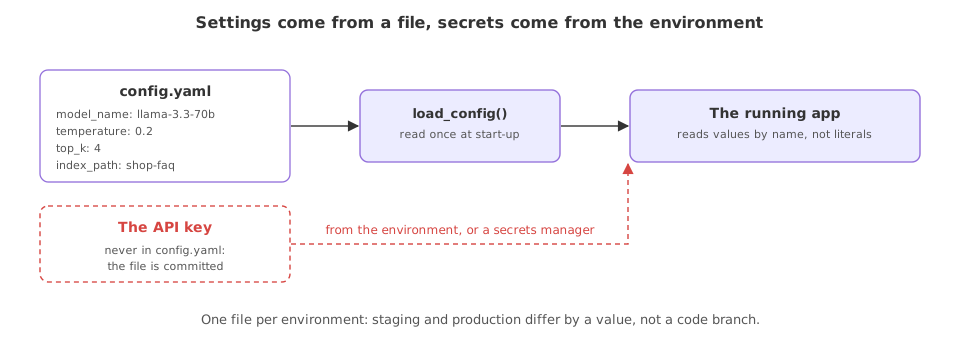
The A production project layout lesson gave configuration its own folder. This lesson fills it. The running example for the rest of the part is a shop support assistant that answers from a small knowledge base, and its first production concern is that the model it uses and how it retrieves are decisions, not constants. In the repo these live in config/config.yaml and are read by utils/config_loader.py.
One note on the files from here to the end of the part. A production project layout put each concern in its own folder, which is how the finished repository is arranged. The examples below keep the same pieces as flat files, settings.py, applog.py, errors.py, prompts.py and app.py, so each one runs on its own in a fresh folder. The content is the same; only the path changes when you move it into the layout.
The settings in a YAML file
The assistant's model and its retrieval are grouped under two keys. A reader, or an operator who never edits Python, can change the model or widen the retrieval by editing this file alone.
assistant:
  model_name: "openai/gpt-oss-120b"
  temperature: 0.2
retrieval:
  index_path: "indexes/shop-faq"
  top_k: 4
A loader that reads the file
The loader is the one function that turns the file into a dict. It is the same shape as the repo's config_loader.py: open the path and hand the parsed result back, with no settings of its own.
import yaml

def load_config(path="config.yaml"):
    with open(path) as f:                 # read the YAML file from disk
        return yaml.safe_load(f)           # parse it into a plain dict
Reading a value at start-up
The app loads the config once and reads each setting by name. Nowhere in the application code does the string llama-3.3-70b or the number 4 appear.
from settings import load_config

cfg = load_config()

# read the values the app needs by name, not as literals in the code
print("model:", cfg["assistant"]["model_name"])
print("top_k:", cfg["retrieval"]["top_k"])
print("index:", cfg["retrieval"]["index_path"])model: openai/gpt-oss-120b top_k: 4 index: indexes/shop-faq
What reading from a file bought you
- The model name came from the file, so pointing the assistant at a different model is a one-line edit to
config.yaml, with no code change and no redeploy of logic. - The retrieval depth is a setting, so tuning
top_kfor better answers is a config change an operator can make and review. - The index path is named, not assumed, so the same code runs against a staging index and a production index by swapping one value.
A constant in code against a value in config
| A constant in code | A value in config | |
|---|---|---|
| Change it | Edit and redeploy the code | Edit a file, restart the app |
| Who can change it | A developer | Anyone who can edit the file |
| Per environment | A code branch or a flag | One file per environment |
| Shows in a review | Mixed into logic | A clear diff in one file |
Where config lives
- The model and its sampling settings, so a cheaper or newer model is a config swap rather than a code change.
- Retrieval settings, such as the index path and how many chunks to pull, tuned without touching the app.
- Anything that differs between staging and production, kept in one file per environment so the code is identical everywhere.
config.yaml, because the file is committed to the repository. Keep keys in environment variables, which the repo reads with python-dotenv, and keep only non-secret settings in the YAML.Related
- Previous: A production project layout
- Next: Logging you can operate on
- Reference: The AI_Trip_Planner project
- Add a
providerkey underassistantand read it in the example. - Point
index_pathat a second value and confirm the code does not change at all. - Move a model name that is currently a literal in one of your scripts into a
config.yamland read it back.
This is what real progress feels like.