
A remote tracking server
A remote tracking server is an MLflow backend hosted off your machine, so a team sees the same runs in one dashboard instead of each person keeping a private ./mlruns folder.
Last updated: 15 Oct, 2026 · LLMOps
The Evaluation in the lifecycle lesson needed scores many people can read. A local file store cannot do that. The MLflow video pushes the same runs to Dagshub, a hosted MLflow server, and compares them in its web dashboard. The code barely changes: you point the tracking URI at the remote and authenticate, and every log_param and log_metric call stays the same.
Pointing MLflow at Dagshub
Syntax: dagshub.init wires up the connection and set_tracking_uri sends runs to the hosted server instead of a folder. This block is shown, not run, because it needs a Dagshub account and a repository.
import dagshub
import mlflow

# point MLflow at a Dagshub-hosted server instead of a local folder
dagshub.init(repo_owner="your-name", repo_name="shop-assistant", mlflow=True)
mlflow.set_tracking_uri("https://dagshub.com/your-name/shop-assistant.mlflow")

# from here the logging calls are identical to the local version
with mlflow.start_run(run_name="return-window"):
    mlflow.log_param("model", "shop-stand-in")
    mlflow.log_metric("faithfulness", 0.78)
Authenticating the push
The push is authorised by a token tied to your Dagshub account. It is read from the environment, never written into the code, so the repository stays shareable. This is shown, not run.
# a Dagshub access token authorises the push; set it in the shell, keep it out of the code
export MLFLOW_TRACKING_USERNAME="your-name"
export MLFLOW_TRACKING_PASSWORD="your-dagshub-token"
What a remote server needs
- An account and a repository on the hosted server, which is what
repo_ownerandrepo_namepoint at. - A token in the environment, so the push is authorised without a password in the code.
- Network access to the server, because runs now travel over HTTPS rather than landing in a local folder.
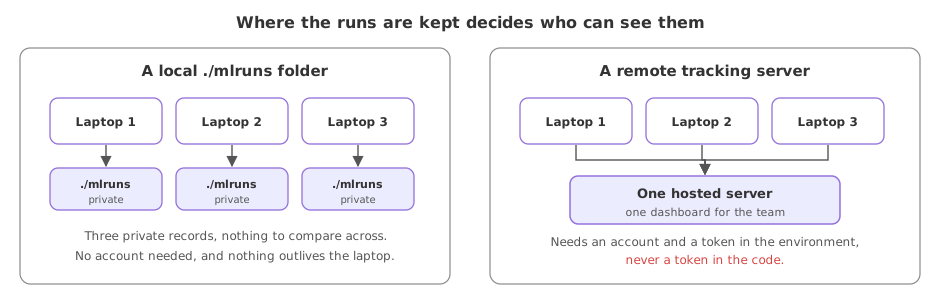
Local file store vs a remote server
| Local ./mlruns | Remote (Dagshub) | |
|---|---|---|
| Lives | On one machine | On a hosted server |
| Shared by a team | No | Yes, one dashboard |
| Needs an account | No | Yes |
| Code difference | A local URI | A remote URI plus a token |
Where you use a remote server
- A team that needs one place to compare everyone's runs rather than scattered folders.
- Continuous integration, where a build machine logs runs a person can open later.
- A long-lived record that outlives any single laptop, kept on a server with backups.
Related
- Previous: Evaluation in the lifecycle
- Next: Why you monitor an LLM app
- Create a free Dagshub repository and read where its MLflow remote URI is shown.
- Change the local tracking URI from the tracking lessons to a
sqlite:///mlflow.dbbackend and confirm the same calls still run. - List which of your runs hold a secret you would not want pushed to a shared server.
This is what real progress feels like.