
Versioning model, data and code
Versioning in LLMOps means putting a label on every input to a result, the model, the data and index, and the code and prompts, so a specific answer can be reproduced and a regression can be traced to the exact thing that changed.
Last updated: 15 Oct, 2026 · LLMOps
The CI/CD for an LLM app lesson automated the path from a commit to a running app. Once changes ship on their own, you need to know which change produced which behaviour. The LLMOps lifecycle video puts version control last and names what it covers: model versioning, data versioning and code tracking, with GitHub or GitLab for code, a CI/CD pipeline, and MLOps tools such as MLflow, Kubeflow and DVC, where DVC stands for data version control. This lesson takes each of those in turn.
Four things to version
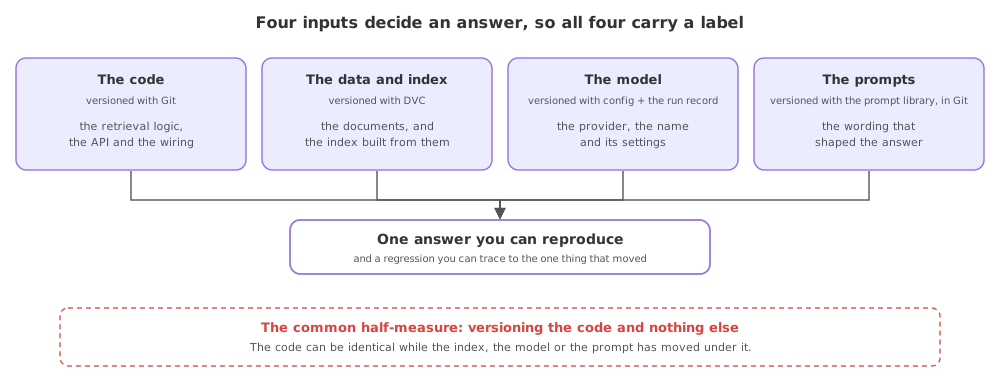
- The model. The provider, the exact model name and its settings decide the answer. A provider retiring a version or shipping a new default changes behaviour with no code change, so the model name and version belong in config and in the run record, not in your memory.
- The data and the vector index. A RAG answer is only as good as the documents behind it. The source files, the chunking settings and the built index are all inputs, so each gets a version; DVC, the data version control tool the video names, tracks large data files the way Git tracks code.
- The code. Git or GitLab versions the application: the retrieval logic, the API and the wiring. A commit is the label that ties a running build back to the source that produced it.
- The prompts. A prompt is behaviour written in words, so a wording change can move every answer. Kept in the prompt library and committed with the code, a prompt is versioned and reviewed like any other change.
Why a version lets you reproduce a result
A result is a function of all four inputs. If any of them can change without a label, an answer you got last week cannot be reproduced and a drop in quality cannot be pinned on a cause. Versioning turns "the assistant got worse" into "the index rebuilt on Tuesday with a smaller chunk size", which is a thing you can revert. The experiment tracking earlier in the course records the model and the scores of a run; versioning records the model, data, code and prompt that the run used.
What each version pins down
| What | Versioned with | What a version pins down |
|---|---|---|
| The code | Git or GitLab | The exact application logic |
| The data and index | DVC | The documents and the built index |
| The model | Config plus the run record | The provider, name and settings |
| The prompts | The prompt library, in Git | The wording that shaped the answer |
Where versioning earns its keep
- Reproducing a past answer, by checking out the code, the prompt and the data version that produced it.
- Tracing a regression, by comparing the versions of a run that scored well against one that scored badly.
- A rollback, where reverting to the previous model, index or prompt is possible because each was labelled.
Related
- Previous: CI/CD for an LLM app
- Next: Observability in production
- See also: Experiment tracking with MLflow
- List every input to one of the shop assistant's answers and name the tool that would version each.
- Read what DVC tracks and decide which of your files belong in it rather than in Git.
- Pick a past result and write down the four versions you would need to reproduce it exactly.
Little by little, you're building something great.