
The shape of an LLM pipeline
An LLM pipeline is the path a request takes from a user's query, through your data and a model, to a served answer, with evaluation and monitoring wrapped around it.
Last updated: 15 Oct, 2026 · LLMOps
Planning and requirements fixed what the app is for. This lesson draws the path a single request runs along once it is built. The Simplify LLMOps video builds that path end to end on a no-code platform, which makes the stages easy to see even though production code wires them together itself.
Why a pipeline, not a script
The Simplify LLMOps video opens with the thing that makes LLM apps awkward: one app depends on many pieces at once. The example uses a model, external sources such as documents, a web search and a Wikipedia lookup, and a vector database, and each one needs its own key, connection and configuration. Building that by hand takes time and is easy to get wrong. Treating the app as a pipeline, a fixed set of stages a request flows through, is what keeps all those pieces in order behind one entry point.
The stages a request flows through
In the video a request starts as a query, is matched against a dataset that has already been turned into vector embeddings, is answered by a chosen model under a prompt, and leaves as output through an HTTP endpoint. Those stages line up with the lifecycle stages from the project lifecycle video: data, build, serve, with evaluation and monitoring around them.
- Data. Your documents are ingested and stored as vectors so the app can find the right passage for a query. In the video, adding a dataset quietly builds the embeddings and the vector store for you.
- Build. A model is wired in under a prompt that says how to answer. A query is first matched against the data, then summarised by the model from what it retrieved.
- Serve. The finished pipeline is reached through one endpoint. The video shows the same flow called from Python with a single API key, so a chatbot or any front end can use it.
- Evaluate and monitor. The lifecycle video wraps the flow in evaluation and in monitoring of cost, latency and answer quality. These are not a stage the request passes through once; they watch every request.
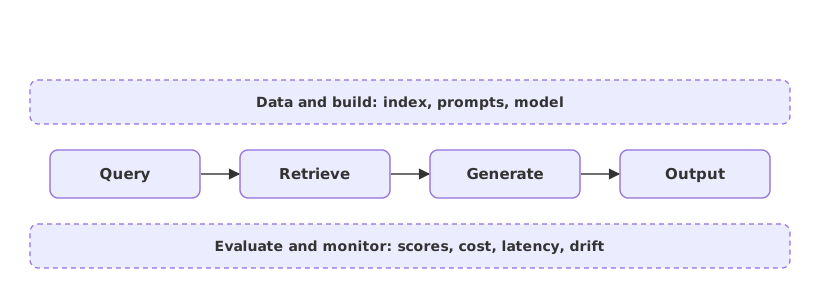
| Pipeline stage | What happens | Lifecycle stage |
|---|---|---|
| Query in | A user request enters the flow | The trigger |
| Retrieve | The query is matched against document vectors | Data |
| Generate | A model answers under a prompt from what it retrieved | Build |
| Output | The answer leaves through an API endpoint | Deployment |
| Around it | Every request is evaluated and monitored | Evaluation and monitoring |
Where you use the pipeline view
- Designing an app, where naming the stages tells you which piece owns retrieval, which owns the model, and where the key lives.
- Finding a fault, where a wrong answer is traced to one stage: the retrieval missed, or the prompt was weak, or the model was the wrong choice.
- Deciding what to measure, since each stage emits a signal, from retrieval quality to the cost of the model call.
Related
- Previous: Planning and requirements
- Next: Pick the build: RAG, fine-tuning, or both
- See also: The RAG data pipeline and A production project layout
- Reference: the krishnaik06 channel on YouTube
- Draw the five stages for a shop support assistant and mark which one answers a question about a return policy.
- For one wrong answer you can imagine, decide which stage you would inspect first.
- Read The RAG data pipeline and see how the data stage expands into its own pipeline.
You understood something today that you didn't yesterday.