
Giving the model tools
Tools are the functions an LLM can call to reach beyond its own text: a database, a web search, another system. The Model Context Protocol, MCP, is a standard way to expose those tools so one model can use many of them without custom wiring.
Last updated: 15 Oct, 2026 · LLMOps
Choosing an LLM: providers and model cards picked the model. On its own a model can only produce text; it cannot look something up or change anything. At the model-selection stage the Detailed LLMOps Project Lifecycle video notes that the next question is whether the model needs tools, and names MCP as one way to give it them.
How a tool call works
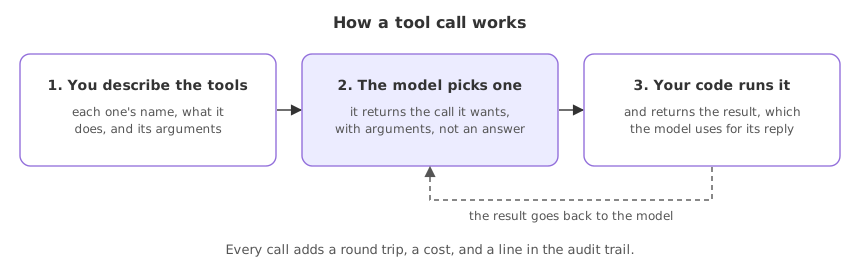
A tool is a function with a name and a description the model can read. The model does not run the function; it asks for it. The app sees the request, runs the tool, and hands the result back to the model to carry on. The video lists databases, web search and other third-party systems as the tools a model commonly reaches for.
- You describe the tools to the model: each one's name, what it does, and the arguments it takes.
- The model picks one and returns the call it wants, with arguments, instead of a plain answer.
- Your code runs the tool and returns the result, which the model uses to produce its reply.
What MCP changes
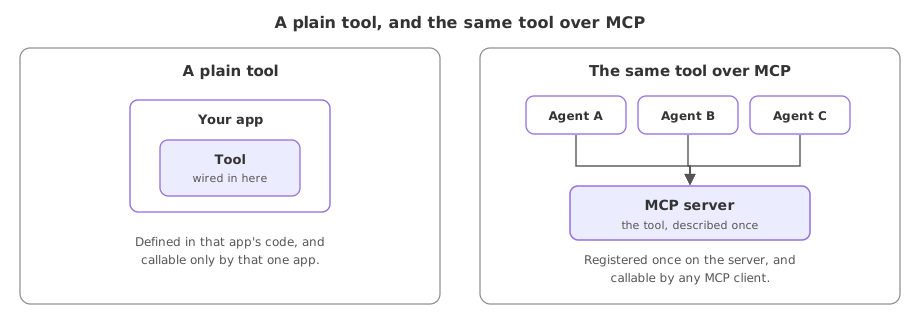
Without a standard, every tool is wired to every app by hand. MCP is a protocol that puts a server in front of a set of tools, so any model or app that speaks MCP can discover and call them the same way. In the lifecycle video MCP is named as one of the options for connecting a model to outside systems.
- Tools live behind a server, described once, instead of being re-wired into every app.
- Any MCP client can use them, so the same tool server serves many agents.
- The connection is uniform, which is what lets a tool be governed and swapped without touching each app.
| A plain tool | A tool over MCP | |
|---|---|---|
| Where it is defined | In your app's code | Behind an MCP server |
| Who can call it | That one app | Any MCP client |
| Adding a new tool | Wire it into the app | Register it on the server |
| Good for | A single app with a few tools | Many agents sharing many tools |
The ops concerns with tools
Tools are the point where an LLM app can touch the real world, so they are where operational risk concentrates. The questions are less about the model and more about control.
- Which tools are exposed. A model that can read is low risk; a model that can delete or pay is not, so dangerous tools need a gate, not trust in the prompt.
- What the tools return. A tool result flows back into the model, so a poisoned or wrong result can steer the next step.
- Cost and latency. Every tool call adds a round trip and, for a paid tool or model, a cost to watch.
- An audit trail. Which tool ran, with which arguments, is what you need when something goes wrong in production.
Related
- Previous: Choosing an LLM: providers and model cards
- Next: A production project layout
- Hands-on: Model Context Protocol (MCP)
- See also: Tool calling
- List the tools your assistant would need, and mark each one safe, costly or dangerous.
- Build the tool-calling loop from the Tool calling lesson and watch the model request a tool rather than answer.
- Read the Model Context Protocol specification's description of a tool and note what a server advertises about each one.
You understood something today that you didn't yesterday.